How to Track Google AI Overviews in 2026: Automated and Manual AIO Tracking Methods
To track AI Overviews, monitor which keywords trigger them, how often they appear, whether your website is cited, which competitors Google references, and how those results change over time.
Simply recording whether an AI Overview appeared is no longer enough. That gives you a snapshot of one search at one moment, but it does not show whether the result appears consistently, whether your URL is gaining or losing citations, or which sources are shaping the answer instead.
Effective AI Overview tracking should therefore cover four signals: appearance frequency, your citation visibility, competitor citations, and the way your brand is represented in the generated response. Together, these metrics show not only whether you are visible, but where you are gaining ground and what you may need to improve.
In this guide, we’ll explain which AI Overview metrics to track, how to monitor them manually for a small keyword set, and when it makes sense to use an automated AI Overview tracking tool like Keyword.com.
What Are Google AI Overviews?
AI Overviews are Google’s AI-generated summaries that appear at the top of search results. They provide users with quick answers pulled from multiple sources. Originally rolled out in the US in May 2023, they are now present in many other countries.
Instead of relying solely on traditional organic rankings, Google’s AI synthesizes information from across the web to generate a response, often reducing the need for users to click through to actual websites.
According to Google’s documentation, “AI Overviews offer a preview of a topic or query based on a variety of sources, including web sources.” This means that AI Overviews synthesizes information from multiple sources to provide a concise, comprehensive answer to queries, including citations to original sources.
AI Overviews do not replace the traditional organic search result links, but instead appear above them.
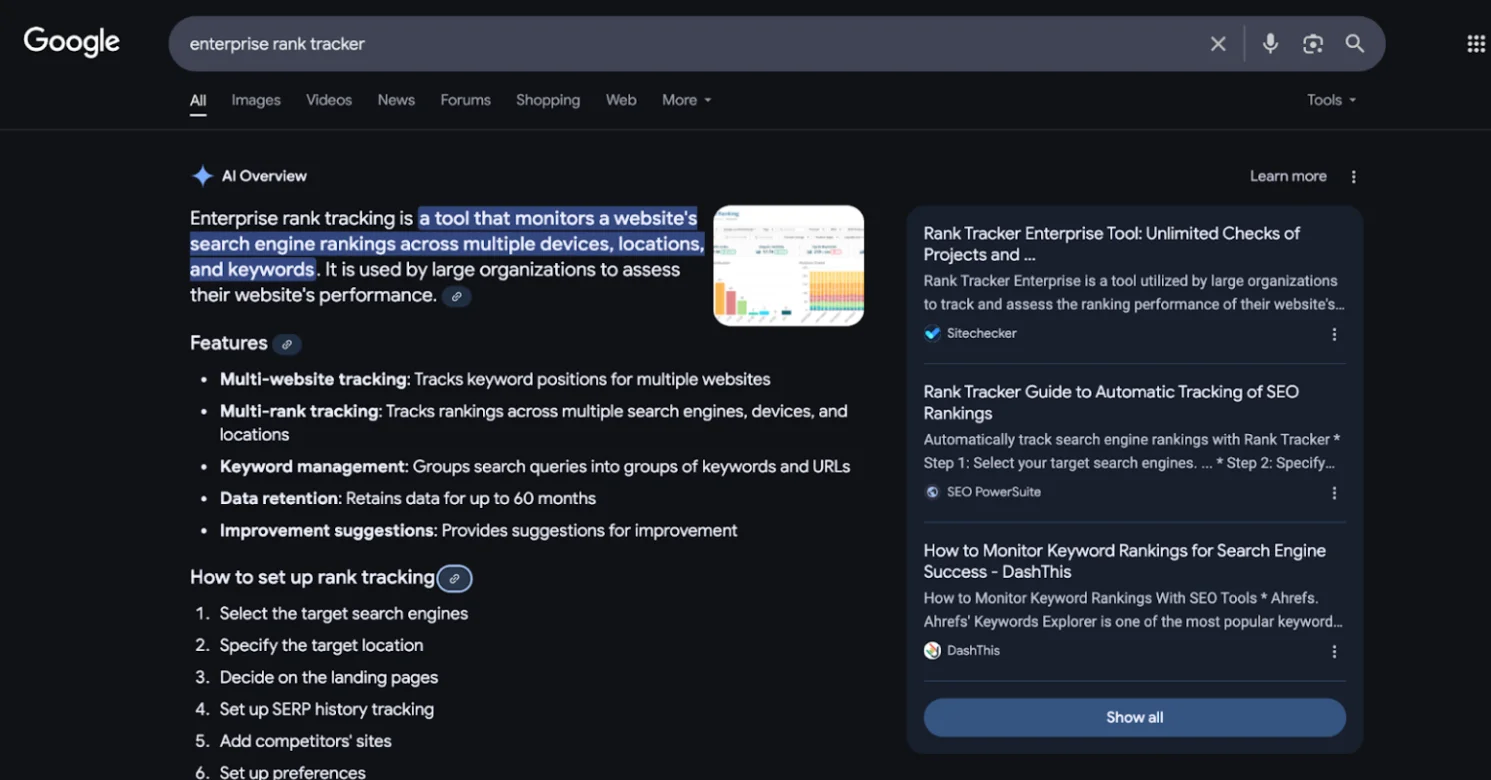
These overviews are part of Google’s push toward AI-powered search experiences, similar to featured snippets but more expansive and conversational. They can boost visibility if your content is cited, but they also pose a risk by keeping users on Google rather than driving traffic to your site. That risk is measurable: when an AI Overview triggers, organic click-through rates can drop by as much as 61% — but pages cited inside the overview tend to earn roughly 35% more organic clicks than pages left out entirely. That’s why tracking when and how your URLs appear in AI Overviews is crucial.
Read: How Google AI Overviews Impact Blog Performance (And What to Do About It)
Do AI Overviews Appear for All Searches?
No, AI Overviews do not appear for all searches. Their appearance varies widely, but they do appear in over half of organic Google queries. They tend to appear more often for longer queries (five words or more), industry-specific terms, and informational searches.
As Google expands its AI-powered search experience, AI Overviews are expected to appear for a broader range of topics. Tracking when they show (and when they disappear) gives you early insight into how search behavior is changing.
Related: If you want to track visibility in AI Mode (not just AI Overviews), see our Google AI Mode visibility tracker.
How to Track AI Overviews Manually
Manual AIO tracking gives you a direct, tool-free way to observe AI Overview behavior across your target keywords. It requires no paid SEO tools and is a practical starting point for understanding which queries trigger AI Overviews and whether your URLs are being cited.
1. Create Your Keyword List
A good starting point is 10–25 high-priority keywords. These should include your money keywords, product/service terms, high-intent comparison queries, and any keywords tied to pages that drive leads, signups, demos, or revenue.
For example, an SEO agency might start with keywords like:
- “best SEO agency for SaaS”
- “technical SEO audit service”
- “local SEO agency pricing”
- “SEO reporting software”
- “[competitor] alternative”
You can also include a few informational queries if they influence the buyer journey.
2. Set Up Your Browser
Open Chrome in incognito mode, logged out of all Google accounts. Set a fixed location and language in your browser or use Google’s &gl= and &hl= URL parameters to standardize results. Disable any extensions that alter SERP display, such as SEO overlays or ad blockers that may suppress AI Overview rendering.
If you need location-specific data, use a VPN and verify your IP address.
3. Identify the Keywords That Trigger AI Overviews in Search Results
Search each target keyword and observe whether an AI Overview appears. Note whether it is expanded or collapsed by default, and identify which URLs are cited within the AI Overview panel. Note the position and format of the citation — inline links, source cards, or footnotes — as this affects click-through behavior.
4. Record AIO Appearances
Log every check in a spreadsheet with the following columns: Keyword, Date, AI Overview Present (Y/N), Your URL Cited (Y/N), Competitor URLs Cited, and Screenshot Link. Keeping a screenshot archive creates a timestamped record you can reference when performance changes and there’s a need to trace back to a SERP shift.
5. Validate AIO Impact With Search Console
Google Search Console does not separate AIO data from traditional organic results. However, you can use it to validate manual tracking and estimate AIO impact.
Do this by exporting weekly GSC data (wait two to three days after the week ends for complete data). Pull these columns:
- Query
- Clicks
- Impressions
- CTR
- Average Position
Use VLOOKUP to match these keywords with your manual tracking sheet, then look for patterns: CTR or traffic drops without ranking changes, or impressions rising without a corresponding click increase.
Stable rankings with a declining CTR is a reliable indirect signal that an AI Overview is intercepting clicks above your organic result.
6. Maintain Consistency
Consistency ensures your data is comparable over time. Between searches:
- Clear cookies and cache
- Reconnect VPN if changing locations
- Wait 10–15 seconds before the next query
Run AIO checks at the same time of day each week when possible to track changes reliably.
Limitations of Manual AI Overview Tracking
Manual tracking is not a reliable method for monitoring AI Overviews because:
- Time and effort costs add up fast: Each keyword check takes two to three minutes when done properly. Tracking 100 keywords manually requires 15+ hours per week.
- AIOs are highly volatile: Citations change 45.5% of the time between consecutive checks. This means you have a 50% chance that a keyword cited on Monday will display different citations on Tuesday, even under identical conditions.
- Varies with personalization: Even in incognito mode with VPNs, AIOs can vary based on device fingerprinting, time of day, search session context, and microtargeting down to ZIP code level.
- Requires manual historical tracking: Unlike automated tools, you must maintain spreadsheets and screenshots. Missing a week means losing that data point entirely.
These limitations make manual tracking a useful diagnostic tool, but not a reliable monitoring system at scale — which is where automated tracking becomes necessary.
How to Track AI Overviews Automatically: Using an AI Overviews Tracker
An AI Overviews tracker is a tool that automatically monitors when Google AI Overviews appear for your target keywords, which URLs are cited, how often your website shows up, and how your visibility changes over time.
Instead of manually searching each keyword and updating a spreadsheet, an automated AIO tracker like Keyword.com collects this data for you at regular intervals. This is useful once you need to monitor more than a handful of keywords, compare visibility across competitors, or report on AI Overview performance for clients.
There are multiple tools that you can use to track AI Overviews, including Keyword.com, Ahrefs, Semrush SE Ranking, Advanced Web Ranking and Ziptie.
Here is how to use Keyword.com’s AIO tracker to monitor when your keywords trigger AI Overviews in the SERPs.
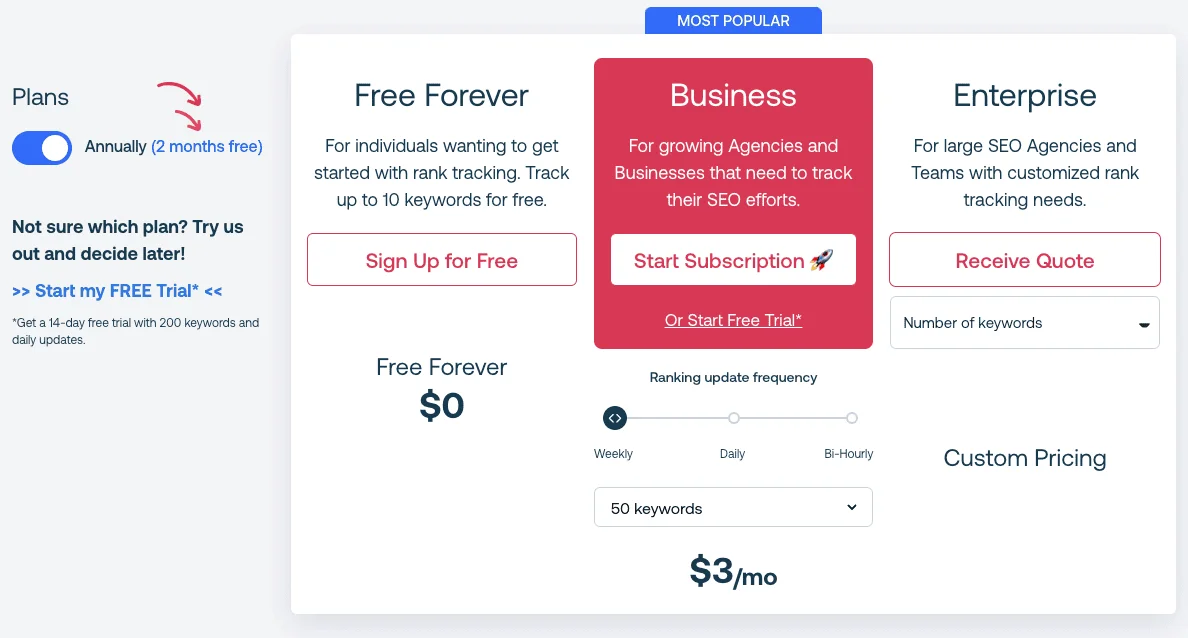
Step 1: Sign up for a Keyword.com account. You get a 14-day free trial of all our rank tracker features.
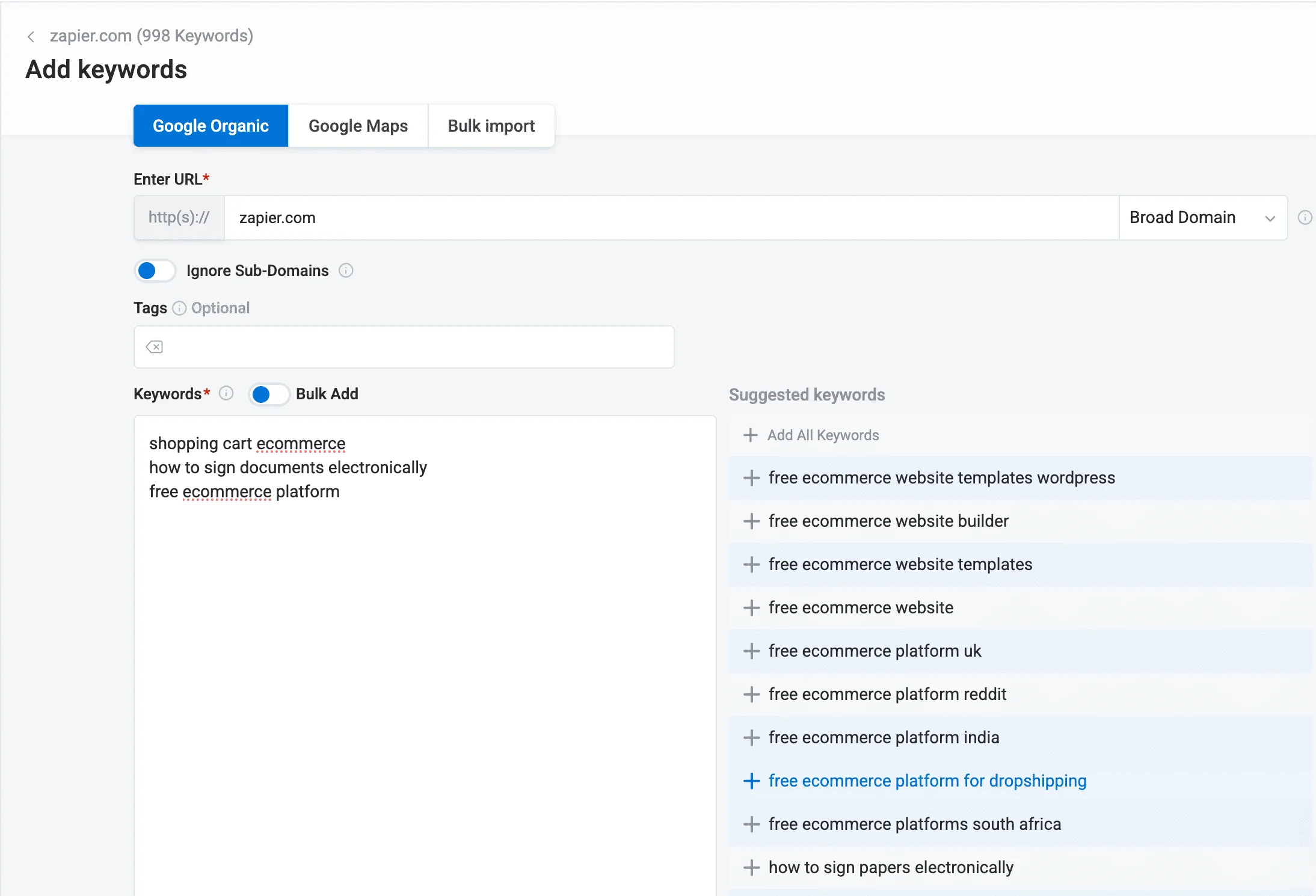
Step 2: Log into your dashboard, create a new project, and add the keywords you want to track AI Overviews for.
Step 3: After a few minutes, your dashboard will be automatically updated with your latest keyword ranking data and SERP features — including AI Overviews. Keywords triggering AI results will have a green, robot-like icon beside them.
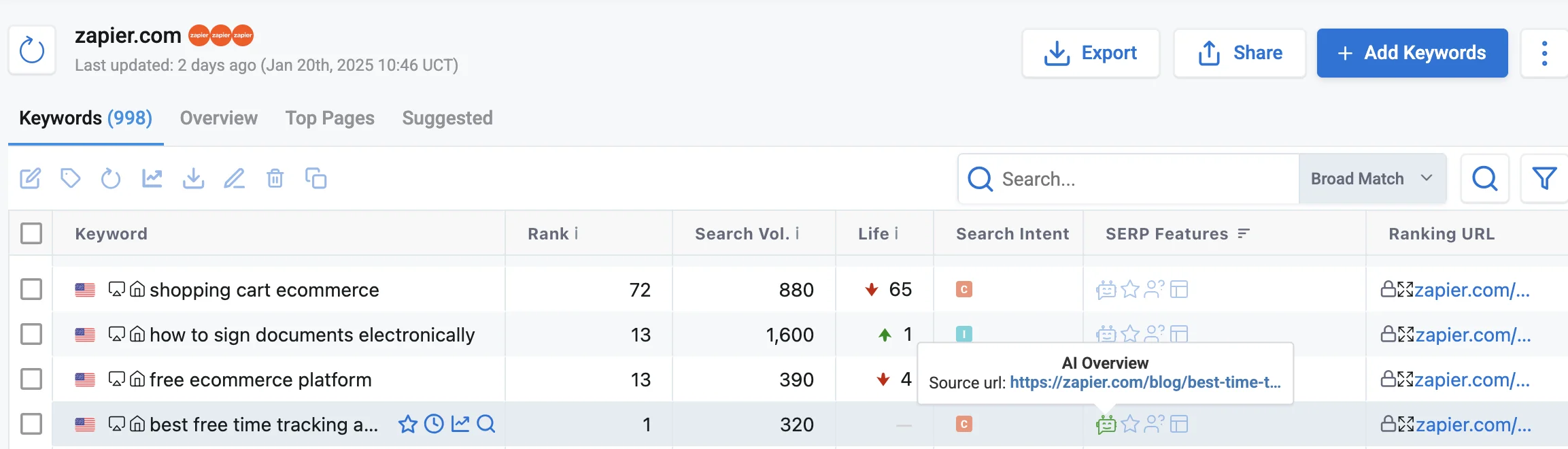
Step 4: You can see which of your pages are cited in AI Overviews by hovering over the AI Overview icon. This reveals the exact URL and the specific content Google pulled for the summary.
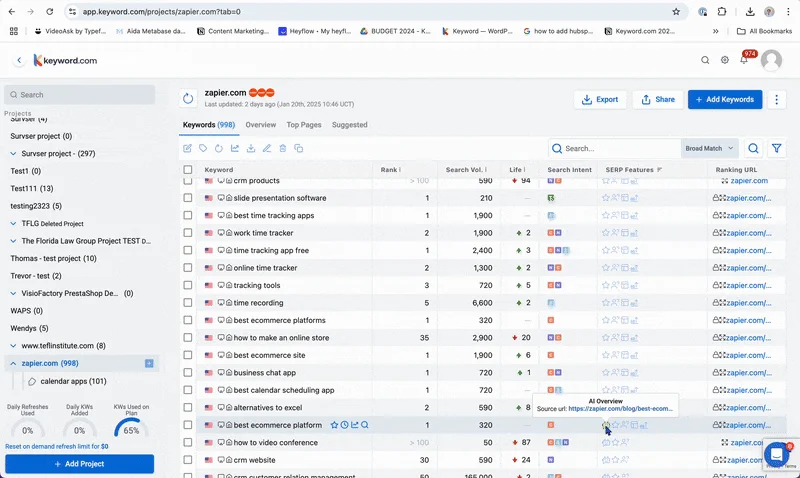
Keyword.com also offers a SERP Feature Performance report that tracks how often AI Overviews appear for your keywords and how frequently your content is included. This report helps you:
- Monitor AI Overview trends over time
- Measure your content’s visibility in AI-generated summaries
- Compare AI Overviews to other SERP features
- Identify opportunities to improve your content’s presence in AI Overviews
This data helps you adjust your SEO strategy and increases the chances of your client’s websites being featured in AI search results.
How to Interpret Your AI Overview Rankings (AIO Metrics)
Knowing that an AI Overview appeared for a keyword is only the starting point. The more useful question is: how consistently does it appear, is your URL being cited when it does, and which specific pages are driving those citations? These AI visibility metrics — visibility score, citation frequency, and source URL performance — give you the analytical layer needed to move from observation to strategy.
1. Visibility Score
The visibility score reflects how consistently an AI Overview appears for a given keyword across a defined time window, not simply whether it appeared once during a spot check.
A high visibility score tells you the AIO is a stable SERP feature for that query — meaning Google is reliably generating an AI-powered summary every time (or nearly every time) that keyword is searched.
A fluctuating or low score, on the other hand, signals instability: Google is testing whether to surface an AIO for that query, or the AIO is being triggered inconsistently based on factors like search context, device, or real-time content signals.
Monitoring visibility score over time lets you catch queries where AIO presence is growing and adjust your content approach before the traffic impact becomes significant. Keyword.com surfaces this data in the SERP Feature Performance report, where you can view AIO presence trends per keyword over your selected date range.
2. Citation Frequency
Citation frequency tracks how often your site appears as a cited source inside AI-generated summaries for the keywords you’re monitoring. It is expressed as a percentage of AIO appearances for that keyword — so if a keyword triggers an AI Overview 90% of the time but your URL is cited in only 10% of those, your citation frequency is 10%, not 90%.
This is one of the most important distinctions in AIO analysis, and it is easy to overlook. A high AIO score for a keyword does not mean your content is being pulled into that overview. Google may be consistently generating an AI summary for a query while drawing entirely from competitor sources. In that scenario, you are losing potential citation-driven visibility on nearly every search, even though your page may rank well organically just below the AIO.
Ranking well doesn’t guarantee a citation, either. In an internal analysis of 5.46 million AI Overview appearances, Keyword.com found that even the #1 organic result was cited inside the AI Overview only about 40% of the time — because each overview typically draws from roughly 5.5 sources, not just the top of the page.
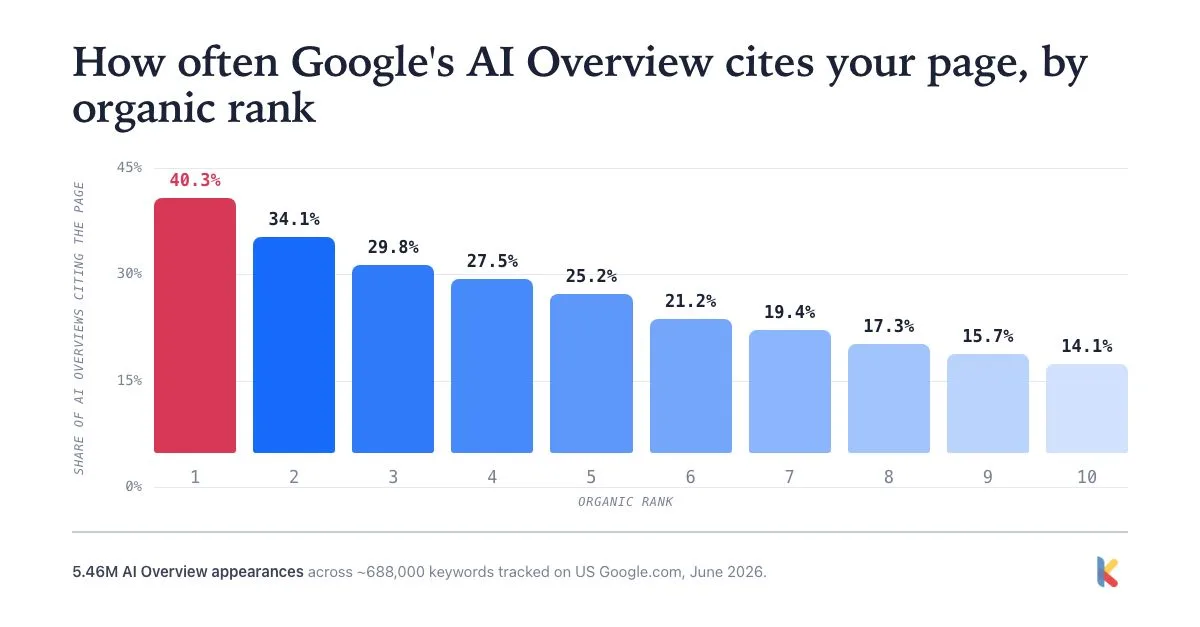
Tracking citation frequency per keyword lets you identify exactly these situations — queries where the AIO is stable and active but your content is not being referenced — so you can prioritize those pages for structured content improvements, schema additions, or authority signals. Keyword.com shows citation frequency at the individual keyword level, making it straightforward to sort and surface your lowest-cited high-presence keywords.
3. Source URL Performance
Source URL performance identifies which specific URLs on your domain are being cited inside AI Overviews, allowing you to distinguish between a single high-performing page driving the majority of your citations versus citations distributed more evenly across multiple pages.
If one page is consistently being cited across a cluster of related keywords, that page is carrying outsized weight in your AIO visibility — and it deserves priority attention when updating, expanding, or structuring content. Equally important are the pages that rank well organically but do not appear in any AI Overview citations. These represent a gap: Google values the page enough to surface it in traditional results, but it is not drawing from it when generating AI summaries. That often points to fixable issues around content structure, answer clarity, or the presence of authoritative supporting data.
Ranking position is still the strongest lever here. Keyword.com’s analysis of that same 5.46-million-appearance dataset found citation rate climbs steadily with organic rank — from 36.8% for pages ranked 1–3, down to 21.5% for 4–10, 9.4% for 11–20, and just 1.7% for 51–100. Pages in the top 3 were cited roughly 22 times more often than pages ranked 51–100, reinforcing that source URL performance and organic ranking move together rather than independently.
Early data from that same research also suggests the source pool is more format-diverse than most SEOs assume: ordinary web pages accounted for about 76% of citations, but video — YouTube specifically — was the single most-cited individual domain at roughly 9%, ahead of any other site. If your top-cited competitor pages skew toward video, that’s a signal worth factoring into your own source URL strategy.
In Keyword.com, the citation section displays the top five pages most frequently sourced for a keyword and their percentage share — letting you inspect which URLs are being cited per keyword and build a picture of source URL performance across your tracked keyword set.
Also note that having a high share alone is not the goal. The correct page must align with the query. If AI consistently cites your homepage instead of a dedicated service page, it indicates a content alignment issue worth addressing.
4. Mentions Frequency
Mention frequency tracks how often your brand name appears in AI-generated narrative text, regardless of whether you’re cited as a linked source.
Keyword.com shows not only whether your brand is mentioned, but how many times it appears within a response. In the citation and reference analysis section, selecting “View Result” for a term reveals all the sources Google used for that prompt, along with where your brand is mentioned and where it is absent. This metric is useful for evaluating brand visibility and informing PR strategy.
A Few Common AIO Metric Misinterpretations to Avoid
- Comparing metrics across different tools that use different query sets
- Assuming higher is always better without considering search intent
- Treating a single data point as a trend rather than analyzing it over time
Before acting on any of these metrics, be cautious about drawing conclusions from a narrow data window. A single AI Overview appearance, or even a week of data, is not sufficient to identify a pattern — AI Overviews fluctuate based on query context, content freshness, and ongoing changes to Google’s systems.
Use trend data spanning at least four weeks before making strategic decisions based on visibility score, citation frequency, or source URL performance. Stable trends over that window are meaningful; one-off spikes or dips almost never are.
What Are the Best SEO Tools for Tracking Google AI Overviews?
Here are a few tools worth looking at if you want to track Google AI Overviews without living inside a spreadsheet:
1. Keyword.com
Top Features: Mentions, citations, AI Share of Voice, Spyglass verification, on-demand run, historical data, and sentiment analysis.
Pricing: From $33/month
Best for SEO teams and agencies that want AI Overview tracking alongside traditional rank tracking. Keyword.com shows which queries trigger AI Overviews, which URLs get cited, and how your AIO visibility changes over time. We’d put this first when you care about connecting AI Overview visibility back to keyword performance, client reporting, and SEO decision-making.
If you already use Keyword.com’s traditional rank tracker, keywords that trigger Google AI Overviews are automatically flagged with a robot icon, making it easy to spot AI-affected queries within your existing workflow.
How It Works: From the Keyword.com dashboard, click AI Visibility, add your brand name and a topic to generate keyword suggestions, select the keywords, choose an AI engine (AI Overviews), set ranking intervals, region, and language, then click Save to load the data.
2. Semrush
Top Features: AIO detection, citations, AI visibility metrics, mentions, AI response, topic opportunities, source opportunities, and competitor research.
Pricing: Core plans start at $139/month; AI visibility tracking requires the Starter plan at $199/month
Best if your team already uses Semrush and wants AI Overview data inside a broader SEO suite. Semrush surfaces AI Overview presence as part of its Position Tracking module, meaning you can see whether a keyword triggers an AIO alongside where you rank organically, all within the same dashboard.
Where it stands out is in the research phase: the Keyword Magic Tool gives you AIO-related signals when you are building or expanding a keyword list, helping you prioritize terms based on whether they are likely to produce AI-generated results.
How It Works: From the dashboard, go to AI Visibility → Visibility Overview, enter your brand name, and use the “All AI Platforms” dropdown to filter for AI Overviews and review your brand’s AIO performance.
3. SE Ranking
Top Features: Traffic estimation, organic AI overlap, mentions, and AIO presence (visibility percentage).
Pricing: From $129/month
Best for teams that want AIO tracking as part of a more affordable all-in-one SEO platform. SE Ranking includes AI visibility and tracking across platforms like Google AI, ChatGPT, Gemini, and Perplexity, making it a practical option if you need SEO + AI monitoring without jumping into enterprise pricing.
How It Works: From the SE Ranking dashboard, go to AI Tracker → Tracking Setup to create a project, select AI Overviews, choose keywords from your rank tracker, and start viewing your metrics.
4. Ziptie
Top Features: Overview state, AIO share of voice, keyword suggestion, mentions, citations, and sentiment.
Pricing: From $69/month
Best for teams focused specifically on AI search visibility and citation tracking. Ziptie is more of a dedicated AI visibility tool than a traditional rank tracker, so it may be useful if your main goal is monitoring AI-generated answers rather than managing a full SEO workflow.
While it is less rich in in-depth visual analysis, Ziptie offers useful insights, such as the presence of AIO features like bullet points, numbered lists, images, and videos. It also indicates whether your page appears in the top 10 organic results, which allows you to easily compare AI visibility with traditional rankings.
How It Works: Enter your domain URL, select device type (mobile or desktop), country, language, and keywords. Submit to view performance and AI Overview metrics.
5. Ahrefs Brand Radar
Top Features: Mentions, impressions, competitive share, and market share.
Pricing: From $199/month
Ahrefs is best used for the discovery phase of AIO research, specifically identifying which keywords in a niche are currently triggering AI Overviews before you decide which terms to target or track.
Within Keywords Explorer, you can filter and analyze large keyword sets and see AIO presence flagged at the SERP feature level, making it practical to assess AI Overview prevalence across thousands of queries in one pass. The SERP history feature adds a time dimension, letting you check whether a keyword has recently started or stopped triggering an AIO, which is useful context when evaluating whether a traffic shift is linked to Google expanding or contracting AI Overview coverage.
How It Works: Enter your domain, add the brands you want to track, select AI Overview from the dropdown, and click Explore to see performance.
What Are the Best Practices for Consistent and Accurate AI Overview Tracking?
Tracking AI Overviews only works if the process is repeatable and structured. Sporadic checks or inconsistent methods produce noisy data that is difficult to act on. The following best practices will help you build a reliable tracking workflow from day one:
1. Establish a Baseline Before AIO Tracking Begins
Before you start monitoring trends, record which keywords trigger AI Overviews, which domains — yours and your competitors’ — are being cited, and how the AIO is structured at that point in time. Without this starting point, you have no way to measure improvement or decline. Keyword.com’s AI visibility dashboard can be used to capture this initial state, giving you a dated reference to measure everything against going forward.
2. Use a Consistent, Clean Search Environment
Always check AI Overviews in incognito mode, logged out of your Google account, with a fixed location and language setting applied. Personalized search history can skew which results appear and whether an AIO is triggered at all. Clear cookies between manual checks to further reduce this risk. Keyword.com removes this variable entirely by running anonymized searches automatically, ensuring that every data point reflects the true SERP rather than a personalized version.
3. Track the Same Keyword and Competitor Set on a Regular Cadence
Consistency in what you track matters as much as consistency in how you track it. Weekly checks are the minimum for volatile or trending queries where AIO presence can shift quickly. For stable informational keywords, a monthly cadence is generally acceptable. Whichever schedule you choose, stick to it so your data remains comparable over time.
4. Benchmark Against Competitors From Day One
From your very first tracking session, note which competitor URLs are cited alongside yours or instead of yours — this is effectively a citation-based share of voice measurement, and it’s often more actionable than raw presence data alone. Keyword.com’s competitor tracking view allows side-by-side citation comparison across the same keyword set, making it straightforward to identify where you are losing ground and which pages competitors are using to earn those citations.
Track Your Website’s AI Overview Rankings Accurately with Keyword.com
The goal is not to appear in every AI Overview. It is to understand where Google already sees your content as a useful source—and where competitors are giving it something your pages are not.
Once you can see those patterns over time, AI Overview tracking becomes much more useful. You can identify the topics where you already have authority, find citation opportunities worth pursuing, and make better decisions about which content to update or create next.
Keyword.com helps you monitor AI search visibility alongside your traditional rankings, so you can see how your search presence is changing in one place. Start your 14-day free trial to track the keywords and citations that matter to your brand.