Picking the right keyword tracking tool for SEO agencies can feel overwhelming, especially when every keyword monitoring software promises "accurate, real-time rankings" and buries the meaningful differences in a pricing page you have to request a demo to see.
We've been building tools for SEO keyword tracking for years. We've tested these tools against real campaigns, the actual SERPs, and real client reporting needs. This guide cuts through the noise.
Below you'll find 15 of the best keyword tracking tools available right now — each reviewed for rank tracking features, accuracy, update frequency, pricing, and who it's actually built for. Whether you're an agency managing hundreds of clients or an in-house SEO team chasing competitive rankings, there's a tool on this list that fits your workflow.
The 15 Best Keyword Tracking Tools in 2026 at a Glance
Here is a quick look at the keyword monitoring platforms covered in this article — including dedicated keyword monitoring tools with AI visibility tracking and all-in-one SEO suites.
Swipe horizontally to see all columns →
| Tool | Best for | Starting price | Free tier | Update frequency | Standout features |
|---|---|---|---|---|---|
| Keyword.com | Agencies & SEO teams | From $3/month | No (14-day trial) | Daily / weekly | AI Overview Tracker; Spyglass verification |
| Semrush | Enterprise in-house teams | From $139.95/month | Limited | Daily | Full SEO platform; competitor tracking |
| Ahrefs | Backlink + rank workflows | From $29/month | Webmaster Tools | Daily | SERP history screenshots |
| SE Ranking | Growing agencies | From $103.20/mo | 14-day trial | Daily | AI Search Toolkit (ChatGPT, Gemini, Perplexity) |
| AccuRanker | High-volume agencies | From $249/month | None — 14-day money-back | Daily + on-demand | Fastest on-demand refresh; AccuLLM |
| Moz Pro | Moz ecosystem users | From $49/month | 30-day trial | Daily | Domain Authority integration |
| Advanced Web Ranking | Enterprise / historical data | From $139/month | 30-day money-back | Daily + on-demand | 20+ years of historical data |
| Nightwatch | Budget-conscious agencies | From $32/month | 14-day trial | Daily + real-time | Unlimited users and white-label on all plans |
| Mangools SERPWatcher | Freelancers & small teams | From $30.50/month | 10-day trial | Daily | Dominance Index score |
| BrightLocal | Local SEO agencies | From $39/month | 14-day trial | Daily / weekly | Local pack + GBP position tracking |
| SISTRIX | European & enterprise markets | From €119/month | No | Daily | Visibility Index benchmark |
| Rank Ranger / Similarweb | Enterprise intelligence | Custom | No | Daily | Market share and rank data combined |
| Conductor | Enterprise in-house teams | Custom | No | Daily | Content and SEO workflow integration |
| WooRank | Small businesses | From $89.99/month | No | Weekly digest | Simple UX for non-SEO teams |
| Google Search Console | All website owners | Free | Always free | Rolling average | First-party Google data |
How We Tested the Keyword Tracking Tools on Our List
We didn't put this list together by skimming feature pages. Over several weeks, our team of SEO specialists and product researchers actively tested each of the 15 keyword tracking tools covered in this guide — working through real-world workflows including campaign setup, rank monitoring across multiple locations, reporting, and day-to-day usability.
- Rank tracking accuracy and frequency: how reliably rankings are captured, and how often data is refreshed
- Keyword monitoring depth: SERP feature tracking, local and mobile monitoring, competitor visibility
- Ease of use: time to set up, dashboard clarity, and learning curve for new users
- SEO reporting and sharing: white-label options, scheduled reports, and client-ready exports
- Pricing and value: what you actually get at each plan tier relative to cost
We supplemented our hands-on testing with verified user reviews from G2 and Capterra and cross-referenced published documentation to confirm feature availability. Where tools have changed pricing or features recently, we've noted it.
Tools that offer only keyword research with no ongoing rank monitoring were excluded from the main list. Where a tool's strength is primarily keyword research with rank tracking as a secondary feature, we say so clearly.
What to Look for in a Keyword Monitoring Software Tool
Not every keyword tracking tool is built the same, and the wrong choice can leave you optimizing against data that doesn't reflect reality. Before you commit to any platform, here are the criteria we'd encourage you to weigh up.
- Tracking frequency: Daily updates are the baseline for any serious SEO campaign. If a keyword monitoring software only refreshes weekly, you risk missing rank swings tied to algorithm updates or competitor activity. On-demand tracking is a meaningful bonus for time-sensitive decisions.
- Location and device granularity: Keyword rankings vary significantly by country, city, ZIP code, and device type. Look for a tool that lets you track at a hyper-local level — down to city and postcode — and separates desktop from mobile performance, so you're not averaging away signal that actually matters. The Keyword.com local rank tracker monitors rankings up to the street and ZIP code levels.
- White-label reporting and share of voice: Clean, shareable keyword dashboards save time with clients and stakeholders. Beyond individual rankings, look for aggregate visibility metrics, such as share of voice, that show how your overall presence is growing across a topic cluster, not just a single keyword.
- SEO integrations: Your keyword monitoring tool should connect to the tools already in your stack: Google Analytics, Google Search Console, Looker Studio, and ideally an open API for custom workflows.
- Pricing scalability: Most SEO tools charge based on keyword volume. Make sure the pricing tier you start on can grow with your campaigns without forcing a disruptive upgrade mid-contract.
- SERP feature and AI Overview tracking: The SERP is no longer just ten blue links. A complete keyword monitoring tool needs to track featured snippets, local packs, video carousels, and — critically in 2026 — AI Overview appearances and AI Mode visibility. Ranking #1 organically while being absent from the AI Overview is a meaningful visibility gap.
- Historical data depth: The ability to look back at 12 or 24 months of keyword ranking data helps you prove SEO ROI and diagnose what ranking changes after algorithm updates.
- Competitor rank tracking: Monitoring your own positions in isolation only tells half the story. Good keyword tracking software lets you compare competitor domains on the same keyword sets so that you can spot gaps and opportunities.
1. Keyword.com: Best Dedicated Keyword Monitoring Software for SEO Agencies
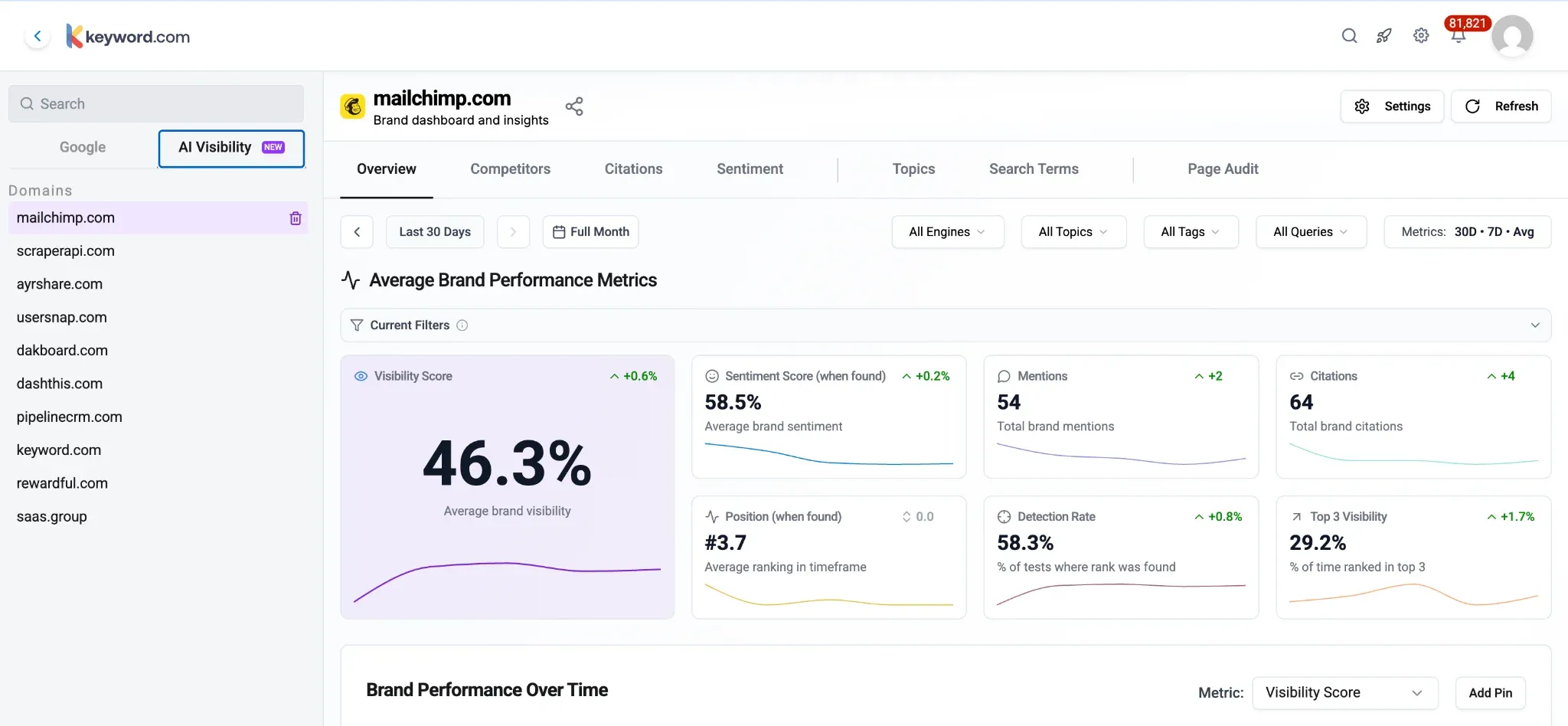
Best for: Agencies and SEO teams that need daily accuracy, transparent data verification, and agency-grade reporting
Starting price: From $3/month (weekly ranking updates)
Free tier: No (14-day free trial, no credit card required)
Update frequency: Daily / weekly
Keyword.com is a keyword monitoring software that accurately tracks mobile and desktop keyword rankings with daily, weekly, or on-demand updates. We built the Keyword.com rank tracker because we couldn't find a rank tracker that combined daily accuracy, transparent data verification, and agency-grade reporting without forcing you into an all-in-one platform you'd only use 20% of.
What Features Does Keyword.com Offer?
- Daily rank tracking is the default for all Keyword.com plans. We don't lock daily updates behind a premium tier — it's the baseline. Rankings refresh every 24 hours across Google (desktop and mobile), with on-demand refreshes available in under two to three minutes when you need to check a position right now.
- AI Overview Tracker monitors whether your pages appear inside Google's AI-generated answer boxes for your tracked keywords. With AI Overviews now appearing on a significant share of high-intent queries, visibility in that box can matter more than ranking first in the SERPs. We track appearance rate, frequency, and changes over time — not just a single snapshot.
- Local Rank Tracker provides granular city- and neighborhood-level position data, including Google Maps and local pack tracking. If you manage multi-location clients, you can track each location independently within a single project.
- Share of Voice Monitor gives you an aggregated visibility score across your full keyword set — so you can see whether overall search presence is growing even when individual keywords move in different directions.
- Spyglass third-party verification is unique to Keyword.com. It lets you independently verify ranking data against real SERP checks, so you can prove to clients that the numbers in your reports are accurate — not an artifact of a scraping discrepancy.
- Rank tracker API access enables you to pull ranking data into any external dashboard, BI tool, or custom client portal. Enterprise accounts get full API access with no limits.
- White-label reporting means every report that leaves your agency carries your brand. Reports can be scheduled, automated, and shared via live links — no PDF-only exports.
Why Should You Use Keyword.com for SERP Monitoring?
Keyword.com offers agency-specific SERP monitoring features, including unlimited domain tracking within projects, team permissions, and group-level reporting, to manage multiple clients from one view. For mid-sized and large SEO agencies, Keyword.com is built to eliminate the overhead of client reporting while delivering data you can actually defend. Adam R., a Director at an Individual & Family Services agency, described this in a Capterra review: "It has made it much easier to track rankings across different locations, measure progress, and focus our efforts on the keywords and pages that need the most attention."
How Much Does Keyword.com Cost?
Keyword.com has a 360-degree visibility plan for tracking Google SERPs and AI brand mentions — starting at $33 per month. See current plans at keyword.com/pricing/.
Keyword.com Pros
- On-demand rank refreshes deliver results in 2–3 minutes, which is useful when you need data before a client call
- Tracks unlimited domains within a project, so there's no penalty for managing large multi-site portfolios
- Clean, agency-ready reporting that can be white-labeled
- 7-day-a-week customer support available on all plans
- Pricing is structured around keywords tracked, not seats, which suits growing agencies
Keyword.com Cons
- Focused exclusively on rank tracking — no built-in site audit or backlink analysis tools
2. Semrush: Best All-in-One Platform for Teams Who Want Everything in One Place
Best for: In-house SEO teams that need keyword monitoring alongside competitive research, site auditing, and content tools in one subscription
Starting price: From $139.95 per month
Free tier: Yes (limited — 10 queries per day)
Update frequency: Daily
Semrush's Position Tracking tool is one of the most capable keyword tracking tools available. You can set up campaigns to monitor keywords across specific locations and devices, and the platform tracks a wide range of SERP features, including featured snippets, local packs, and AI Overviews.
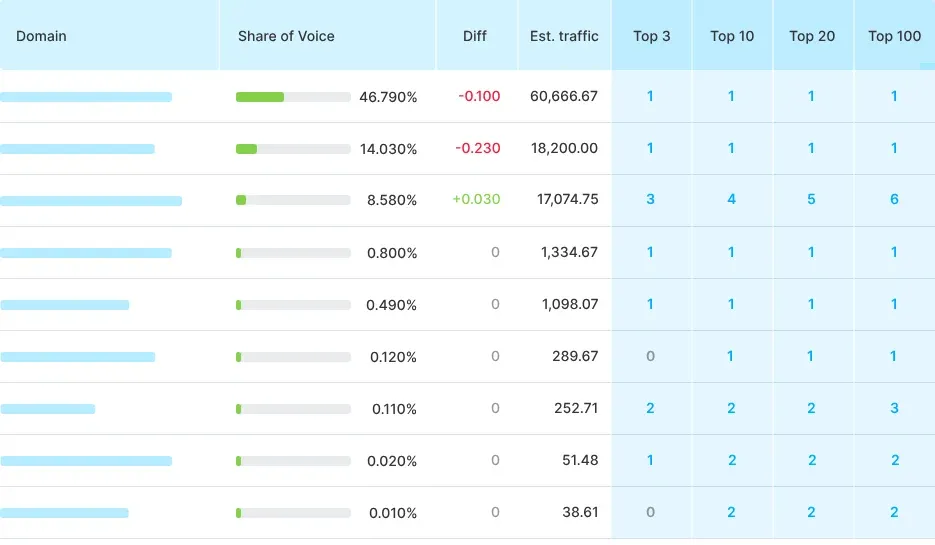
The Position Tracking dashboard shows rank distribution over time, visibility percentage, estimated traffic, and competitor positions — all from a single campaign view. Cannibalization detection surfaces cases where multiple pages are competing for the same keyword. The Looker Studio integration is robust and well-documented for agency reporting.
Semrush's main trade-offs are scope and cost. The pricing jumps significantly between tiers, and the platform can feel overwhelming for users who only need rank tracking. If position monitoring is your primary need, you may be paying for features you won't use. Data accuracy across client accounts has also drawn complaints — one Capterra reviewer, Alp A., a Director at a marketing and advertising agency, wrote that position tracking showed "0 volume for their most primary keywords... making our traffic metrics look like garbage in position tracking, when in fact they're booming."
What Features Does Semrush Offer?
- Daily rank tracking across Google, Bing, and Yahoo, with mobile and desktop differentiation
- SERP feature tracking: monitors featured snippets, AI Overviews (via Semrush One), local packs, image carousels, and more
- Branded PDF reports and Looker Studio connector
- Keyword cannibalization detection: identifies when multiple pages on your site compete for the same keyword
- Share of Voice tracking: see your estimated visibility share across a tracked keyword set
How Much Does Semrush Cost?
Plans start at $139.95/mo and scale up to $499.95+/mo depending on features and limits. Pricing increases with keyword tracking capacity, users, and add-ons. There's no free plan, but a limited free trial is sometimes available.
Semrush Pros
- Covers rank tracking alongside a full suite of SEO, content, and competitor tools
- SERP feature detection is detailed and regularly updated
- Historical ranking data available on Guru and above
- Multi-location and multi-device tracking on higher plans
- Strong reporting and PDF export options
Semrush Cons
- Pro plan limits tracked keywords and restricts historical data access
- Semrush can feel complex for users who only need rank tracking
- Cost per seat adds up quickly for larger agency teams
- Some advanced position tracking features require the Guru tier or above
3. Ahrefs: Best for Teams Combining Rank Monitoring With Backlink Intelligence
Best for: SEO teams who need deep backlink data alongside rank tracking, and who treat position monitoring as part of a broader competitive workflow
Starting price: From $29 per month
Free tier: Ahrefs Webmaster Tools (limited rank tracking)
Update frequency: Weekly by default; daily tracking available on higher-tier plans
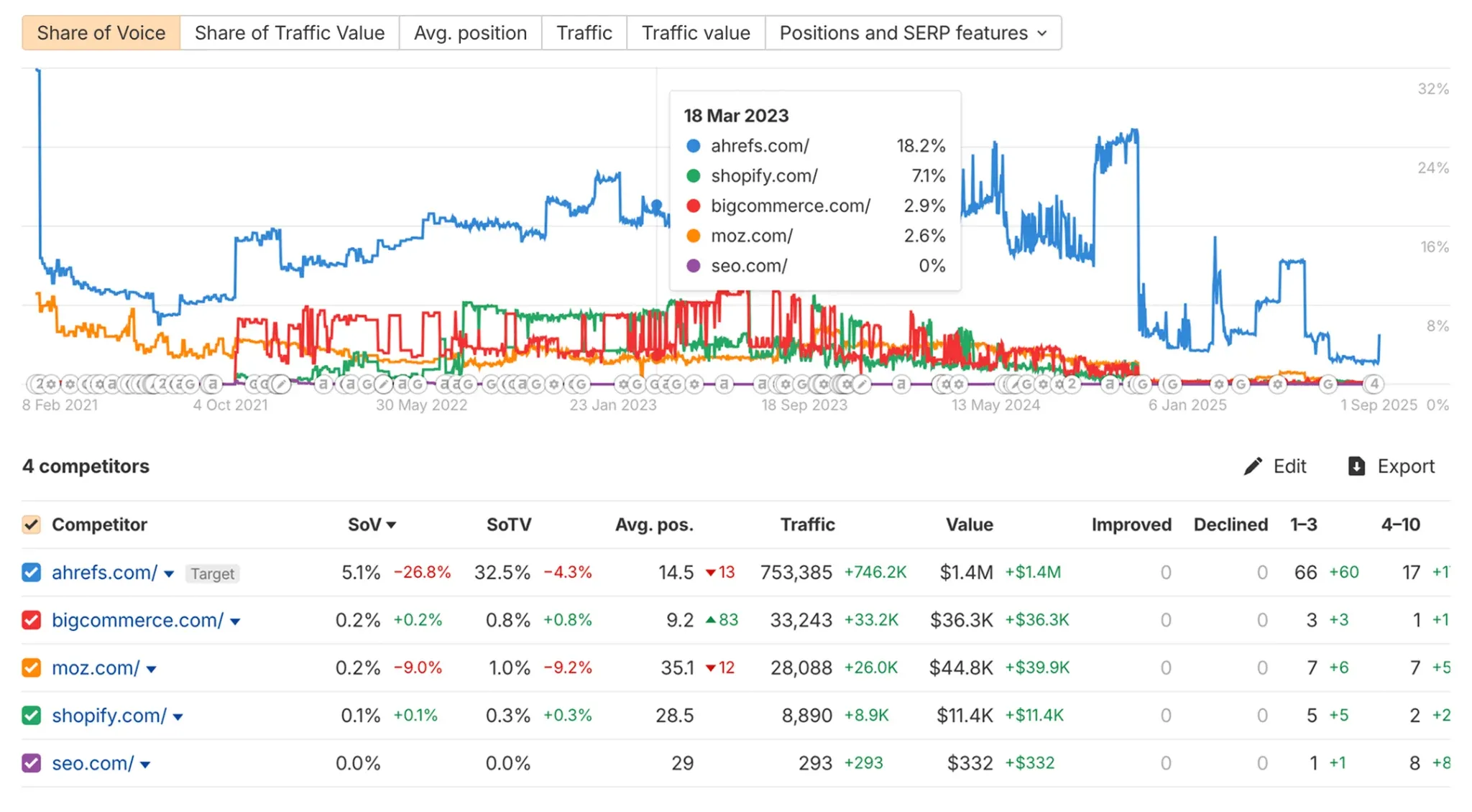
Ahrefs rank tracker delivers reliable daily position data across Google and Bing, with device and location segmentation. Each project tracks keyword movements with historical snapshots and SERP screenshots so you can see exactly what the search result looked like on any given date. The SERP history feature is genuinely useful for diagnosing position drops. For example, you can see when a featured snippet appeared, when a new competitor entered the top 3, or when a local pack replaced an organic result.
It also offers Competitor tracking, which lets you benchmark rankings against multiple domains on the same keyword set. Plus, the Looker Studio integration on Advanced plans and above expands reporting flexibility. Jayant G., a Search Engine Optimization Analyst, echoed this in a G2 review, noting that the Rank Tracker tool lets you "see how the site is performing in comparison to competitors."
The trade-off, though, is similar to Semrush. For pure rank tracking, you're still paying for a broader all-in-one platform. The Lite plan includes 750 tracked keywords across five projects, which can feel limiting for agencies, while Standard increases that to 2,000. Additional users are paid add-ons at every tier, pushing costs higher as teams grow.
What Features Does Ahrefs Offer?
- Keyword rank tracking with position history and movement alerts
- Ahrefs brand radar tool for monitoring AI visibility across Google AI Overviews, AI Mode, ChatGPT, Copilot, Gemini, and Perplexity
- SERP overview: see which pages rank for a keyword and their key metrics
- Mobile vs. desktop tracking is available on higher-tier plans
- SERP feature tracking: featured snippets, image pack, video, sitelinks, and AI Overviews
How Much Does Ahrefs Cost?
Plans start at $29/mo and scale up to $1,499/mo depending on usage limits and features. Pricing increases with keyword tracking, data credits, and the number of users. A limited free Webmaster Tools plan is available (for your own sites only), but there's no full free trial.
Ahrefs Pros
- A strong data ecosystem means rank tracking sits alongside backlink and keyword data in one interface
- SERP history is useful for identifying the impact of algorithm updates
- Tracks ranking across Google, Bing, and YouTube
- The advanced plan includes Looker Studio integration
- Reliable crawler and index used across the platform
Ahrefs Cons
- Tracked keyword limits are relatively low at entry-level tiers (750 on Lite, 2,000 on Standard)
- Adding extra users costs $40–$80/month per seat, depending on plan
- Rank tracking is not the primary focus of the platform, so dedicated features are less developed than specialist tools
- No free trial available for the rank tracking functionality
- Cost increases significantly when scaling keyword volumes or adding users
Learn more: How does Keyword.com compare to Ahrefs for keyword monitoring?
4. SE Ranking: Best Mid-Market Keyword Tracking Platform for Growing Agencies
Best for: Agencies and in-house teams that want daily tracking, solid SERP feature coverage, and AI search visibility tracking at a mid-market price point
Starting price: From $103.20/mo (annual billing)
Free tier: 14-day free trial
Update frequency: Daily, weekly, or monthly, depending on your pricing plan
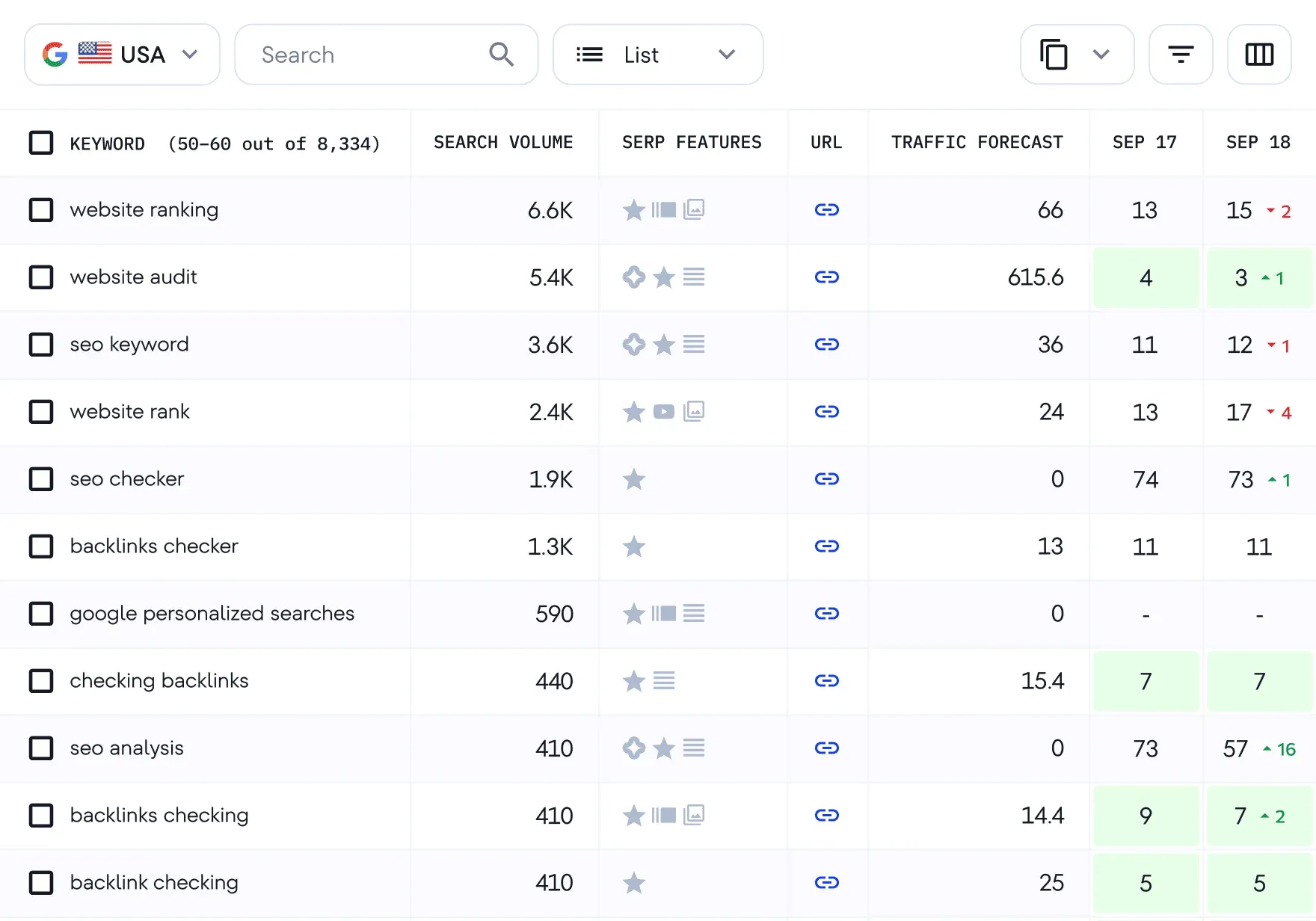
SE Ranking is one of the most price-competitive keyword tracking tools that still delivers daily data and a reasonably full feature set. It's a strong option for solo SEOs and small agencies who need accurate daily tracking without enterprise-level pricing.
Daily tracking is available across Google, Bing, and Yahoo, with location-specific and mobile tracking supported on all plans. The platform also offers an AI Search Toolkit that covers Google AI Overviews, AI Mode, Perplexity, ChatGPT, and Gemini — making it one of the more comprehensive AI visibility tracking options among mid-market tools. The core rank tracker covers SERP features such as featured snippets, local packs, and video carousels.
However, the integrations you get depend on your plan. Looker Studio, Matomo, Google Analytics 4, and Google Search Console are included on the Core plan, while API access and full historical data are reserved for the Growth plan. Agencies can also add white-label reporting via the Agency Pack.
What Features Does SE Ranking Offer?
- SERP feature tracking: featured snippets, local pack, knowledge panel, and video
- Daily, weekly, or monthly rank tracking: flexible check frequency to manage costs
- Google Search Console, Looker Studio, and Google Analytics integration
- Local rank tracking for city-level position monitoring
- Competitor rank tracking: add and compare competitor domains
How Much Does SE Ranking Cost?
Plans start at about $129 per month, depending on your keyword limits, projects, and features. Pricing increases with keyword tracking volume and team size; add-ons are available for agencies. A 14-day free trial is available with no credit card required.
SE Ranking Pros
- Tracks rankings across multiple search engines, including Yandex
- Local and map rank tracking is included without needing a separate tool
- Historical data is retained for the full project lifetime on Growth
- The Agency Pack add-on provides white-label reporting and client seat management
- Competitive pricing relative to the feature set offered
SE Ranking Cons
- Core plan limits daily tracked keywords to 2,000, which may be insufficient for larger accounts
- AI visibility tracking requires a paid add-on rather than being included by default
- API access is only available on Growth and above
- Page change monitoring is limited to the Growth tier
- Some users report that the interface requires time to navigate efficiently
Learn more: The top five SE Ranking alternatives for local keyword monitoring
5. AccuRanker: Best Pure-Play Rank Tracker for Speed and Volume
Best for: Agencies and enterprise teams who need the fastest on-demand rank updates and want a rank-tracking-first platform with no distractions
Starting price: From $249 per month ($224 billed annually)
Free tier: None — 14-day money-back guarantee
Update frequency: Daily automatic + on-demand in seconds
AccuRanker is built for speed and scale. It's one of the few keyword tracking tools that lets you refresh keyword rankings on demand rather than waiting for a scheduled daily update — making it particularly useful when you need real-time data after a site change, algorithm update, or campaign launch. In a Capterra review, Doug L., an Owner-Partner in the arts and crafts industry, said: "It checks my keyword rankings daily, unlike other tools that can take up to a week between updates."
It tracks rankings across Google, Bing, and YouTube, along with common SERP features like featured snippets, local packs, ads, image packs, and AI Overviews. With AccuLLM, you can also monitor how your brand appears in LLM-generated responses.
Location tracking goes down to the city level across a large number of locations. You can segment by device (desktop, mobile, tablet), and Share of Voice is calculated across your keyword sets. The tagging system lets you group keywords by campaign, page type, or any custom structure, which helps keep reporting organized.
In terms of integrations, it connects with Looker Studio, Google Analytics, and Google Search Console, and also offers API access. There's support for white-label reporting with scheduled delivery, plus forecasting to estimate traffic based on ranking changes.
AccuRanker's pricing increases as you scale, so it tends to make more sense for teams where rank tracking is a core part of the workflow and timely data matters.
What Features Does AccuRanker Offer?
- Daily keyword rank updates with on-demand refresh capability
- Search intent labeling and keyword tagging for segmentation
- AI CTR and AI search volume metrics on Expert and above plans
- Google Analytics and Google Search Console integration
- Unlimited users and domains on Enterprise; unlimited users on all plans
How Much Does AccuRanker Cost?
Professional plan starts at $249/month for 2,000 keywords; Expert at $849/month; Enterprise pricing on request (for 25,000+ keywords). Annual billing takes 10% off, bringing those to $224 and $764. There is no free trial, but a 14-day refund policy applies.
AccuRanker Pros
- On-demand keyword refresh and ranking updates
- Unlimited users across all plans removes per-seat billing concerns
- Search intent data adds context to ranking movements
- Google BigQuery integration on Enterprise for data warehousing
AccuRanker Cons
- Entry-level pricing at $249/month for 2,000 keywords is high compared to most competitors, and there is no smaller plan
- AI search visibility tracking requires the separate AccuLLM product
- Advanced features like dynamic tagging and Looker Studio are locked behind the Expert tier
- No built-in keyword research, backlink, or site audit tools
- Raw SERP HTML access is restricted to the Enterprise tier
Related: The best AccuRanker alternatives for keyword monitoring
6. Moz Pro: Best for SEO Teams Already Invested in the Moz Ecosystem
Best for: SEO practitioners who use Moz's DA/PA metrics heavily and want integrated keyword monitoring within the same platform
Starting price: Starter $49/mo (50 keywords, 1 site)
Free tier: 30-day free trial
Update frequency: Daily
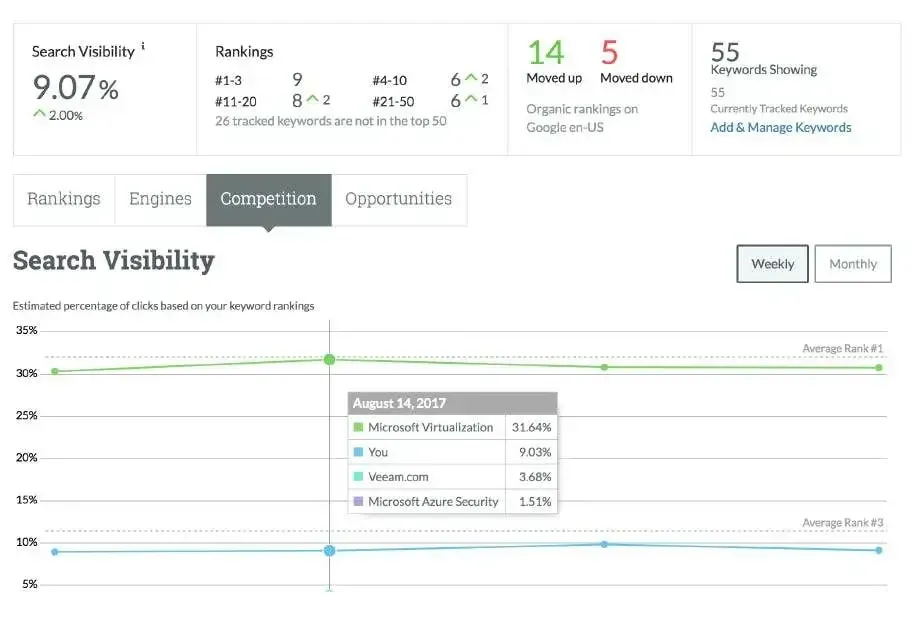
Moz Pro's Rank Tracker (Campaigns) provides daily ranking updates for tracked keywords. Position monitoring covers Google desktop and mobile, and the platform surfaces AI Overview appearances for tracked keywords in the Keyword Suggestions and tracking views. All paid plans include AI Overviews by keyword, which is a meaningful inclusion given how central AI Overviews have become to search visibility.
The Campaigns interface is clean and well-suited to communicating with non-technical stakeholders. You get scheduled PDF reports, branded report templates on Medium and Large plans, and the ability to track up to 3,000 keywords on the Large tier ($299/mo).
Where Moz Pro falls behind dedicated trackers is in the flexibility of update frequency. Keyword tracking limits by plan are more conservative than a keyword monitoring tool like Keyword.com at an equivalent price point. Local rank tracking at city-level granularity is limited, as Moz is more of a national/domain-level tracker.
For teams that already rely on Moz's domain authority metrics and page authority scores for competitive analysis, consolidating rank tracking here makes practical sense. For agencies primarily selling rank monitoring, the per-keyword economics get tight at scale.
What Features Does Moz Pro Offer?
- Keyword rank tracking with weekly update frequency on standard plans
- SERP feature tracking, including local packs and featured snippets
- Competitor ranking comparisons per tracked keyword
- Site crawl and on-page recommendations alongside rank data
- Branded reporting with custom report builder
How Much Does Moz Pro Cost?
Moz Pro starts at $49/month for the Starter plan, with most teams landing on the $99–$299/month range (Standard to Large). Higher-tier plans go up to $599/month, and you can save ~20% with annual billing. There's also a 30-day free trial if you want to test it first.
Moz Pro Pros
- Domain Authority and Page Authority metrics integrate directly with rank tracking data
- The interface is accessible and relatively straightforward to navigate
- SERP feature tracking is included across plans
- Offers a local SEO add-on for businesses managing location-based rankings
- Established tool with a large knowledge base and community
Moz Pro Cons
- Update frequency defaults to weekly on standard plans — daily updates require higher tiers
- Tracked keyword limits are relatively conservative at entry-level pricing
- The platform has not kept pace with some competitors in feature development
7. Advanced Web Ranking (AWR): Best for Enterprise-Grade Reporting and Historical Data
Best for: Enterprise SEO teams and large agencies that need decades of historical ranking data, SEO forecasting, and full AI brand visibility tracking in one platform
Starting price: Pro from $139/month (7,000 keywords, unlimited projects and users)
Free tier: 30-day money-back guarantee
Update frequency: Daily + on-demand
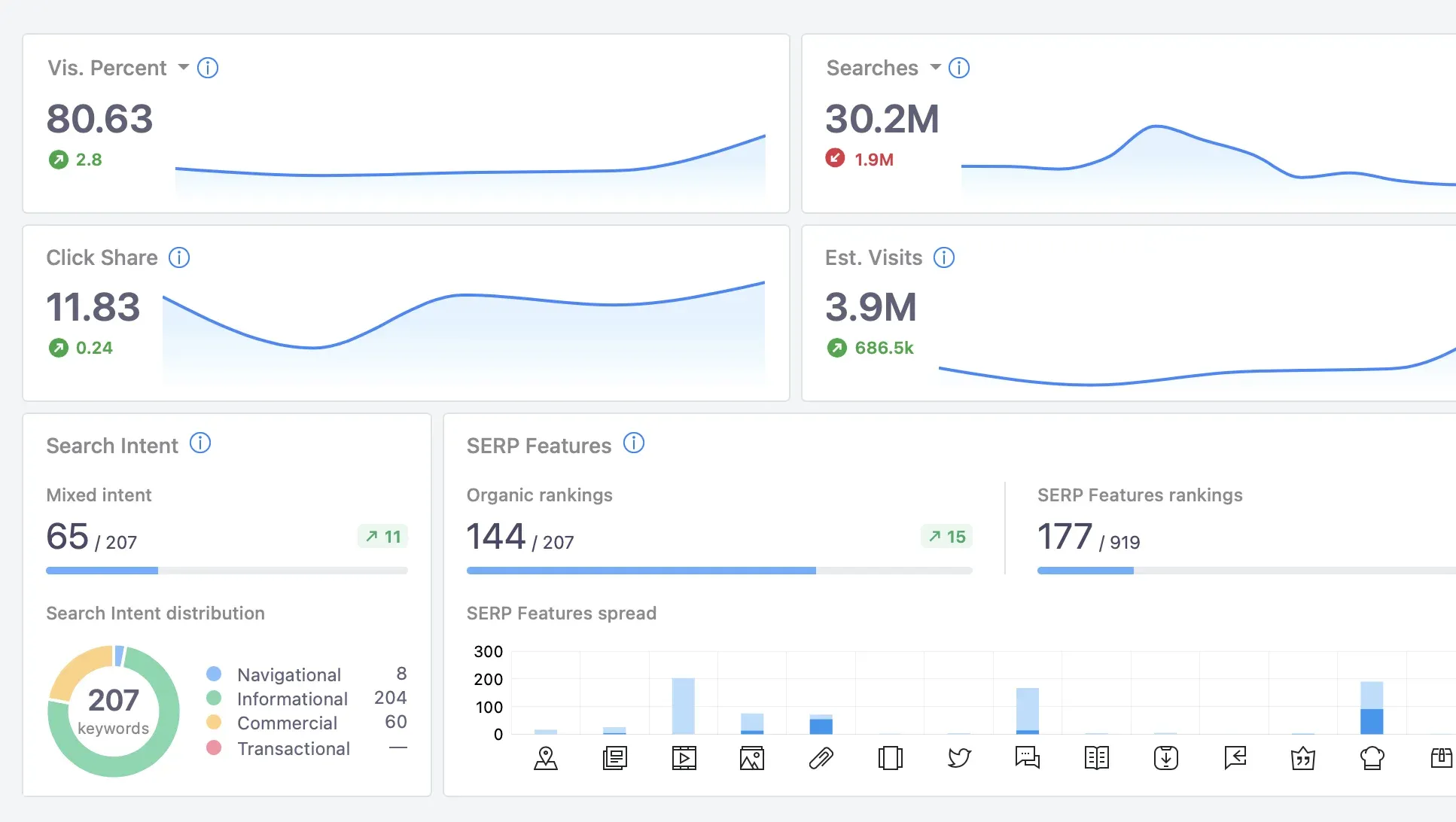
Advanced Web Ranking is a rank tracking platform with a focus on accuracy, reporting depth, and support for large-scale keyword monitoring. It also covers AI search visibility.
It tracks Google, Bing, YouTube, and over 340 search engines globally. Local rank tracking is available at the city level, including Google Maps pack positions. Mobile and desktop tracking are separated, while its SERP feature analysis covers featured snippets, local packs, image carousels, video results, and knowledge panels.
The AI Brand Visibility module tracks AI-generated search results — including AI Overviews, AI citations, and AI mentions — and positions it alongside traditional rank data in the same interface. SEO Forecasting lets you model projected traffic gains from rank improvements, with one forecasting project on the Pro plan.
Its SEO reporting is highly configurable as well. You get unlimited projects, unlimited users on all plans, white-label report scheduling, and a Looker Studio integration.
What Features Does Advanced Web Ranking Offer?
- Daily rank tracking across Google, Bing, Yahoo, and other search engines
- AI search visibility tracking alongside traditional SERP monitoring
- Share of voice and visibility score metrics across tracked keyword sets
- White-label reporting with customizable PDF and CSV exports
- Competitor tracking with side-by-side ranking comparisons
How Much Does Advanced Web Ranking Cost?
Plans start at $139/month for the Pro tier, which includes 7,000 keywords and unlimited projects and users. From there, pricing scales based on keyword volume and usage needs.
Advanced Web Ranking Pros
- Supports a large number of search engines, including regional variants
- Reporting depth is strong, with multiple export and visualization formats
- AI search visibility coverage is built into the platform
- Suitable for high-volume keyword tracking at scale
- White-label options make it practical for agency use
Advanced Web Ranking Cons
- The user interface can feel dated compared to newer competitors
- Onboarding requires time investment to configure correctly for large accounts
- Pricing structure is not immediately transparent from the public-facing page
- Less emphasis on keyword research and site auditing compared to all-in-one platforms
- Support responsiveness varies by plan tier
- AI visibility tracking hasn't expanded as deeply as some dedicated keyword monitoring platforms, like Keyword.com's AI visibility tracker. In a G2 review, Matty M., a Webmaster at a small marketing and advertising business, said: "I hoped they would expand beyond rankings, instead it is a bit too focused on it. I still use the old version from years ago. Their AI tracking seems basic."
Related: Keyword.com vs Advanced Web Ranking for keyword monitoring
8. Nightwatch: Best Budget-Friendly Rank Tracking Tool for Growing Teams
Best for: Small agencies and growing in-house teams that need accurate daily rank tracking with white-label reporting at an accessible price point
Starting price: From $32/month (250 keywords, billed annually)
Free tier: 14-day free trial
Update frequency: Daily + real-time on-demand
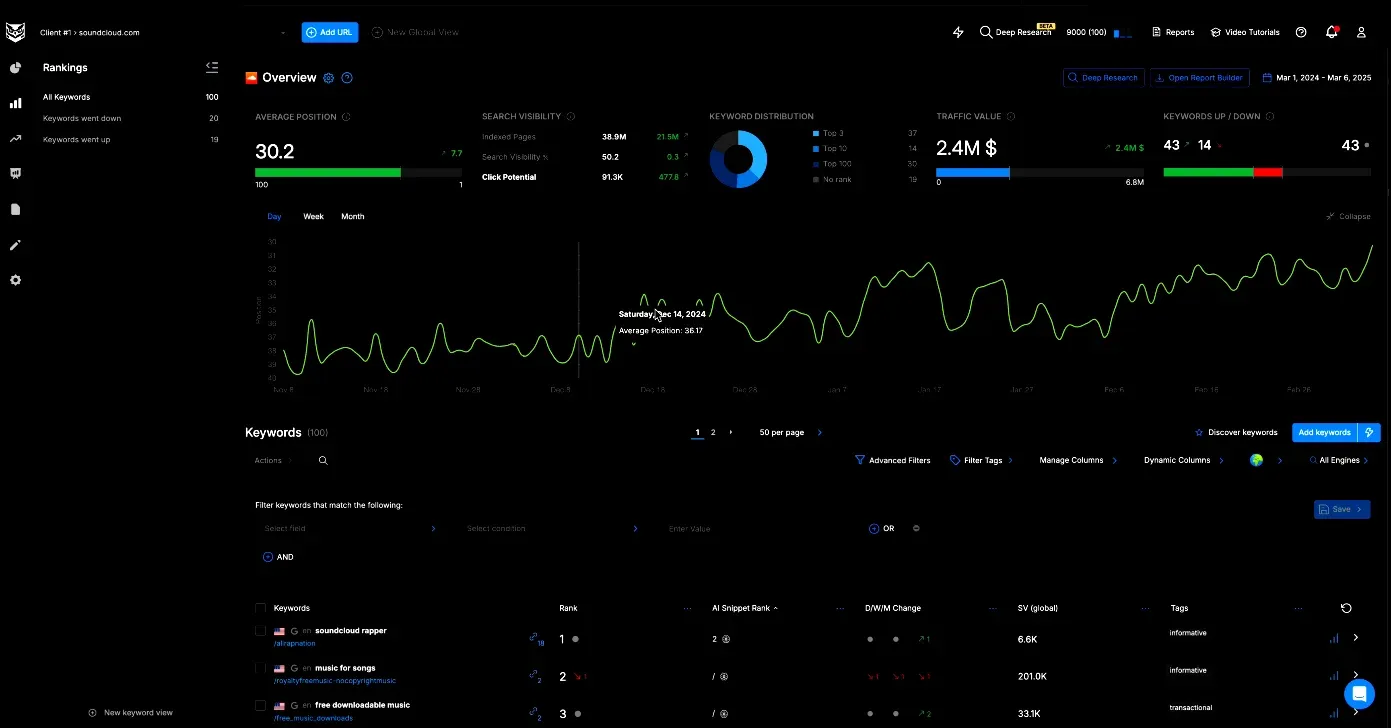
Nightwatch is a rank-tracking and SEO reporting tool built for agencies and teams that need local accuracy, high keyword volume, and white-label reporting without per-seat costs.
The platform tracks Google, YouTube, and Bing rankings with daily updates. Location targeting is exceptionally granular — 107,000+ locations worldwide — making it competitive with much more expensive tools for local SEO use cases.
All plans include unlimited white-label reports and unlimited user seats, plus the Looker Studio integration is included in every plan. On-demand (real-time) updates are available, so you don't have to wait 24 hours if you need a fresh position check.
The AI Tracking add-on extends position monitoring to AI platforms such as ChatGPT, Gemini, and other LLMs. It tracks sentiment, share of voice across AI results, citations, and generative rankings. At $99/month for 100 prompts, it is a meaningful add-on cost, but one of the cleaner AI visibility bolt-ons available at this price tier.
The site audit functionality is included but lightweight. If your primary need is a solid keyword monitoring tool with generous reporting features at a low base cost, Nightwatch punches well above its price.
What Features Does Nightwatch Offer?
- Daily keyword rank tracking across Google, Bing, and YouTube
- Tracking across 107,000+ locations for local and hyperlocal campaigns
- On-demand rank refresh for real-time data when needed
- Unlimited white-label reports and unlimited user seats on all plans
- AI tracking add-on covering ChatGPT, Gemini, and other platforms
How Much Does Nightwatch Cost?
Pricing starts at $32/month (billed annually) for 250 keywords. Plans scale based on keyword volume up to 10,000+. AI tracking is an add-on at $99/month for 100 prompts. 14-day free trial, no credit card required.
Nightwatch Pros
- 107,000+ trackable locations makes Nightwatch well-suited for local SEO campaigns
- Unlimited user seats on all plans removes per-seat cost concerns for agencies
- On-demand refresh provides real-time ranking data when required
- Looker Studio integration is available across plans
- Transparent keyword-based pricing that scales predictably
Nightwatch Cons
- AI tracking is not included in base plans and requires a separate add-on purchase
- Site audit functionality is limited compared to full-suite SEO platforms
- Keyword research tools are basic relative to dedicated research platforms
- The entry-level plan caps site audit pages at 25, which can be restrictive for growing SEO agencies
Related: Nightwatch vs. Keyword.com for keyword and AI brand monitoring
9. Mangools SERPWatcher: Best Beginner-Friendly Rank Tracker for Solos and Small Teams
Best for: Freelancers, bloggers, and small businesses who want straightforward daily rank tracking with an interface that doesn't require an SEO background to navigate
Starting price: From $30.50 per month
Free tier: 10-day free trial
Update frequency: Daily
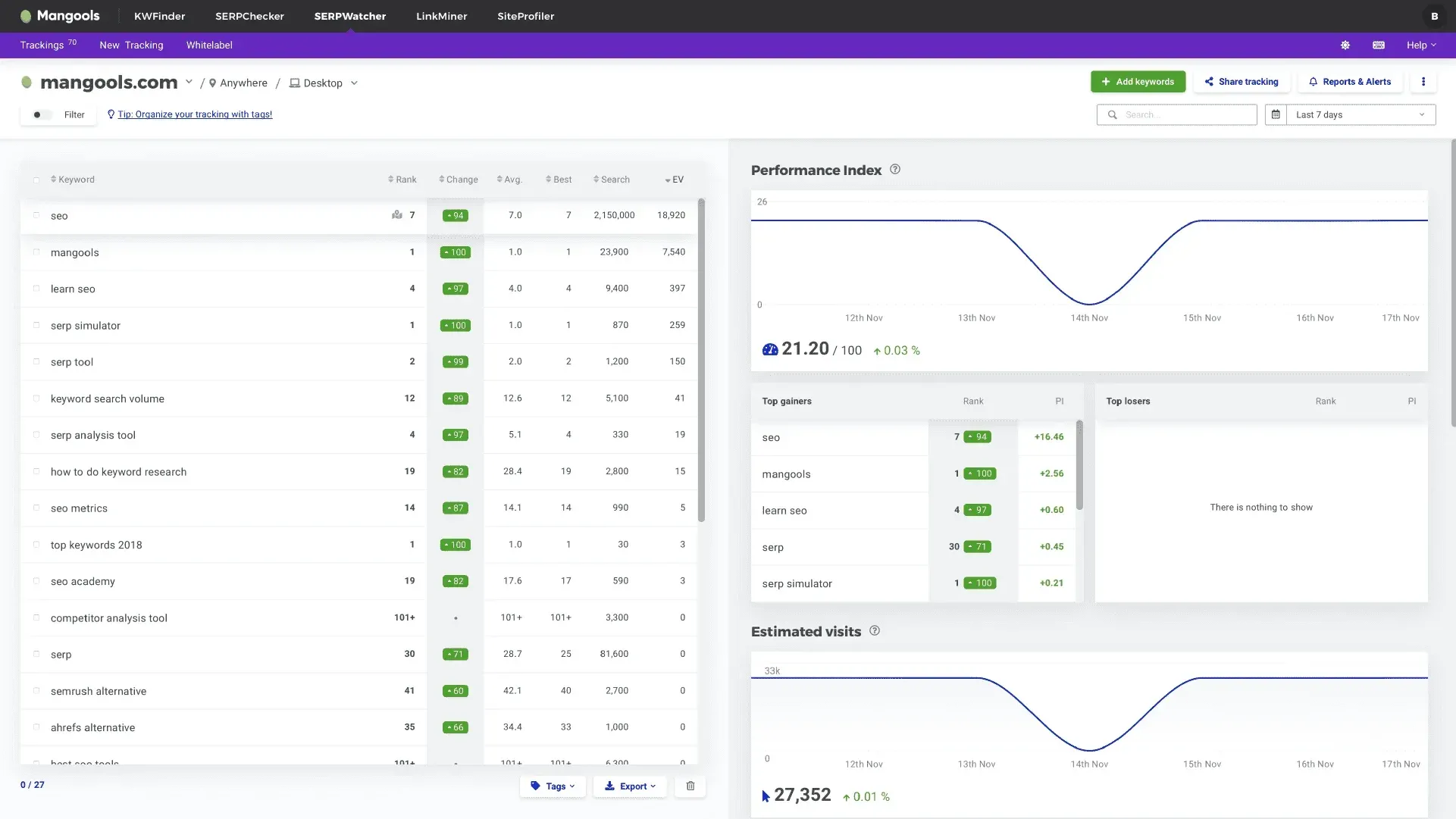
SERPWatcher is the rank tracking component of the Mangools suite, which also includes KWFinder (research), SERPChecker (SERP analysis), LinkMiner (backlinks), and SiteProfiler (site metrics). The Mangools suite is sold as a bundle, which means you pay for all five tools even if keyword monitoring is your primary need.
Daily rank tracking is available across Google, with city-level targeting in 65,000+ locations worldwide. The interface is clean and easy to navigate, and the Dominance Index rolls overall keyword performance into a single score — useful for reporting to non-technical clients. White-label reports are included, and a Looker Studio connector is available.
Mangools has also introduced AI Search Watcher, which tracks how your brand appears in AI-generated answers. This adds a layer of visibility for teams exploring generative search alongside traditional rankings.
That said, SERPWatcher is more limited than dedicated rank tracking tools in a few areas. Its SERP feature tracking isn't as deep, there's no standalone API, and keyword limits per plan can become restrictive when managing larger keyword sets across multiple clients.
What Features Does Mangools SERPWatcher Offer?
- Daily rank tracking with Dominance Index: Tracks keyword positions in Google daily and aggregates performance into a single Dominance Index score, giving a quick read on overall keyword set health without requiring manual analysis
- 65,000+ location targeting: Supports city-level local rank tracking across a large global location database, covering both national and hyper-local keyword monitoring use cases
- AI Search Watcher: Monitors brand and keyword visibility within AI-generated search results (LLM answers), extending tracking coverage beyond traditional blue-link SERP positions
- White-label reporting with Looker Studio connector: Generates shareable, branded interactive reports and connects to Looker Studio for custom dashboard builds, covering standard agency and freelancer reporting workflows
- Full Mangools suite integration: SERPWatcher position data connects directly with KWFinder keyword research and SERPChecker SERP analysis, allowing keyword monitoring to inform research and competitive workflows within one login
How Much Does Mangools SERPWatcher Cost?
SERPWatcher is included in the Mangools suite, with plans starting at about $30.50 per month (annual billing) and scaling to $50–$100/month+ depending on usage limits such as tracked keywords and team seats.
All plans include the full toolset (KWFinder, SERPWatcher, SERPChecker, etc.), with differences mainly in keyword tracking limits and daily usage caps. A limited free version and a money-back guarantee are available.
Mangools SERPWatcher Pros
- Clean, low-friction interface that requires no SEO background to operate. The tool's onboarding time is short, compared to enterprise keyword tracking tools.
- The Dominance Index metric provides a single performance score across a tracked keyword set, useful for client-facing reporting.
- City-level location targeting across 65,000+ locations supports local and regional tracking without an additional plan upgrade.
- White-label reports and a Looker Studio connector are included, covering the core reporting needs of freelancers and small agencies.
- AI Search Watcher adds LLM visibility monitoring, giving users early-stage GEO tracking alongside standard rank data.
Mangools SERPWatcher Cons
- Sold exclusively as a five-tool suite. There is no standalone SERPWatcher plan, so users who only need rank tracking end up paying for tools they may not use.
- Keyword limits per plan require careful management at scale; large keyword sets across multiple client accounts can quickly exhaust those limits.
- SERP feature tracking depth is more limited than dedicated keyword tracking tools — coverage of features like PAA, local packs, and image carousels is not as granular
- No standalone rank tracker API; API access is tied to the broader Mangools suite, which may not suit developers needing isolated rank data.
- No on-demand or intraday refresh option. Daily ranking updates are the only cadence available, which limits use in high-velocity or time-sensitive tracking scenarios.
10. BrightLocal: Best Local Rank Tracker for Multi-Location SEO
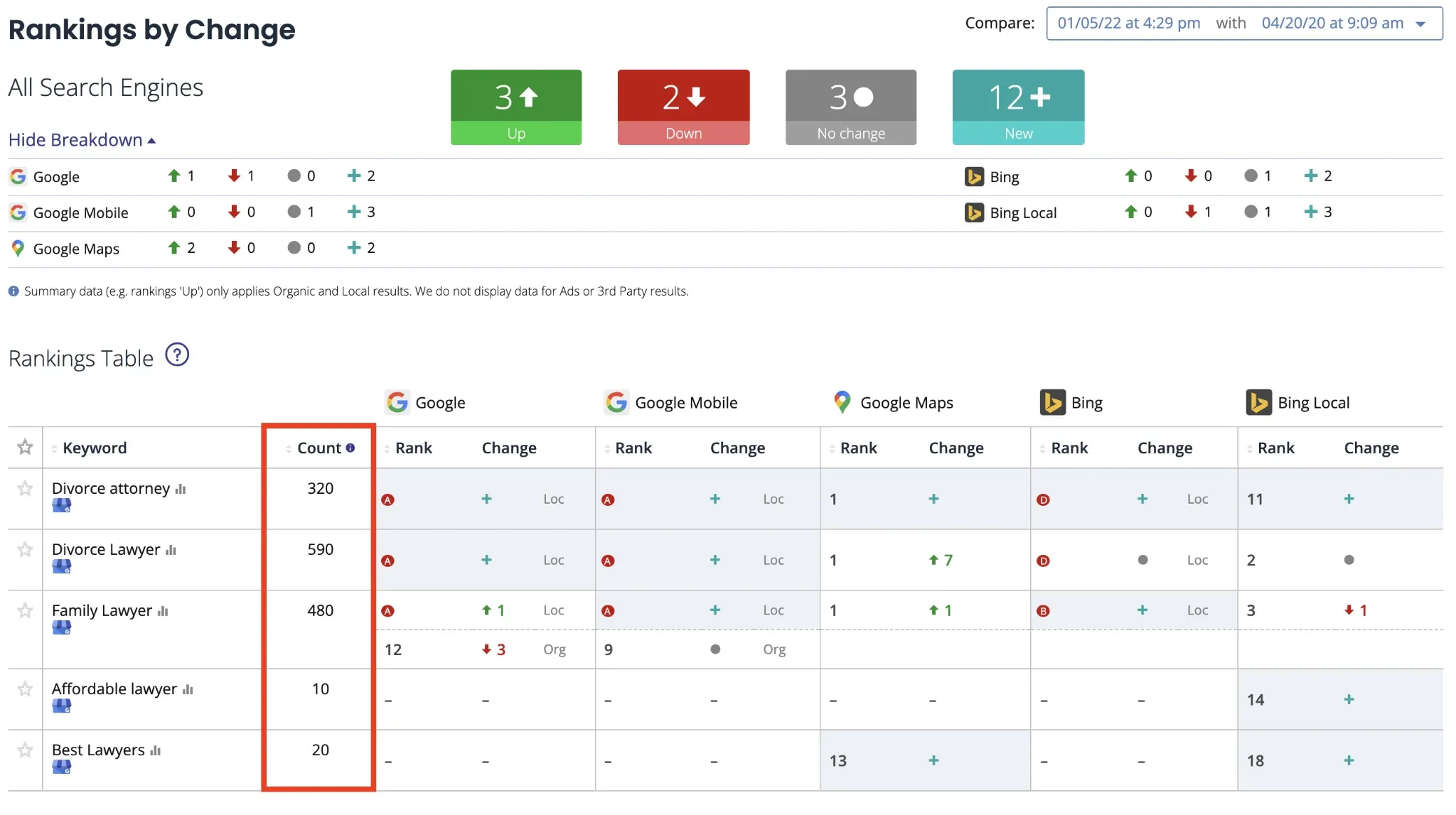
Best for: Local SEO agencies and businesses that need granular geographic rank tracking, Google Business Profile monitoring, and citation tracking in one platform
Starting price: From $39 per month
Free tier: 14-day free trial
Update frequency: Daily / weekly
BrightLocal is a local SEO platform with rank tracking as a core feature, built for businesses and agencies managing visibility across multiple locations.
At the campaign level, it lets you track rankings across multiple locations under a single client and compare their performance. Alongside this, Google Business Profile (GBP) monitoring shows whether your listing appears in the local pack and at what position for each tracked keyword. Together, these features make it particularly useful for agencies working across multiple towns or regions.
On the reporting side, BrightLocal offers white-label and flexible options, including automated scheduling, branded PDF reports, and live report links. In addition to rank tracking, the platform includes citation auditing, review monitoring, and GBP management, enabling local SEO teams to run much of their workflow without relying on separate tools.
That said, its focus is clearly local. BrightLocal isn't designed for large-scale national or e-commerce tracking. If you need to monitor thousands of keywords across broad topic sets, it may not be the right fit. But for local position tracking, it's a focused and practical choice.
What Features Does BrightLocal Offer?
- Local pack (Google Maps) rank tracking: monitors keyword positions within the local pack separately from organic results, with position data at the city, zip code, and neighborhood levels.
- Google Business Profile (GBP) monitoring: tracks whether your GBP listing appears in the local pack for each tracked keyword and at what position.
- Multi-location campaign management: organizes keyword tracking by location under a single client record, with side-by-side location performance comparison.
- Organic local rank tracking: tracks standard Google organic positions alongside local pack data for a complete picture of local search visibility.
- White-label reporting: automated, scheduled reports with branded PDFs and shareable live report links, built for agency client delivery.
How Much Does BrightLocal Cost?
Plans start at about $39/month and scale to $49–$59/month+ depending on features and usage. Pricing is based on the number of locations you track, with costs increasing as you add more locations. All plans include core local SEO tools, with higher tiers adding features like listings management and review monitoring. A 14-day free trial is available with no credit card required.
BrightLocal Pros
- Tracks keyword rankings at city, zip code, and neighborhood level — more location granularity than most general-purpose keyword tracking tools offer.
- Google Business Profile monitoring is integrated directly into rank tracking, showing local pack presence and position per keyword.
- Multi-location campaign structure makes it straightforward to manage and compare rankings across dozens of client locations.
- White-label reporting with automated scheduling and live report links reduces manual agency overhead.
- Citation auditing and review monitoring are included, reducing the need for additional local SEO tools
BrightLocal Cons
- Not built for large-scale national or e-commerce keyword tracking — the platform is optimized for local, multi-location campaigns rather than broad topic sets.
- Pricing scales with the number of locations tracked, so agencies managing many multi-location clients can see costs climb quickly compared to per-keyword pricing models.
- Lacks broader SEO suite features like backlink analysis or content optimization, so teams doing more than local SEO will likely need a second tool.
- SERP feature tracking beyond the local pack (featured snippets, People Also Ask) is more limited than dedicated rank trackers built for organic-only campaigns.
- Historical ranking data and API access are less extensive than competitors like SISTRIX or Advanced Web Ranking, which limits deeper trend analysis or custom integrations.
11. SISTRIX: Best Rank Monitoring Platform for European and Enterprise Markets
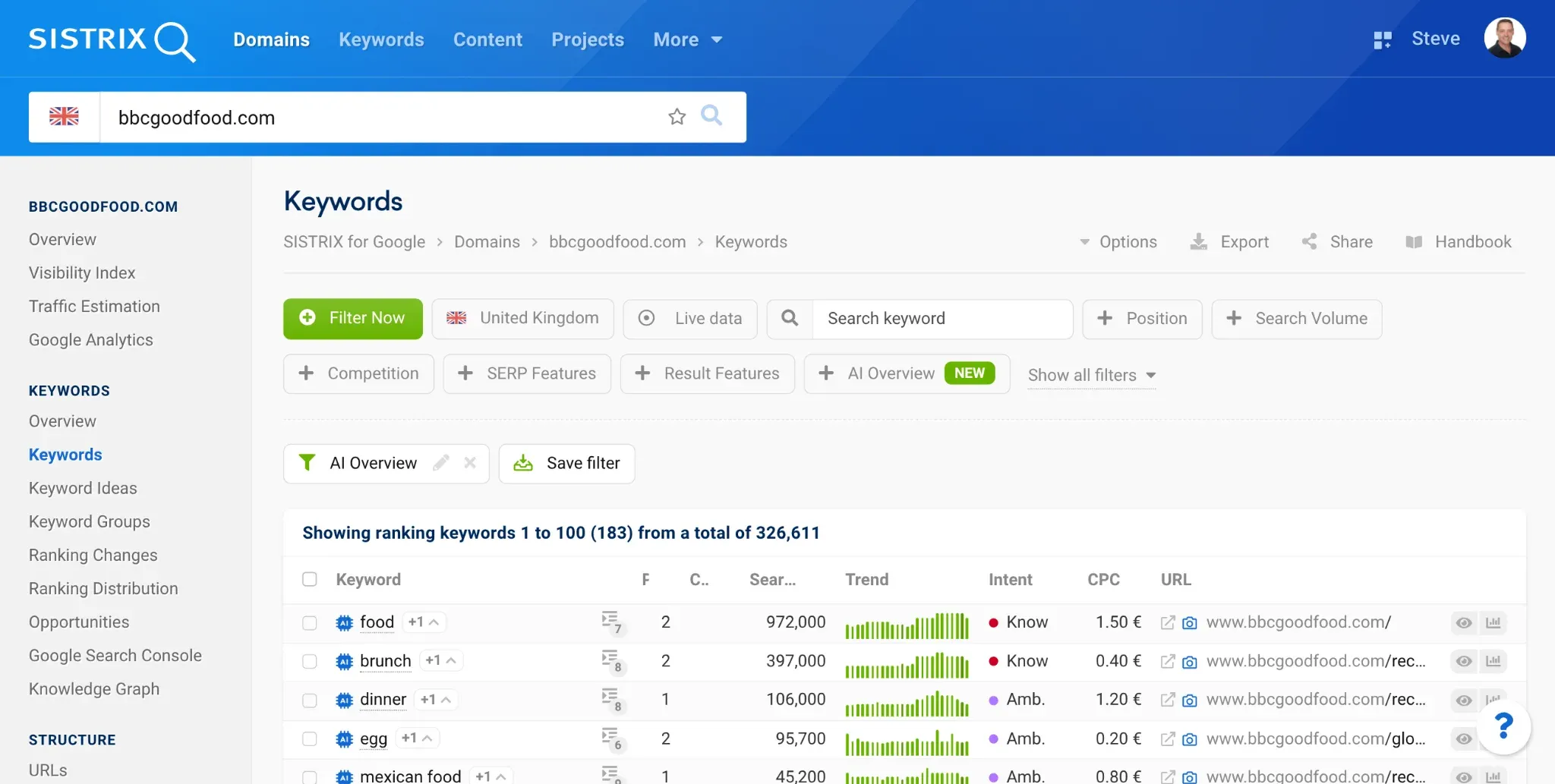
Best for: Enterprise SEO teams and agencies operating across European markets who need robust visibility index data alongside keyword position monitoring
Starting price: Starts at €119/month
Free tier: No
Update frequency: Daily
SISTRIX is particularly strong in European markets — Germany, France, Spain, Italy, the UK — where its Visibility Index has become an industry benchmark for measuring organic search performance. The platform tracks keyword positions daily with full SERP feature analysis and provides historical ranking data stretching back over a decade for many domains.
Position tracking in SISTRIX is granular — desktop and mobile tracking are separated, location targeting is available, and SERP features, including featured snippets, local packs, ads, and knowledge panels, are all tracked. The Visibility Index score gives you an aggregated view of domain-level search presence across all tracked and estimated keyword positions, which is useful for board-level reporting where a single KPI is preferred over keyword-by-keyword tables.
For teams tracking competitors across European markets, SISTRIX's domain comparison features are among the most comprehensive available. You can benchmark visibility trends across multiple domains over months or years.
What Features Does SISTRIX Offer?
- Keyword position monitoring: daily tracking of keyword rankings across desktop and mobile, with location targeting and full SERP feature visibility.
- Visibility Index: aggregated domain-level search presence score calculated across tracked and estimated keyword positions, available as a single KPI for reporting.
- SERP feature tracking: monitors featured snippets, local pack, knowledge panels, ads, and image packs alongside standard position data.
- Competitor domain comparison: side-by-side visibility and ranking trend benchmarking across multiple domains over configurable time ranges.
- Historical data archive: 13 years of ranking history available on Professional and above, enabling long-term performance and algorithm impact analysis.
How Much Does SISTRIX Cost?
The pricing is in euros and is structured for professional and agency use. The entry Start package at €119/mo is accessible, while the Premium tier at €799/mo is designed for large enterprises or multi-market operations. User accounts are scalable from the Plus plan upward.
SISTRIX Pros
- SISTRIX's Visibility Index is a widely recognized benchmark in European SEO, making cross-client and competitive reporting straightforward.
- Daily keyword position tracking, with desktop and mobile data separated, providing reliable, granular monitoring data.
- Historical ranking data dating back 13 years (Professional and above) supports long-term trend analysis.
- SERP feature tracking covers featured snippets, local pack, knowledge panels, ads, and image packs in a single view.
- Domain comparison tools are well-suited to multi-market competitive analysis across European search landscapes.
SISTRIX Cons
- Pricing is in euros and structured for professional use. Also, the entry cost may be high for freelance SEOs or growing agencies with limited budgets.
- Coverage outside European markets is narrower than that of US-headquartered rank monitoring tools, making it less suitable as a sole platform for global campaigns.
- API access is gated behind the Professional plan (€419/mo as of 2026), which raises the cost of programmatic integrations.
- No free tier means there is no low-risk way to evaluate the platform before committing to a paid plan.
- SISTRIX's reporting functionality is more limited than dedicated enterprise reporting platforms. For example, the dashboard exports and scheduled reports cover the basics but lack deep customization.
12. Rank Ranger / Similarweb: Best for Data-Rich Competitive Intelligence Combined With Rank Tracking
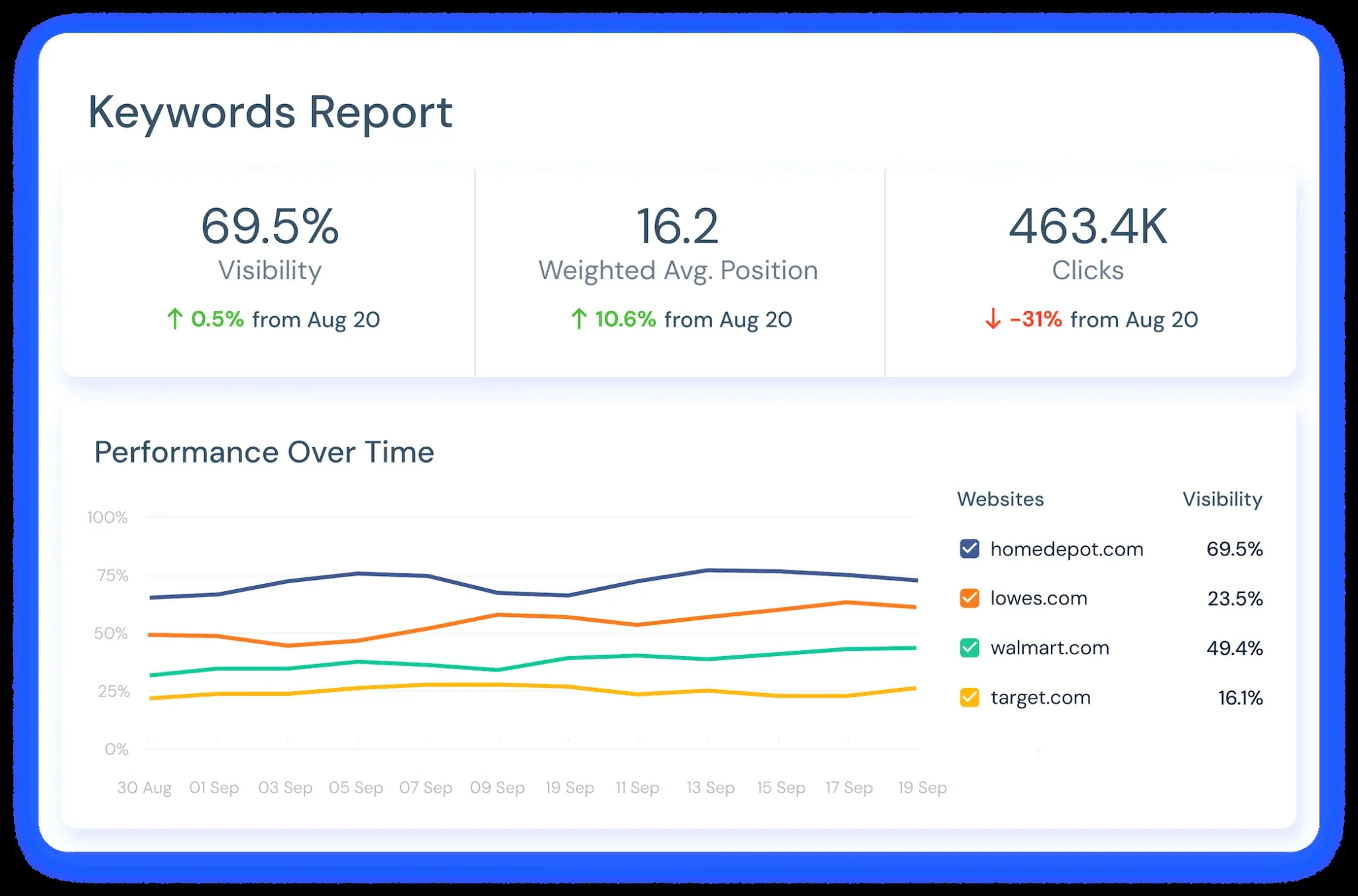
Best for: Enterprise teams that need keyword position monitoring layered with competitive market intelligence and traffic estimation at the domain level
Starting price: Custom; contact Similarweb
Free tier: No
Update frequency: Daily
Rank Ranger is a rank tracking and SEO reporting platform, now integrated into Similarweb's broader competitive intelligence suite. Together, they offer a more expansive view of search performance by combining traditional position tracking with market share and traffic data.
At its core, Rank Ranger still handles the fundamentals well. It tracks positions across Google, Bing, and other search engines, with daily updates and support for SERP feature monitoring. Reporting has long been one of its strengths, and that carries through here, with highly customizable, white-label reports that agencies and in-house teams can tailor to their needs.
What's changed is the added context. With Similarweb data layered in, rankings can be tied to estimated traffic share and competitive positioning, giving teams a clearer sense of what those rankings actually mean in practice.
That said, this broader scope comes with trade-offs. If you're looking for a simple, cost-efficient rank tracker, the platform can feel overbuilt and expensive. But for enterprise teams that want to connect rankings to market-level insights, it is worth exploring.
What Features Does Rank Ranger Offer?
- Keyword position tracking across Google, Bing, and additional search engines with a daily refresh cadence.
- SERP feature monitoring covering featured snippets, local pack, knowledge panel, ads, and image pack.
- Competitive traffic share estimation layering Similarweb's panel-based traffic data alongside rank position data for the same keyword sets.
- White-label and customizable reporting inherited from Rank Ranger's agency-focused infrastructure, with flexible dashboard and export options.
- API access for integrating rank and competitive data into proprietary dashboards or reporting pipelines.
How Much Does Rank Ranger Cost?
Rank Ranger's pricing isn't publicly available, so you have to contact sales for a quote.
Rank Ranger Pros
- Combining rank position data with Similarweb's traffic share estimates gives context that standalone keyword tracking tools do not provide.
- SERP feature tracking is granular and covers a broad range of result types beyond standard blue-link positions.
- White-label reporting makes it suitable for SEO agencies managing multiple clients.
- Cross-engine tracking covers search engines beyond Google, which matters for teams operating in markets where Bing or regional engines have a meaningful share.
- API access supports integration into custom reporting environments without manual data exports
Rank Ranger Cons
- Rank Ranger no longer exists as a standalone product; teams that preferred its focused rank tracking interface will now need to navigate a broader, more complex platform.
- Pricing is enterprise-only, with no published tiers or free trial listed on the Similarweb pricing page (as of 2026), which creates friction in the evaluation process.
- The platform is over-specified and over-priced for teams whose primary need is keyword rank tracking without the competitive intelligence layer.
- Similarweb's traffic estimation methodology relies on panel and modeling data, which introduces variance that dedicated keyword monitoring tools do not have.
- Onboarding and feature discovery in a merged enterprise platform can deliver a slower time-to-value than dedicated keyword-tracking tools.
13. Conductor: Best Enterprise Keyword Monitoring Platform for In-House Marketing Teams
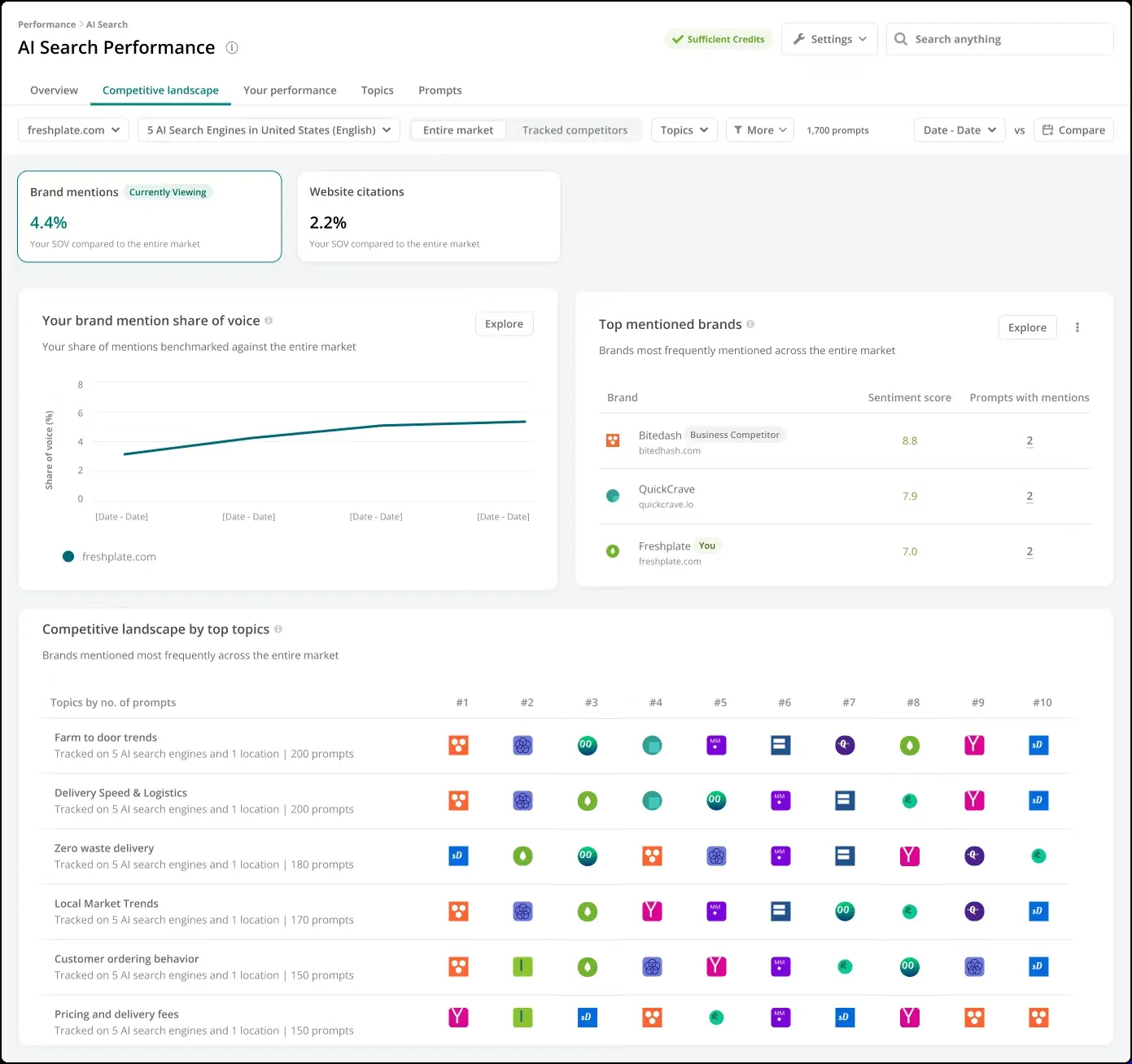
Best for: Enterprise in-house SEO and content teams that need position monitoring, content performance, and AI search visibility in a managed platform with dedicated support
Starting price: Custom enterprise pricing
Free tier: No
Update frequency: Daily
Conductor (formerly Conductor Searchlight) is an enterprise SEO platform that combines rank tracking with content and marketing workflows in a single system.
Its keyword monitoring product, Conductor Intelligence, monitors keyword positions daily across locations and devices, including full SERP feature tracking such as AI Overviews and AI Mode. But the main difference is how that data is used. Rankings feed directly into content briefs, publishing workflows, and reporting, so teams can act on insights more quickly.
It also includes AI visibility tracking, with AEO (Answer Engine Optimization) workflows for platforms like ChatGPT and Gemini built into the product. For reporting, Conductor Data connects with tools like Power BI and supports API access for enterprise setups.
This is firmly an enterprise tool. Implementation is managed, pricing is custom, and it's designed for organizations with established content and marketing operations. For those teams, it offers a more integrated way to connect rankings, content, and performance.
What Features Does Conductor Offer?
- Keyword position monitoring: Daily rank tracking across locations, devices, and search engines, with SERP feature detection including AI Overviews, AI Mode, featured snippets, and local pack
- AI search visibility tracking (AEO/GEO): Measures brand and content presence in ChatGPT, Perplexity, Google AI Overviews, and other LLM-driven answer surfaces
- Content workflow integration: Keyword and ranking data surfaces inside Conductor Creator briefs and optimization workflows, connecting monitoring directly to content production
- Conductor Data (enterprise intelligence layer): Unified API, Power BI, and LLM integrations that pipe keyword, AI visibility, and content performance data into existing enterprise reporting stacks
- Competitive and topical intelligence: Topic-level keyword opportunity mapping, competitor rank comparisons, and technical health signals consolidated into a single reporting view
How Much Does Conductor Cost?
Custom pricing; contact sales for a quote.
Conductor Pros
- Unlimited keyword tracking is included at the enterprise tier, meaning there are no artificial caps on keyword volume as your program scales.
- Keyword position data is connected directly to Conductor Creator's content briefs and publishing workflows, reducing the distance between insight and action.
- AI search visibility tracking (AEO/GEO) for ChatGPT, Perplexity, and Google AI Overviews is built into the same platform, not bolted on separately.
- Conductor Data provides API, Power BI, and LLM integrations so that ranking data feeds directly into existing enterprise BI infrastructure.
- Dedicated customer success and managed onboarding reduce internal resource requirements for large-scale deployments
Conductor Cons
- Custom pricing without published tiers makes it difficult to assess costs before engaging sales. So, it is not suitable for agencies with fixed or limited budgets.
- No meaningful self-serve entry point; the platform is built for managed enterprise deployment, not quick individual adoption.
- Overkill for agencies, SMBs, or teams that only need standalone rank tracking without content workflow integration.
- The breadth of the platform (Creator, Intelligence, Monitoring, Data) means initial implementation and team onboarding incur real-time costs.
14. WooRank: Best Lightweight Keyword Monitoring Tool for Small Businesses
Best for: Small businesses and in-house marketers who need a simple, accessible keyword tracking tool without the complexity or cost of enterprise rank trackers
Starting price: From $89.99 per month (for plan including keyword monitoring)
Free tier: No
Update frequency: Weekly digest
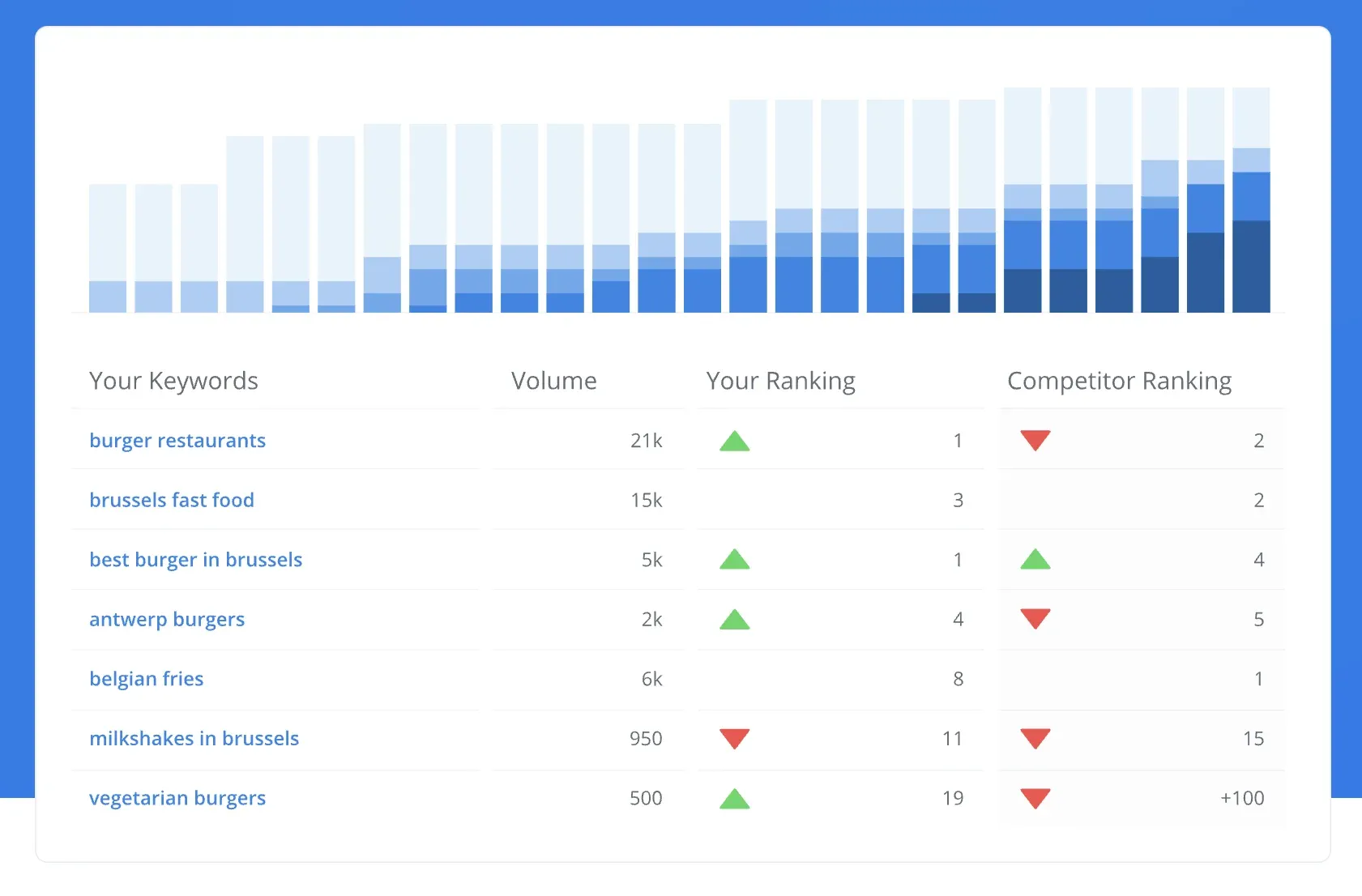
WooRank is a website optimization and keyword monitoring tool designed for small businesses and individual site owners.
Its keyword tool tracks position changes over time for a defined set of keywords and includes built-in competitor comparisons. You also get weekly digest updates highlighting performance changes, along with integrations for Google Analytics, Google Search Console, and Facebook. Keyword data can be exported via CSV on all plans. The interface is simple and easy to navigate, making it accessible if you're not an SEO specialist but still want to keep an eye on rankings.
That simplicity, however, comes with some clear trade-offs. Keyword tracking caps are relatively low: 50 keywords on one site for the Pro plan and 250 across five sites for Premium, which makes it less suitable as your tracking needs grow. SERP feature tracking is also fairly limited, and white-label reporting is only available on higher tiers. There's also no support for AI Overview tracking, which is very important as the search landscape evolves.
Which Features Does WooRank Offer?
- Keyword tracking tool with position tracking: monitors rank changes over time for a defined keyword set.
- Weekly keyword ranking updates
- Competitor keyword comparison: compare your tracked keywords against up to 3 competitors on all plans
- Site Crawl and Core Web Vitals monitoring: 2,500-page crawl on Pro, 10,500 pages on Premium, alongside CWV signals for a lightweight technical SEO layer
- PDF and white-label reporting: unlimited PDF reports on all plans; white-label branding available on Premium and Enterprise plans.
How Much Does WooRank Cost?
Plans start at about $89.99/month and scale to $199.99/month depending on features and limits. The Pro plan includes 50 keywords for one site, while Premium increases this to 250 keywords across five sites, along with additional features like white-label reporting. An Enterprise plan is also available.
WooRank Pros
- Approachable interface that doesn't require SEO expertise to navigate
- Competitor comparison included on all plans (up to 3 competitors)
- Google Analytics, Google Search Console, and Facebook integrations are available on Pro and above
- CSV keyword data export is available on all plans
- Core Web Vitals monitoring adds technical context alongside rank tracking
WooRank Cons
- Weekly-only update cadence means position changes can be up to 7 days old — a significant lag for time-sensitive campaigns or sites in volatile SERPs.
- Pro plan limited to 50 keywords across 1 site; Premium caps at 250 keywords across 5 sites.
- No AI Overview tracking or meaningful SERP feature depth.
- White-label reporting is only available to Premium users.
- Full rank tracking API access is restricted to the Enterprise plan.
15. Google Search Console: Best Free Keyword Position Monitoring Baseline for Any Website
Best for: Any website owner who needs a free, first-party keyword position monitoring baseline directly from Google — with no third-party sampling
Starting price: Free. Available at search.google.com/search-console
Update frequency: Rolling average (not daily point-in-time snapshots)
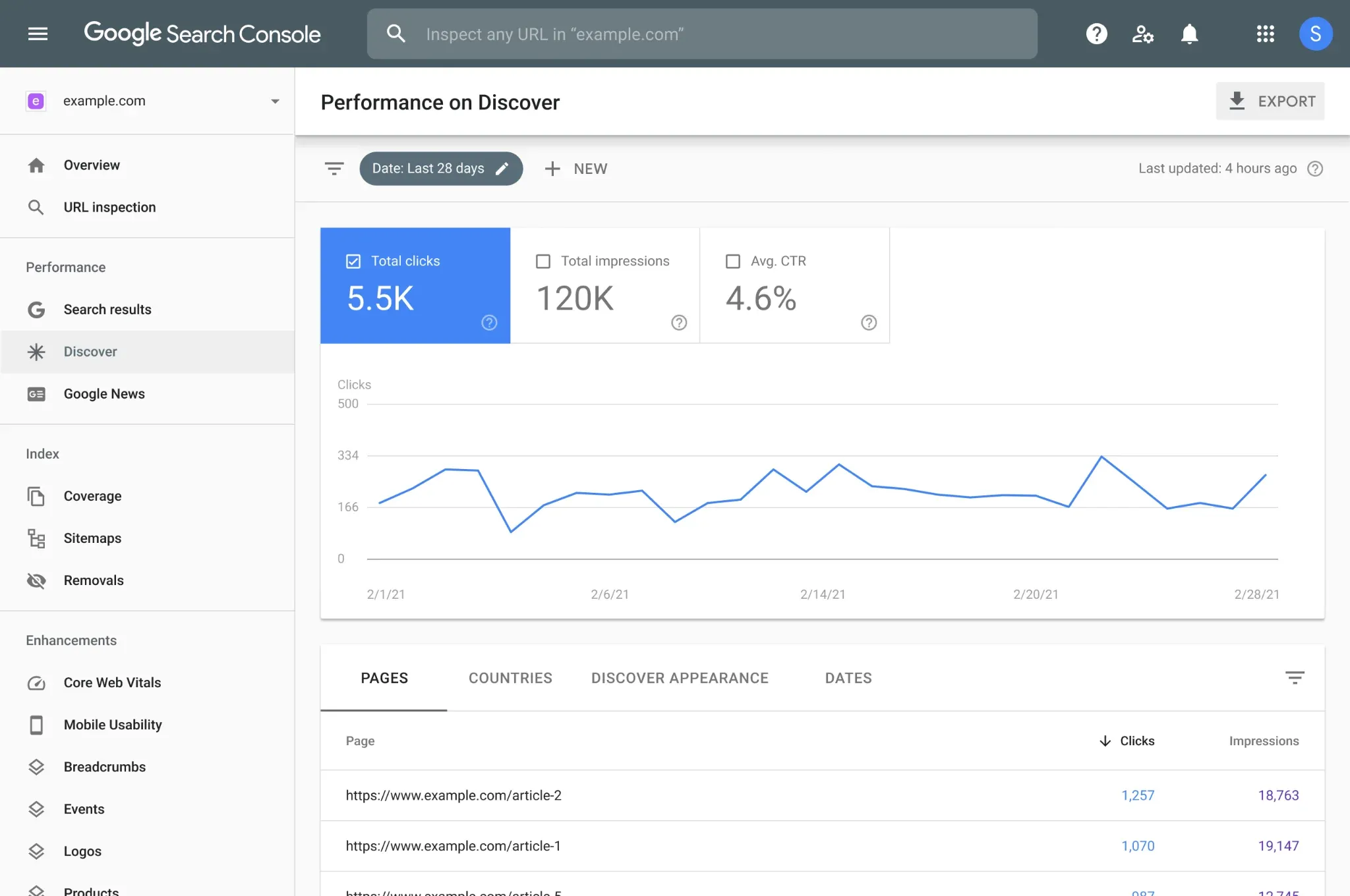
Google Search Console is not a keyword tracking tool in the traditional sense — you don't input a list of keywords and watch them move day by day. But its Performance report gives you first-party data from Google on the average position, impressions, and click-through rate for every query your site receives organic impressions for. That data goes back 16 months, is free, and comes directly from Google's own infrastructure.
For teams using any paid rank tracker tool, GSC should always serve as the verification layer. Position data in GSC represents a rolling average and doesn't support daily point-in-time snapshots the way a dedicated keyword monitoring tool does. It also doesn't track SERP features, AI Overview appearances, competitor positions, or local pack rankings. But for validating trends, no tool provides a more reliable first-party signal.
GSC integrations are available in most tools on this list, including Keyword.com, SE Ranking, Nightwatch, Ahrefs, and others. We recommend connecting GSC to whichever rank tracking software you use so you can cross-reference third-party position data against Google's own reported averages.
Choosing the Best Keyword Monitoring Tool for Your Needs
The keyword tracking tools that perform best in 2026 are the ones built around continuous SERP monitoring: daily updates, SERP feature coverage that includes AI Overviews, granular local data, and reporting infrastructure that lets you prove ROI without spending hours building spreadsheets.
We built Keyword.com to be the most focused, most accurate, and most agency-ready dedicated keyword monitoring tool available. If you want to see what daily tracking, AI Overview visibility, Share of Voice monitoring, and white-label reporting look like in a single platform — with no credit card required — start a 14-day free trial.