AccuRanker Pricing, Features & Reviews: Is This Rank Tracker Worth it?
AccuRanker is a keyword rank tracking platform built for teams that track keywords at scale — agencies with a full client roster, in-house teams with large keyword sets, and enterprises reporting on search visibility across markets. It refreshes rankings daily, allows unlimited on-demand refreshes, and tracks the full top 100 across Google, Bing, Baidu, and YouTube.
It is also priced for that audience. The entry plan starts at $249 per month for 2,000 keywords, and the features SEO teams most often ask about — API access, Looker Studio, and AccuRanker’s AI metrics — only unlock on the $849 per month Expert tier.
This review covers what AccuRanker does well, where it falls short, what each plan actually costs, and what verified users say about it on G2, so you can work out whether it matches your keyword volume and your budget.
AccuRanker at a Glance: Quick Overview
| Spec | AccuRanker |
|---|---|
| What it is | Keyword rank tracking and search visibility platform |
| Starting price | $249/month ($224 billed annually) for 2,000 keywords |
| Free trial | None — 14-day money-back guarantee instead |
| Update frequency | Daily, plus unlimited on-demand refreshes |
| Tracking depth | Full top 100 results |
| Search engines | Google, Bing, Baidu, YouTube |
| Standout features | Zip-code-level local tracking, local pack tracking, AI Share of Voice, social profile SERP tracking |
| Integrations | Google Search Console, Google Analytics, Looker Studio, BigQuery |
| API access | Expert plan and above; AccuSERP sold separately from $149/month |
| G2 rating | 4.8 out of 5 across 233 reviews |
| Best for | Agencies and in-house teams tracking 2,000+ keywords |
Is AccuRanker Worth it?
AccuRanker is worth considering if you need high-volume keyword rank tracking, local SEO tracking, or reporting across multiple clients and search engines. It is particularly well-suited to SEO agencies, in-house SEO teams, and marketers already using Google Search Console, Google Analytics, Looker Studio, or BigQuery.
Here’s how that shakes out by team type:
| Your situation | Worth it? | Why |
|---|---|---|
| SEO agency managing multiple clients | Yes | Unlimited domains and users, scheduled reporting templates, and enough keyword headroom for a full client roster |
| In-house or enterprise team tracking 2,000+ keywords | Yes | Daily updates, unlimited on-demand refreshes, and top 100 tracking across four search engines |
| Multi-location brand or local SEO agency | Yes | Geo-tracking down to zip-code level, plus local pack rankings via Google Business Profile |
| Team that lives in Looker Studio or BigQuery | Only on Expert or above | Looker Studio and read API access start at $764/month; BigQuery is Enterprise-only |
| Agency that needs fully white-label reports | No | AccuRanker’s logo stays at the foot of every report, and live report links can’t run on your own domain |
| Freelancer or small site with a few hundred keywords | No | The entry plan starts at 2,000 keywords, so you pay for capacity you’ll never use |
| Budget-conscious team that still needs API access | No | API access starts at $764/month, or $149/month on top for AccuSERP |
AccuRanker Strengths
AccuRanker is designed for tracking large numbers of keywords and provides detailed data on keyword rankings and search visibility.
Key features include:
- Local rank tracking: Track keyword rankings at a highly granular geographic level, including ZIP code locations.
- Unlimited domains: Track multiple websites without being restricted to a fixed number of domains.
- Unlimited users: Add multiple team members or clients to the account, which is useful for SEO agencies.
- Google integrations: AccuRanker integrates natively with Google Search Console, Google Analytics, Looker Studio, and BigQuery.
- Multi-search-engine tracking: Rankings can be monitored across Google, Bing, Baidu, and YouTube.
- Social profile SERP tracking: Social media profiles can be linked to individual projects, so AccuRanker can identify when URLs from platforms such as LinkedIn, X, or Instagram appear in search results.
- SEO reporting: The platform includes tools to monitor keyword performance and share results with clients or stakeholders.
The ability to track social profiles in search results is especially useful as social media pages increasingly appear alongside traditional website pages in organic SERPs.
Who Is AccuRanker Best For?
AccuRanker is best for:
- SEO agencies managing multiple clients
- Enterprise and in-house SEO teams
- Businesses tracking thousands of keywords
- Local SEO teams that need granular location tracking
- Teams that rely heavily on Google’s analytics and reporting ecosystem
- Marketers tracking visibility across Google, Bing, Baidu, or YouTube
Who might prefer a different rank tracker like Keyword.com?
AccuRanker may not be the best choice for:
- Freelancers with small keyword sets
- Small businesses with limited SEO budgets
- Teams that need API or Looker Studio access without paying for a high-volume plan
If that sounds like your team, the best AccuRanker alternative is Keyword.com — a rank tracker built for growing agencies, starting at $3/month for 50 keywords.
AccuRanker Core Features
Here’s a deep dive into AccuRanker’s features for enterprise SEO agencies.
1. Daily Google SERP Rank Tracking with Top 100 Results
AccuRanker refreshes keyword rankings daily by default and also allows unlimited on-demand refreshes. That makes it useful for businesses in volatile markets or agencies that need the latest ranking data before a client call.
However, daily tracking is not essential for every site. For businesses where rankings move more gradually, a weekly rank tracker may provide sufficient visibility at a fraction of the cost.
AccuRanker plans support roughly 2,000 keywords at the entry level and scale up to 25,000+ keywords on enterprise plans, with higher tiers adding features such as BigQuery integration and a dedicated customer success manager.
The platform also tracks rankings across the full top 100 search results. This is particularly useful for new content and competitive keywords because you can monitor progress long before a page reaches the first few pages of Google — for example, moving from position 87 to 62 — and identify competitors appearing deeper in the SERPs.
That level of detail is valuable for advanced SEO teams, but it is not always necessary. For many businesses, tracking the top 30 or top 50 results provides enough actionable data at a significantly lower cost.
How many keywords do you need?


- API access
- AI visibility tracking Add-on
- Google Looker Studio connector
- Unlimited users and projects
Local Rank Tracker
For businesses that need local visibility data, AccuRanker supports geo-location rank tracking down to the city and zip-code level. This makes it a strong fit for multi-location brands and local SEO agencies.
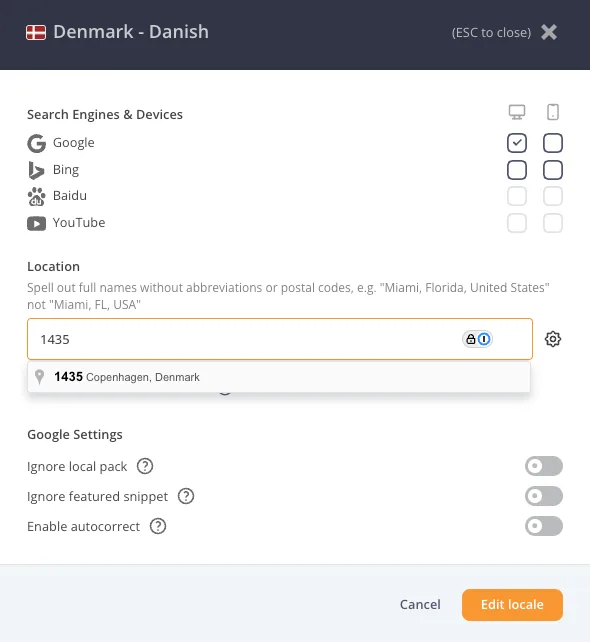
You can also connect your Google Business Profile to track your business’s rankings in the local pack, which is particularly useful for local businesses with a strong local presence.
Share of Voice and Competitor Tracking
Share of voice measures how much search visibility your domain owns across a target set of keywords. It is useful because it shows your overall competitive position in search, not just whether individual keywords have moved up or down.
AccuRanker includes both traditional Share of Voice and its proprietary AI Share of Voice metric. Rather than applying the same estimated click-through rate to every ranking position, AI Share of Voice uses machine-learned CTR estimates that account for factors such as pixel position, SERP features, and device type.
This can provide a more realistic view of how much organic visibility and potential traffic your rankings are actually generating. A #1 ranking pushed below ads, shopping results, or other SERP features, for example, may contribute less visibility than a traditional rank-based model suggests.
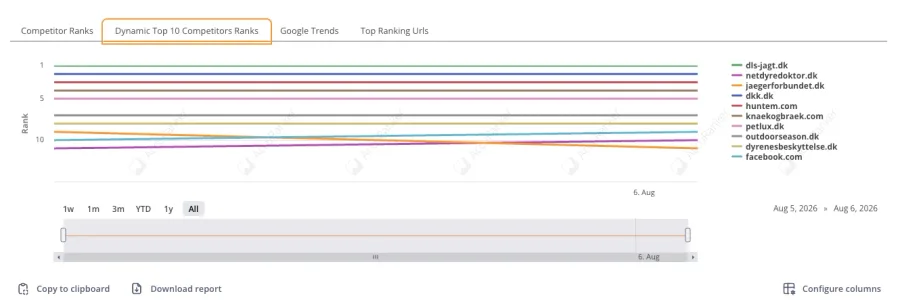
AccuRanker also lets you add competitors to each project and compare their performance directly with your own domain. The Competitor Statistics table shows metrics such as AI Share of Voice, average CTR, and ranking distribution for positions 1–100.
At the keyword level, you can also plot the ranking history of the top 10 competing domains on a single chart. This makes it easier to see whether changes in your visibility are driven by your own rankings, by a specific competitor gaining ground, or by broader movement across the SERP.
SEO Reports for Client Delivery
AccuRanker provides scheduled reporting built on customizable templates, so you can decide which rankings and metrics appear in each report and reuse that format across clients. Reports can be sent out on the email frequency you choose, with filters applied so each recipient only sees the data relevant to them. There is also a public live report link, which lets stakeholders and clients open an up-to-date report in the browser without needing an account.
Overall, the reporting is good and customizable, but if you need fully white-label SEO reports, AccuRanker falls short. Your logo can be added, but AccuRanker’s own logo remains at the foot of the report, and the live link cannot be directed to your own domain, which is a drawback for agencies that want complete branding control over client deliverables.
Keyword Research
Enter your own domain or a competitor’s, choose a country, and AccuRanker returns the keywords that site ranks for, with position, the exact URL that ranks, search volume, CPC, CTR, share of voice, and the SERP features present on each result.
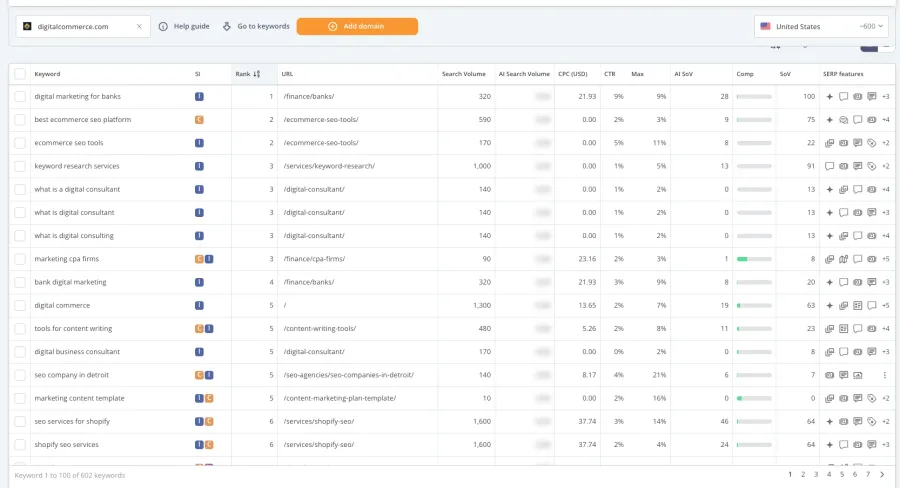
What makes it practical is the handoff into tracking. Once you have found the keywords worth watching, you can add the domain directly from the same screen and start tracking it as a project, rather than exporting a list and reimporting it elsewhere.
The gap is seed keyword research. There is no way to enter a term like “ecommerce seo” and get related keyword ideas back. Everything starts from a domain, so it works well for competitive analysis and gap-finding, but if you are planning content around a topic you do not yet rank for, you will still need a dedicated keyword research tool alongside it.
AccuRanker Pricing
AccuRanker’s pricing is divided into three tiers: Professional, Expert, and Enterprise. Each tier revolves around rank tracking.
The main difference between them is the number of keywords you track, with features unlocked progressively as you move up.
- Professional plan: $249/month ($224 annual) for 2,000 to 5,000 keywords. Daily updates, keyword research, search intent, tagging, advanced filtering, GSC and GA integrations, reporting, and exports. No API.
- Expert plan: $849/month ($764 annual) for 10,000 to 25,000 keywords. Everything in Professional plus AI CTR, AI Search Volume, dynamic tagging, Tag Cloud, Looker Studio, and unlimited read API access.
- Enterprise plan: Custom pricing for 25,000+ keywords. Everything in Expert plus BigQuery, unlimited write API, raw SERP HTML, faster refresh speeds, and a dedicated customer success manager.
Hidden away from the marketing website’s pricing page, AccuRanker also has a separate add-on called AccuSERP, which sells raw SERP data through its API. It starts at $149 per month for 50,000 requests, rises to $749 per month for 500,000 requests, and goes to custom pricing above 1,000,000 requests.
AccuSERP is priced entirely separately from your rank tracking subscription, so anyone planning to pull and push SERP data programmatically should factor it in as an extra cost unless they upgrade to the Expert or Enterprise plan.
AccuRanker User Reviews
Based on 233 G2 reviews, AccuRanker ranks highly, with an average 4.8-star rating and is praised for its ease of use and accuracy.
Positive Reviews
Reviewers consistently highlight speed, accuracy, and ease of setup. Users particularly enjoy the unlimited on-demand refreshes, which let users pull live positions instead of waiting for the next update, and the interface is widely described as clean and quick to learn. Aside from that, users also enjoy bulk keyword uploads, the share-of-voice metric, integrations with GSC, GA, and Looker Studio, and fast, knowledgeable customer support.
 Read this review on G2
Negative Reviews
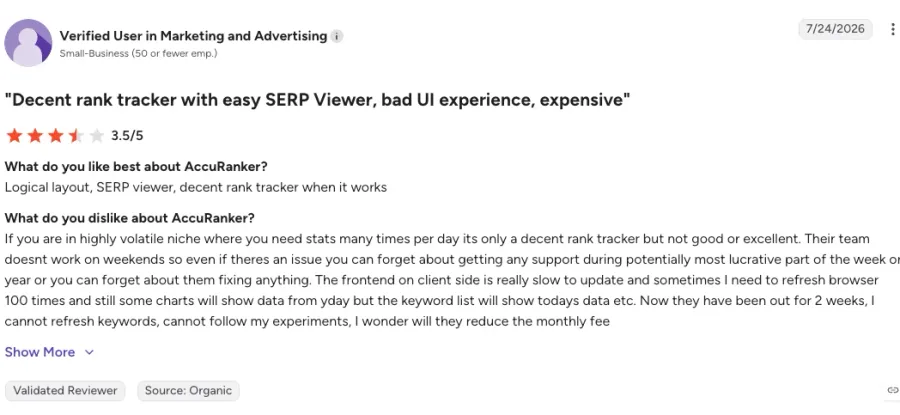
Price is the most common complaint, particularly as keyword volumes grow, with several reviewers saying they would like more keywords for what they pay.
One reviewer notes that the customer support team doesn’t work weekends, which can be problematic if you work weekends and need immediate support.
 Read this review on G2
Verdict: Should You Choose AccuRanker for Rank Tracking?
Yes, if you run a large-scale agency or have enterprise-level rank-tracking needs. AccuRanker is a powerful rank-tracking platform for agencies and larger SEO teams, but its pricing makes it less attractive for smaller businesses. Its strongest advantages are scalable keyword tracking, granular local rankings, unlimited domains and users, extensive Google integrations, multi-search-engine support, and social profile SERP tracking.
For teams that need these capabilities at scale, AccuRanker can be worth the investment. For smaller teams that only need basic rank tracking, a lower-cost alternative may provide better value.
Keyword.com is built for the teams that want the full package, no matter the tier. Tracking starts at $3 per month for 50 keywords and scales to 100,000+, with no keyword limits per project, so you pay for what you actually track. You can choose daily or weekly updates depending on the needs of your business.
Start your 14-day free trial — no credit card required, 100 keywords and 20 credits included.