AI Search Terms vs. AI Visibility Tracking in Keyword.com
AI search has reshaped how people discover brands. Google’s AI Overviews now sit above traditional rankings, and platforms like ChatGPT, Gemini, Perplexity, and Claude serve instant answers that users treat as authoritative. In many cases, they never even scroll to the blue links.
This shift means SEO visibility is no longer just about ranking; it’s about whether your brand appears inside AI-generated results at all.
The New Visibility Challenge (And Why Keyword.com Measures It)
Ranking for keywords doesn’t guarantee you’re cited in AI answers. You need to know:
- Which queries trigger AI-generated responses.
- Whether your brand actually appears inside those answers across different AI engines.
Keyword.com covers both sides with a two-part system:
1. AI Search Terms (Prompt Tracking)
This feature shows which keywords trigger Google AI Overviews and whether your content is referenced.
2. AI Brand Visibility Monitoring
AI Brand Visibility tracks your brand mentions across Google, ChatGPT, Gemini, Perplexity, Claude, DeepSeek, and more, so you can see how often (and how accurately) you appear in AI conversations.
Used together, these insights show not just the prompts that matter, but whether your brand is part of the answer.
What Are AI Search Terms (Prompt Tracking)?
AI search terms are the queries that trigger Google’s AI-generated summaries, known as AI Overviews.
Instead of the familiar list of blue links, Google now sometimes delivers a synthesized answer at the very top of the results page, pulling text from a small set of sources. Like this:
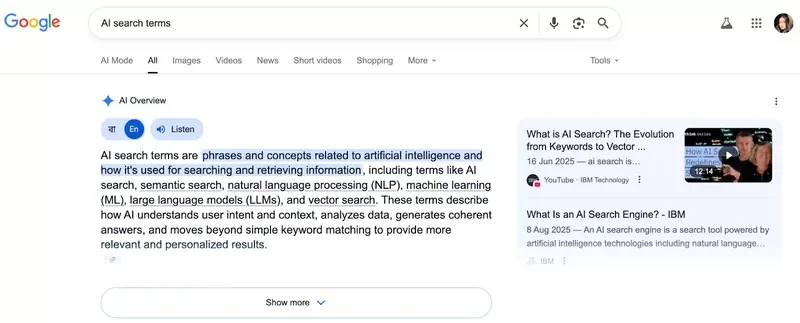
This shift changes the rules for visibility. A page that once dominated the #1 organic spot can be pushed out of view if it isn’t referenced inside the AI Overview. AI search term tracking lets you go beyond simply knowing where you rank organically to understanding whether you’re represented inside the AI-generated answer itself.
Why Prompt Tracking Matters
Tracking Google AI Overview’s prompts helps you:
- Explain traffic swings: when a top-ranking page suddenly loses clicks, it’s often because an AI Overview captured the query. Tracking identifies those keywords so you can tie cause and effect for stakeholders.
- Refocus optimization: if certain high-value queries always trigger AI Overviews, you can rework those pages to increase the chance of citation. Alternatively, you can shift resources toward queries where clicks still flow.
- Benchmark competitors: seeing who is cited in the Overview gives you insight into what Google is rewarding and where your content gaps lie.
AI Overviews are clearly reshaping how searchers interact with results, and the effects show up fast in SEO reporting.
How Keyword.com Tracks AI Search Terms
Keyword.com’s AI Overview Tracker captures this new layer of search data directly inside your dashboard. When you add a keyword, the system monitors whether it triggers an AI Overview and flags it with a green robot-like icon. Clicking into that icon reveals the exact URL cited and the snippet of text Google used, so you know precisely how your content (or a competitor’s) is being represented.
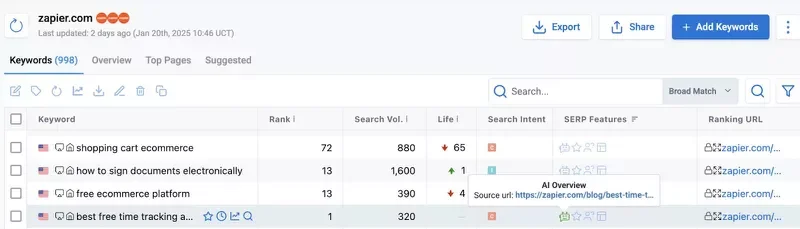
Over time, the tool records patterns. You can group or tag keywords by campaign, priority, or topic and see how inclusion trends change. To ensure accuracy, each instance is backed by a third-party verified SERP snapshot from Spyglass, which shows exactly what the result looked like in a specific location, down to city or ZIP code.
For example, if you’re tracking “AI SEO tools” and Google displays an Overview, you’ll know instantly whether your site was cited. If not, you’ll also see which competitors were included. You can then either close the content gap or create new material that targets the missing perspective.
What is AI Brand Visibility Monitoring?
Brand visibility monitoring shows where and how your brand is mentioned in AI-generated answers across Google AI Overviews and major LLM engines, including which pages or passages are cited and the tone of those mentions.
Why This Matters
Users are increasingly relying on AI responses from platforms like Google and ChatGPT. If your brand isn’t present in those answers, visibility drops, even when you rank organically.
Monitoring provides two strategic benefits:
- Attribution clarity: you can explain shifts in traffic when clicks fall despite high rankings.
- Reputation control: you can spot when AI misrepresents your brand and address perception risks before they spread.
What Keyword.com Monitors for Brand Visibility
Keyword.com’s AI Visibility Tracker captures the full picture of how your brand appears in AI-generated answers:
- Cross-engine presence: track mentions across Google AI Overviews and major AI engines.
- Cited pages: see which URLs are being pulled into responses, so you know which content is driving visibility.
- Sentiment signals: detect whether AI descriptions portray your brand positively, neutrally, or negatively.
- Competitor presence: benchmark your visibility against rivals to understand relative share of voice.
- Linked vs. unlinked references: identify when engines cite you with a clickable link vs. paraphrasing without attribution.
How AI Brand Visibility Monitoring Works in Keyword.com
Keyword.com’s AI visibility tool starts by establishing a baseline. Once you turn on AI Rank Tracker and add your brand or domain, the system scans AI-generated answers across engines. From there, you can expand monitoring beyond branded queries to include category prompts, related searches, and competitor terms.
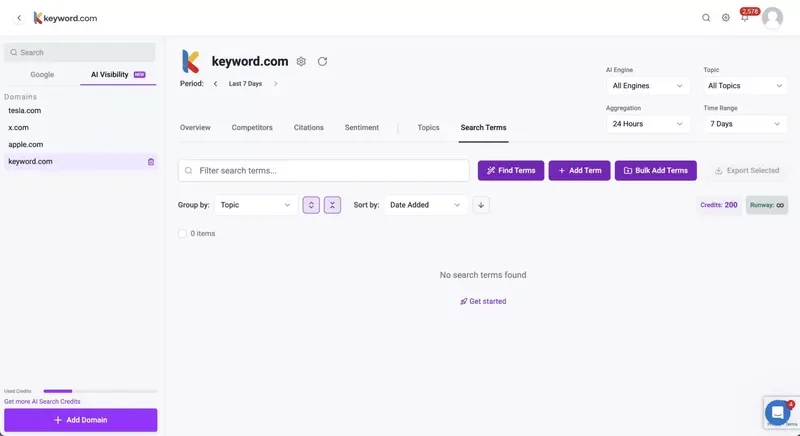
Checks can be scheduled bi-hourly, daily, or weekly, depending on how quickly answer sets shift. Each record is logged with detail: the engine used, the specific prompt, mentions of your brand, citation sources, link status, and sentiment classification. Every entry is backed by a verified SERP or answer snapshot, so you know exactly how your brand appeared to real users.
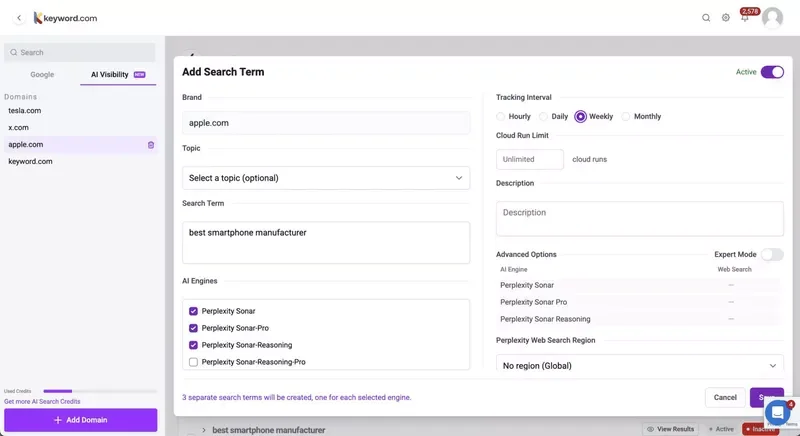
Competitor domains can be layered into the same workflow. This makes it easy to spot where competitors are cited, and if you’re absent, prioritize the gaps worth closing, and connect changes in brand mentions to downstream outcomes like sessions and conversions.
This visibility data powers practical Answer Engine Optimization (AEO). If, for example, Perplexity repeatedly cites a competitor’s article for a high-value category prompt, the tracker shows which page was chosen, how it was framed, and how often it appears. If your content is included, you’ll see the exact snippet used.
| 💡Traditional rank trackers can’t provide this context. AI brand visibility monitoring tells you not only whether you appear but also how your brand is positioned, which engines amplify you, and where competitors are getting the upper hand. That’s the data you need to shape strategy in AI-first search. |
|---|
AI Search Terms vs. AI Visibility Tracking: Side-by-Side Comparison
| Prompt Tracking (AI Search Terms) | Brand Visibility Monitoring | |
|---|---|---|
| Primary goal | Identify prompts that trigger Google AI Overviews and confirm if your pages are cited | Measure cross-platform brand presence and how AIs describe you |
| Scope | Google SERPs only, focused on AI Overviews | Multi-engine: AI Overviews and AI Mode, plus LLMs like ChatGPT, Perplexity, Gemini, Claude, DeepSeek, Mistral |
| Core outputs | Triggered keywords, cited URL, snippet used, trend over time, verifiable SERP proof | Mentions by engine, cited pages, frequency over time, sentiment, competitor visibility |
| Best KPIs | AI Overview trigger rate by keyword set; inclusion rate; count of cited URLs; change over time | Cross-engine mention frequency; citations by engine; sentiment trend; AI share of voice vs competitors |
| Primary users | SEO managers, content leads, technical SEOs | SEO leads, brand and comms leaders, product marketing |
| Optimization levers | Make pages easy for AI to quote: clear answers, reinforced content, and coverage of queries that trigger Overviews. | Fill gaps where your brand is missing, fix inaccurate mentions, and improve the pages AI cites most often. |
| Proof for stakeholders | “We are cited for X% of high-value prompts. Here are the exact URLs and excerpts Google used.” | “We appear in answers on A, B, C engines. Here is sentiment, top citations, and where competitors outrank us.” |
Why Both Matter for AI Discoverability (and What Each Unlocks)
Each view covers different gaps. You might rank #2 for “AI SEO tools,” but Google fires an Overview that cites a competitor instead.
Prompt tracking shows the loss and which URL replaced yours. Brand visibility monitoring then reveals that Perplexity and Gemini already mention your comparison page, but misstate pricing. The fix becomes clear: adapt your Google page to the citation format that’s being favored, and update product details on the pages other engines rely on.
For stakeholders, prompt tracking provides a way to forecast shifts in AI-affected SERPs with precision. It proves which URLs are included or excluded and ties those outcomes directly to performance changes. Brand visibility monitoring extends that view, attributing mentions across engines, surfacing sentiment, and exposing competitor positioning that rankings alone cannot explain.
Taken together, these insights move reporting beyond isolated search metrics and give leadership a defensible, multi-engine view of brand presence.
5 Steps to Set Up AI Visibility with Keyword.com
These steps will help you configure Keyword.com so you can monitor prompts, citations, and brand mentions in AI results.
Step 1: Turn on AI Overview Tracking and Grant Access
Enable AI Overview Tracker and the AI Search Visibility add-on with enough credits, then invite teammates who need to view or receive reports. You’re done when you can open Rank Tracker and AI Search Visibility without upgrade prompts.
Step 2: Add Keywords With Correct Targeting and Grouping
Import or create your priority keywords, set the location and device for each, and put every keyword into a clear group that matches how you’ll report (product, use case, or funnel). You’re done when each keyword shows a location, a device, and a group.
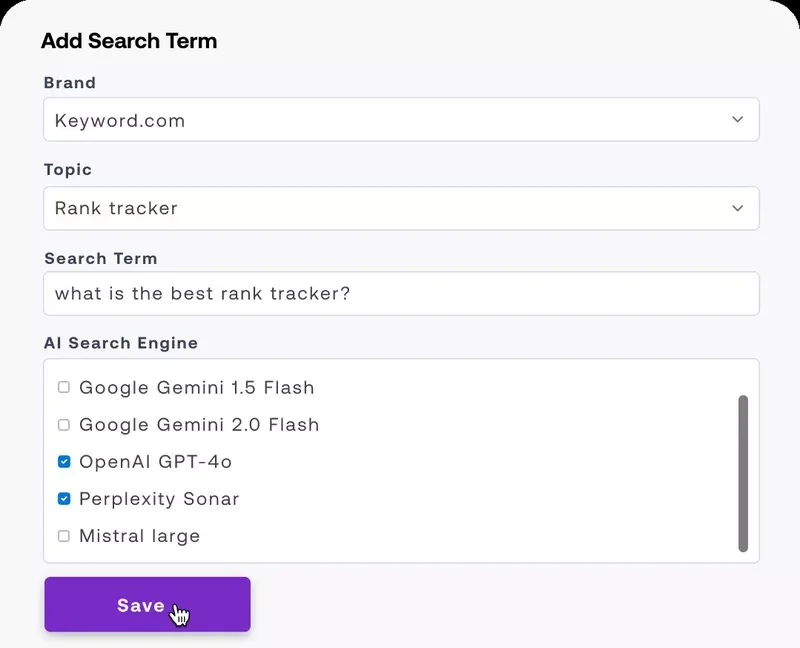
Step 3: Verify Google AI Overview Detection and Citations
Open Rank Tracker, show the SERP Features column, and confirm the AI Overview flag appears on queries that trigger it. For any flagged query, open details to see if you’re included and copy the cited URL into a simple evidence sheet with keyword, date, inclusion, and source URL. You’re done when you’ve recorded at least one example.
Step 4: Set up Cross-Engine Brand Tracking
Open AI Search Visibility, enter your brand name, key product names if distinct, and your main domains, then select engines to monitor (Google AI Overviews, ChatGPT, Perplexity, Gemini, Claude, DeepSeek, Mistral) and run the first check. Export the results to your evidence file. You’re done when the first snapshot completes, even if it shows no mentions yet.
Step 5: Schedule a Weekly Export (Optional)
Create a saved report, choose PDF or CSV, add recipients, and set a weekly send time. You’re done when the first scheduled email lands in your inbox.
| 💡After setup, follow a simple loop: improve, measure, scale. - Improve: Make pages look like the answers that win. Add a short summary at the top. Use clear steps where helpful. Tighten product facts and pricing. Keep details consistent across docs. Publish one source-of-truth page for specs and comparisons. Refresh internal links and request indexing. - Measure (weekly): Check your AI Overview inclusion, new citations across engines, and which pages were referenced. Share screenshots and cited URLs so the team sees exactly what changed. - Scale: Add more keywords to groups that are improving. Reuse winning page patterns for related queries. Keep a backlog of pages to strengthen and topics to cover, tied to visibility gains. |
|---|
This Is How You Win AI Search
Winning in AI search isn’t just about rankings anymore; it’s about proving your presence inside Google AI Overviews and tracking how your brand is mentioned across ChatGPT, Perplexity, Gemini, Claude, and other generative engines. Keyword.com brings all of that into one unified AI visibility report, giving you verified citations, competitor context, and sentiment insights you can actually act on.
If you want to understand which prompts matter, where your brand appears, and how to optimize for AI discoverability, start with the tool built for it.
Try our AI Overview tracker for free and see the difference yourself.