Prompt tracking

Prompt Tracking for Your Clients' AI Search Visibility

Add the questions your clients' buyers ask AI assistants. Keyword.com asks them again on your schedule and records every answer: whether it names the client, where, in what tone, and which pages it cites. Report it next to the client's Google rankings, through a read-only link or a CSV.

14-day free trial · No credit card required

Promptsacme-plumbing.com · 46 tracked · last run today 02:23 UTC
PromptScoreRank

How it works

How prompt tracking works, step by step

Five steps in Keyword.com. The screenshots show demo data for Stridewell, a fictional running-shoe brand.

  1. Add the client's buyer questions

    Type the questions the client's buyers ask, upload a CSV with Bulk import, or start from Quick start suggestions. Put each service line in its own topic, then pick the country, the engines and the schedule.
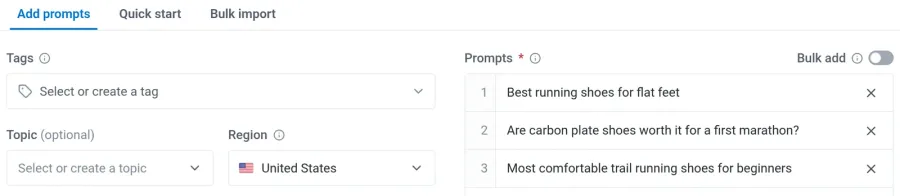
    Keyword.com Add prompts form with three demo buyer questions about running shoes, a topic field and the United States region
    Demo prompts.
  2. Compare the engines

    On the Overview, click a metric such as detection rate to break it down By engine and By prompt. You see which engines name the client for a question and which leave it out.

  3. Open a saved answer

    Open a prompt to read every run in full. Each run shows whether the client was found, at what position and in what tone, next to every other brand the answer named. Switch the engine at the top to read the same question on another engine.
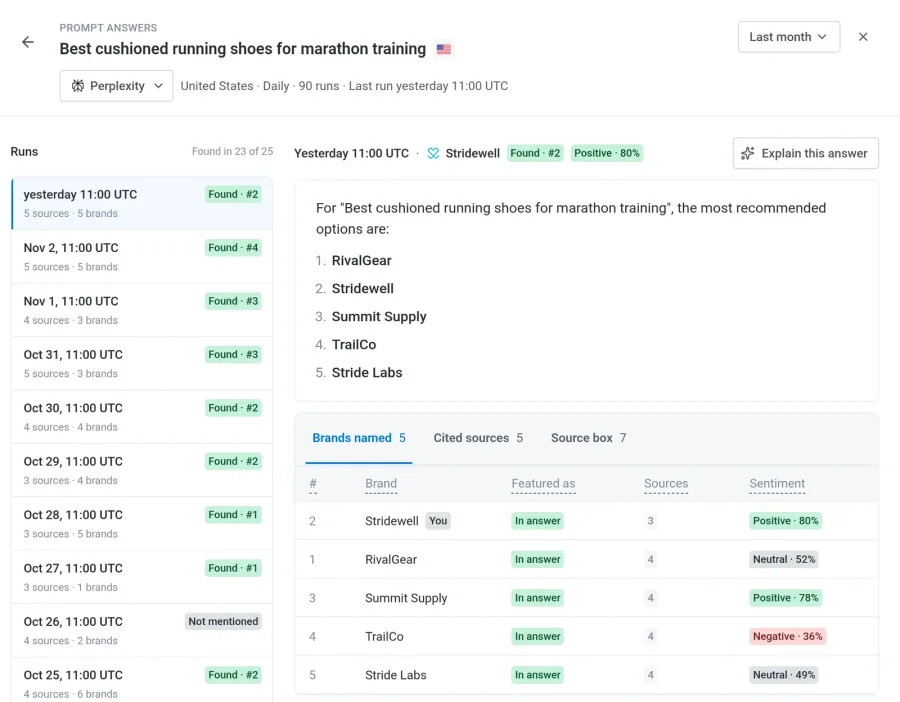
    Keyword.com answer viewer for a demo prompt on Perplexity, with the list of runs, the saved answer and the brands it named
    Demo data for Stridewell, a fictional running-shoe brand.
  4. See which pages the answers cite

    Under each answer, Cited sources lists the pages the answer linked to and Source box lists the sources the engine showed beside it. The Citations screen adds them up across prompts, so you can see which sites the engines cite for competitors and not for the client.

  5. Share the results with the client

    Send the client a read-only link that shows only the screens you choose, or export each screen's table to CSV. With the White-label add-on, you can also protect the link with a password. With the Prompts screen shared, the client can open the same answers you reported on.
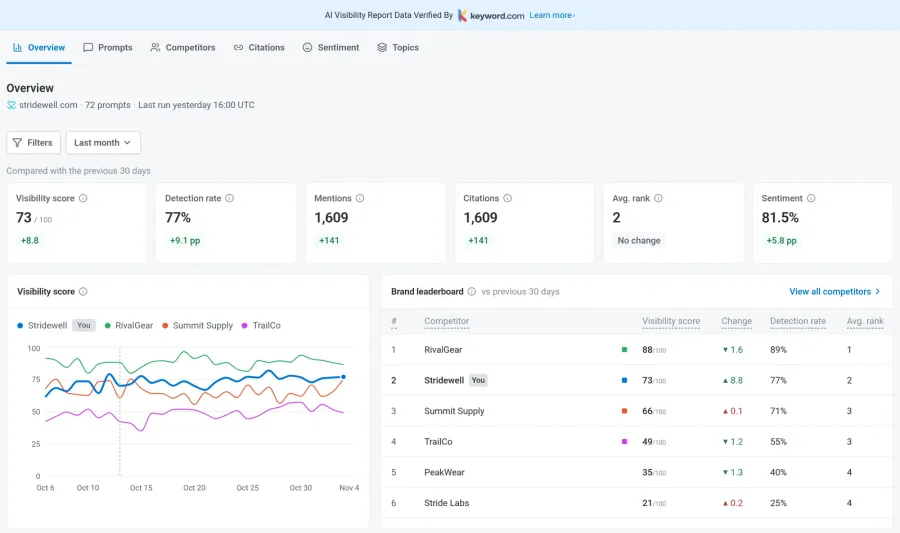
    Read-only Keyword.com AI Visibility report for a demo brand, with Overview, Prompts, Competitors, Citations, Sentiment and Topics tabs
    Demo data for Stridewell, a fictional running-shoe brand.

For agencies

Prompt tracking for every client

  • One set of prompts per client domain, in the same account as that client's Google rankings.
  • One topic per service or location: so the report shows where the client is named and where it isn't.
  • Sharing with clients: a read-only link with only the screens you choose, a password with the White-label add-on, and a CSV export of each screen.
  • Add many prompts at once: import prompts from a CSV, or ask an AI assistant to add them through the Keyword.com MCP server.
See white-label reporting

What is it?

What is prompt tracking?

A prompt is the full question a person asks an AI assistant, such as "Which payroll software works for a UK company with 50 employees?" Prompt tracking asks AI engines the same prompts on a schedule and records each answer, so you can see how often they name your brand and how that changes.

Keyword.com is a prompt tracker, not a ready-made index of prompts. You choose the questions that matter to your business or your client's, and you choose the AI engines that answer them:

Choose your prompts

You choose the prompts and group them by topic

  • Three ways to add prompts: type them, upload a CSV with Bulk import, or let Quick start suggest topics for the domain and prompts for the topics you tick.
  • Topics: group prompts by service line or product, so you see the results for each topic separately.
  • Tags: add your own labels, such as funnel stage or campaign, and filter the results by them.
  • Branded and Non-branded: a prompt that contains one of your brand names is marked Branded, so you can report it apart from the questions that don't name you. You can change the label by hand in the prompt's Edit dialog.
How to choose prompts to track
AI Visibilityacme-plumbing.com · 46 prompts · last run today 02:23 UTC
Last month
Brand leaderboard score

    Schedule and region

    How often your prompts run

    Per-prompt results

    What prompt tracking shows for each prompt

    Every figure breaks down by prompt and by engine, and every one opens the answers behind it.

    Mentions

    Whether each answer names your brand, and the detection rate: the share of answers that do.

    Position

    Where your brand appears among the brands an answer names, as an average rank on the Overview and a Top 3 rate on the Competitors leaderboard.

    Sentiment

    How positively the answers that name you describe your brand, with the phrases behind the score.

    Citations

    The pages each answer links to and the sources the engine shows beside it, from your site and from third parties.

    Competitors

    Every other brand the same answers name, with its visibility score, and the answers where the competitors you compare appear without you.

    The answers themselves

    Each run is stored in full with its date, so you can read what the engine said before you report a change.

    The same metrics roll up by topic and engine on the AI visibility tracker overview. For what each one measures and how to read a change, see our guide to measuring LLM visibility.

    Track the prompts that matter to your clients

    Add a few prompts per topic, pick the engines, and read the first answers in your account.

    Start free trial

    14-day free trial · No credit card required

    FAQ

    Prompt tracking FAQs

    Common questions about choosing, running and reporting tracked prompts.

    More features for rank tracking and SEO strategy

    The keyword rank tracker

    For smart, passionate SEOs that drive the industry forward.

    Start free trial

    14-day free trial · No credit card required