7 AI SEO Workflows and Automations That Will Save Your Agency 10+ Hours Per Week
After experimenting with AI and automation across repetitive SEO tasks like reporting, audits, and content briefs, we have found that the biggest time savings come from reusable AI SEO workflows — not one-off prompts or complex setups you have to recreate every time.
Most agency work already follows a pattern. You pull data, look for the same types of issues, turn findings into recommendations, and explain the outcome to clients or internal teams. AI is most useful when it helps you speed up those repeatable steps without removing the judgment that makes the work valuable.
So, in this article, we have gathered seven plug-and-play AI workflows for SEO that you can replicate inside your agency. For each one, you will see what it does, how it was built, where it fits into your process, and how much time it can save.
1. Large-scale page classification audit
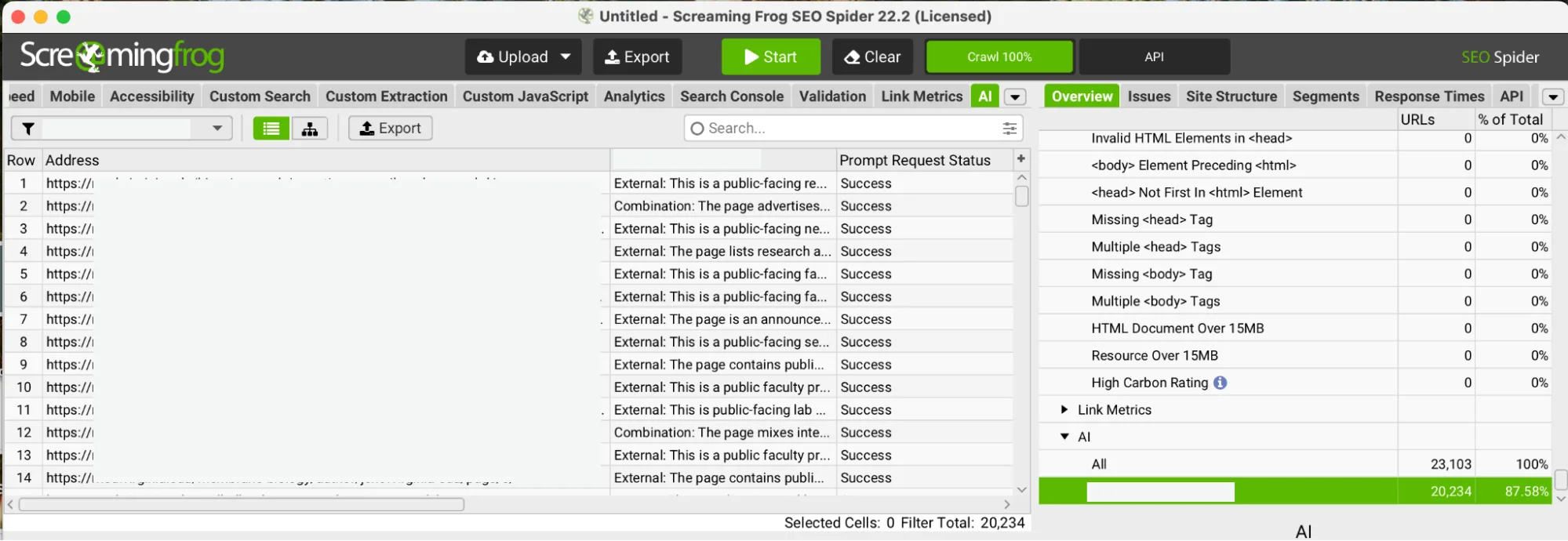
Tool stack: Screaming Frog
What the workflow does: Crawls every page, extracts the actual HTML content, and returns a classification with a written explanation for each URL.
Benefits: The workflow removes the need for you to read and judge individual pages manually. Every page gets assessed against the same standard with no room for inconsistency.
Hours saved: At even two minutes per page for a manual review, 30,000 pages is 1,000 hours of work. The automation doesn’t eliminate human judgment — it removes the need to open each URL just to apply that judgment.
Replicate this workflow: Screaming Frog AI integration guide + Workshop Digital walkthrough
How to build this workflow
In Screaming Frog, go to Crawl Config → Spider → Extraction and enable Store HTML. Without this, the AI has no page content to analyze.
Go to Crawl Config → API Access and connect your LLM of choice. OpenAI requires a paid API key. Gemini offers a free tier of up to 1,500 requests per day, which is useful for testing.
Go to the Prompt Configuration tab, click Add, and write your classification prompt. Workshop Digital’s prompt instructed the model to categorize each HTML page as INTERNAL or EXTERNAL and support the decision with a short explanation.
Run test batches of 10 to 20 pages first. Review the reasoning and refine your prompt where the output does not match your expectations.
Once the results consistently match your logic, run the full crawl. The classifications and explanations will appear as new columns in Screaming Frog and can be exported directly to clients.
2. AI sentiment audit for answer engine optimization
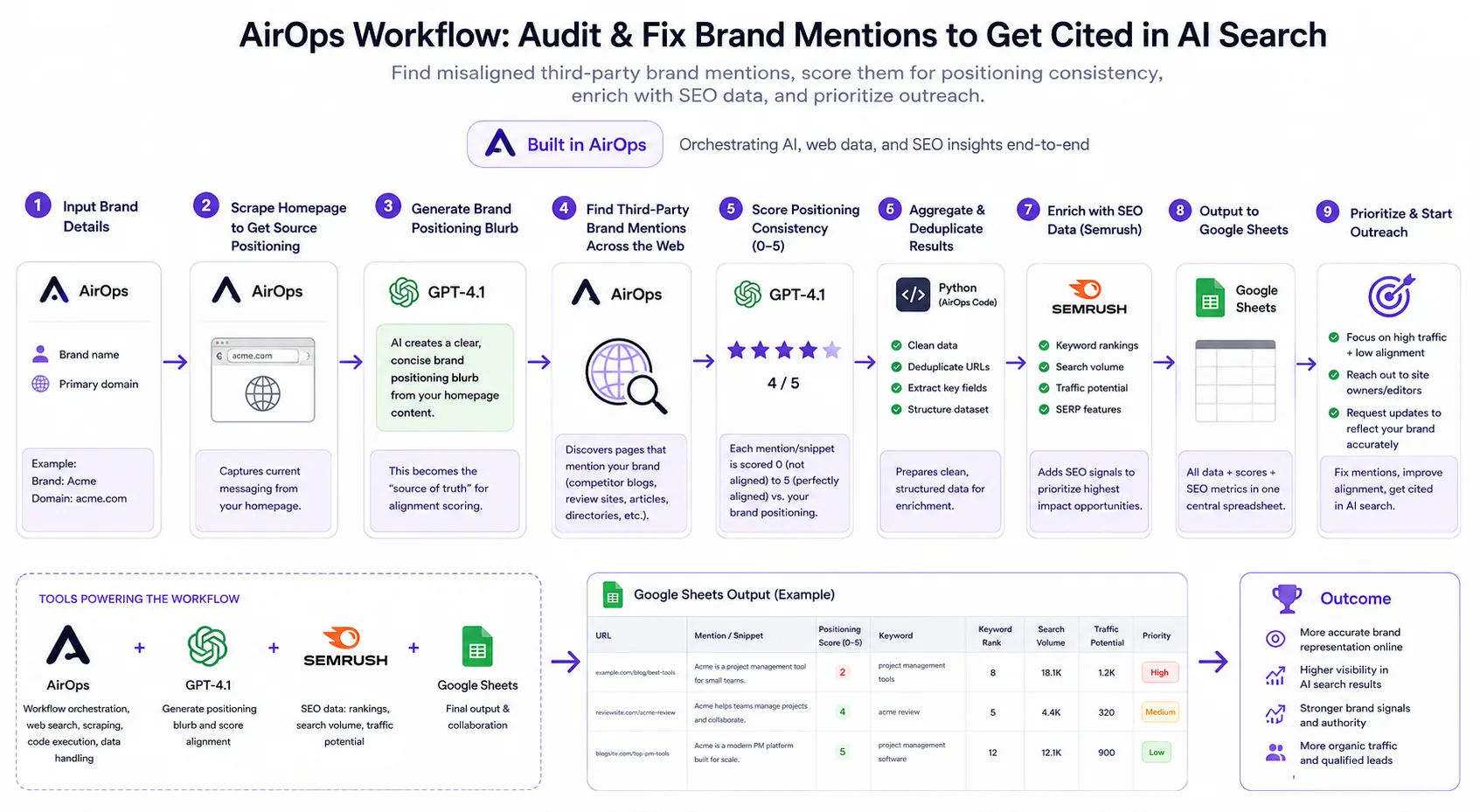
Tool stack: AirOps, ChatGPT, Semrush, and Google Sheets
What the workflow does: Flags gaps between how your client’s brand describes itself and how other online sources describe it, and shows you which mentions to fix first.
Benefits: Instead of getting bogged down in data collection, your agency can focus on strategic, high-impact actions that actually improve AI search visibility.
Hours saved: A light manual brand mention audit runs three to five hours per client. Once the workflow is built, that drops to the time it takes to hit run — typically under 15 minutes.
Replicate this workflow: The brand mention workflow to fix what LLMs say about you
How to build this workflow
Using an AirOps workflow, start with a step that collects the client’s brand name and primary domain.
Add a homepage scraping step that connects to ChatGPT 4.1 with a prompt to turn it into a short, plain-language description of how the brand positions itself.
Next, the workflow searches the internet for third-party pages that mention your brand, using the brand name from step one. Each result captures the URL, the page title, and the snippet describing your brand.
An AI step compares those third-party descriptions against the homepage description and scores it between zero (low) and five (high).
Add a step that pulls search volume and keyword ranking data for each mention to prioritize which mismatches are most damaging to fix first.
3. Programmatic comparison pages
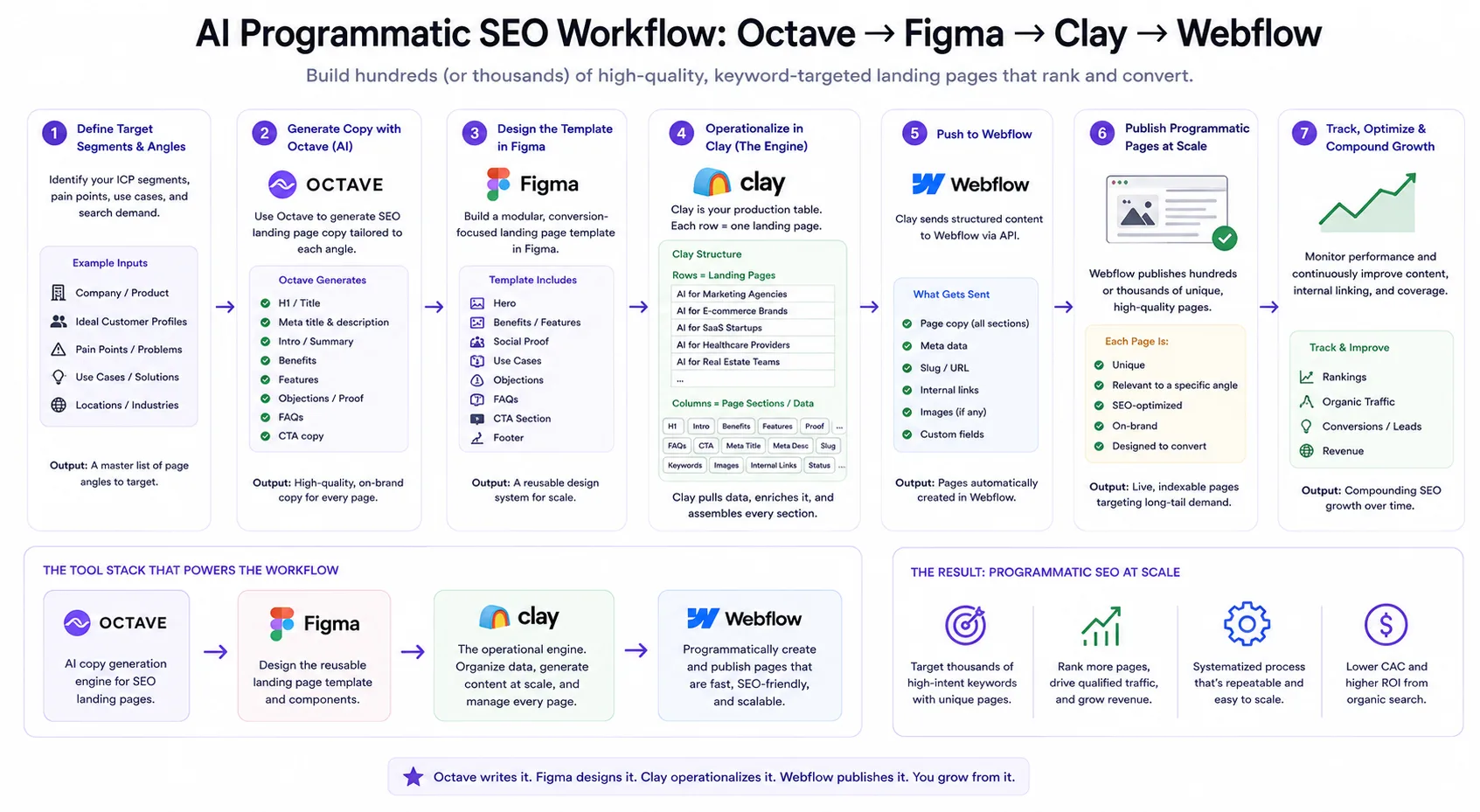
Tool stack: Octave, Figma, Clay, and Webflow
What the workflow does: Builds competitor comparison pages at scale. You feed the workflow your client’s brand messaging and competitor info, it researches the market, generates content for each page, and publishes them automatically, with no manual writing or formatting needed.
Benefits: Keeps pages accurate without manual maintenance. When competitor pricing or reviews change, you can rerun the relevant columns in Clay and push updates directly to your CMS.
Hours saved: Manually creating each programmatic page would take at least 30 minutes. With the workflow generating 1,600 pages automatically, that’s a total of 800 hours saved, plus more from future updates.
Replicate this workflow: The AI workflow scaling 1,600+ comparison pages with Clay
How to build this workflow
Start by feeding Octave your resources and have it ingest and structure them into brand messaging, customer proof, personas, use cases, and competitor data points.
Manually review and fine-tune the ingested messaging using Octave’s natural language chat to resolve inconsistencies. The quality of everything downstream depends on this step.
Build your page templates in Figma for each comparison type (product vs competitor, competitor vs competitor), mapping each section to a specific data input.
In Clay, create tables for each page type. Each row is a future page, and each column is a section (headline, comparison table, pricing, FAQ, SEO metadata).
Use the Octave agent inside Clay to pull messaging from the library, combine it with scraped research (reviews, competitor sites, logos), and generate the copy for each section automatically.
Connect Clay to Webflow, map each column to the correct field, and select rows to push for automatic publishing.
4. Automated WordPress publishing from Google Docs
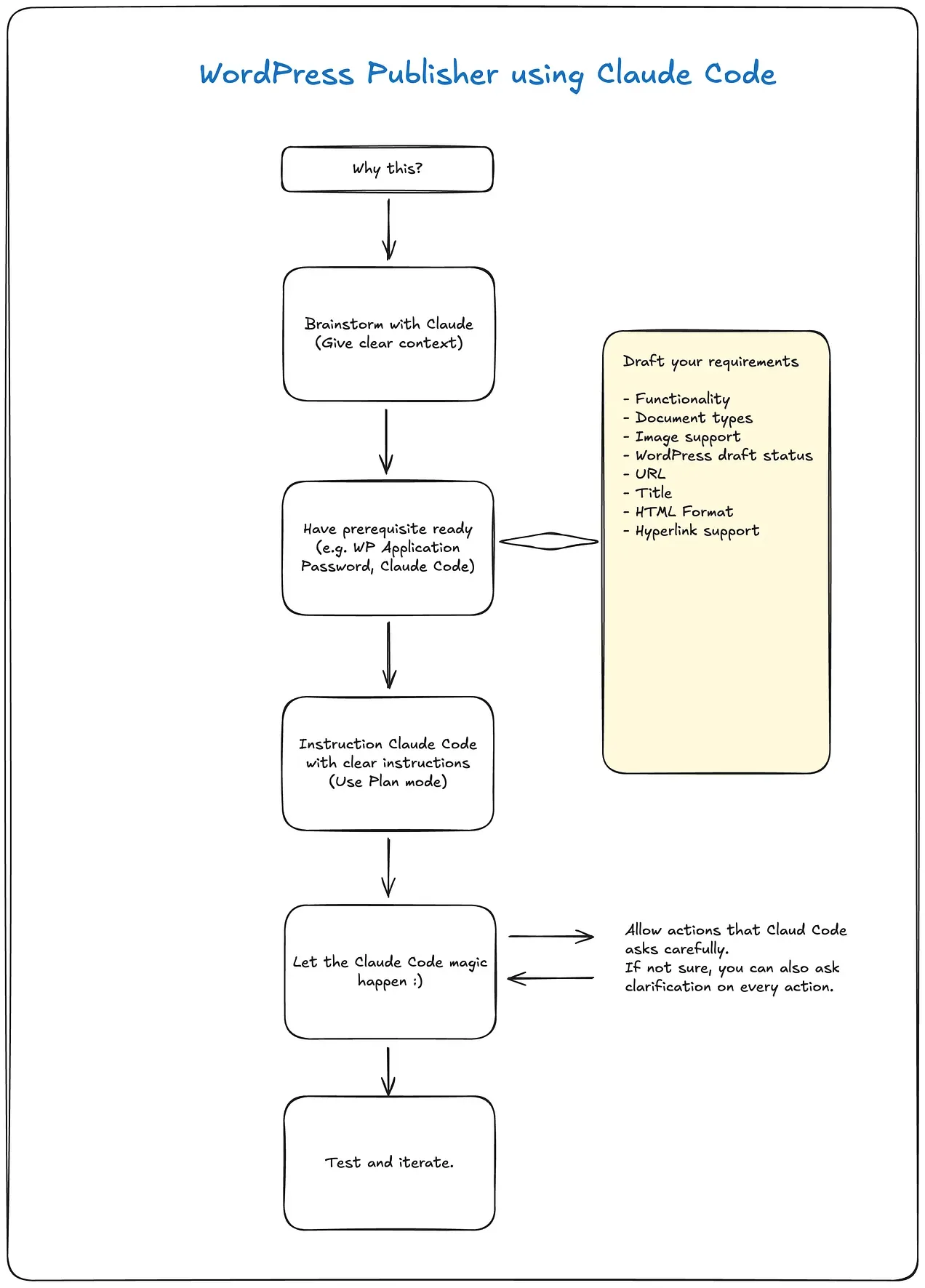
Tool stack: Claude Code and WordPress
What the workflow does: Automates content publishing on your website. Drop a Word doc or PDF into the system, type one command, and the post appears in WordPress as a formatted draft ready for a final review.
Benefits: Removes the manual copy-paste and formatting steps so you can publish faster and start racking up results.
Hours saved: Manually formatting and publishing a single blog post typically takes 30 to 45 minutes, depending on post complexity. If your agency publishes five posts per client per week across, say, three clients, that’s 7.5–11.25 hours per week saved.
Replicate this workflow: Claude Code for Marketing — WordPress Post Publisher
How to build this workflow
Start with regular Claude to explain your situation — WordPress setup, what file types you work with, and what you need the workflow to do. It will give you a clear plan and next steps.
Use Plan Mode in Claude Code to see the system design, file outputs, and tools before building.
Prepare a WordPress Application Password to allow the workflow to connect to your site via the WordPress REST API.
Let Claude Code build the Python script, config file, and WordPress connection. It will ask for your credentials, update the config file, and test the connection.
Once the connection is confirmed, test with a simple text post first. Then test with a full document, including images and links.
Once both work, ask Claude Code to create a /wpdraft slash command, so the workflow is reusable from a single command going forward.
5. AI-powered backlink audit
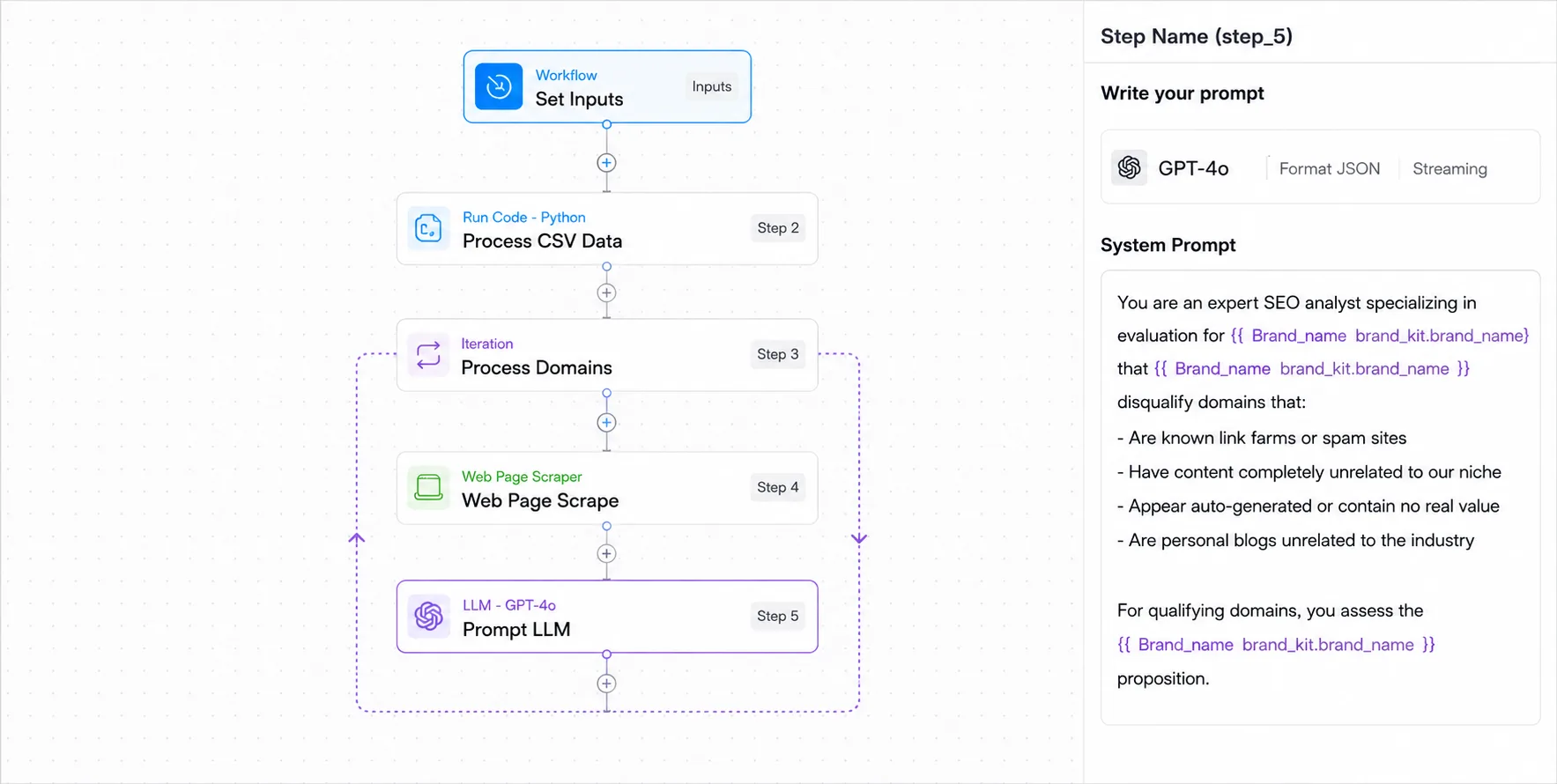
Tool stack: TripleDart and AirOps
What the workflow does: Evaluates the value of each backlink against criteria based on your client’s niche and positioning, then returns a clear keep or disavow decision for each one, along with a written explanation. This makes the audit faster and easier to justify to clients.
Benefits: More accurate backlink audits and clearer justification for clients. Once you build the workflow, you can reuse it for other clients by simply changing the brand details.
Hours saved: Manual backlink audits run three or more hours per client, depending on link volume. After the one-time setup, each subsequent audit takes as long as the workflow runs, which is not as long as a person reviewing URLs.
Replicate this workflow: AI SEO Agent: SaaS Backlink Auditing
How to build this workflow
You can use the TripleDart backlink audit workflow template, which simply requires you to add your backlink CSV and your brand details. You can also build one from scratch using AirOps.
Start with an input step that includes the client’s brand details (name, niche, industry) and the backlink CSV file.
Add a data-processing step that parses the CSV and organizes the domains into individual rows ready for review.
Add an iteration step, so the workflow processes each domain individually.
Add a scraping step inside the loop that pulls real content from each backlink URL using a tool like Apify or Browserless. This gives the LLM context instead of just a domain name.
Connect an LLM such as GPT-4o or Claude and write a prompt that evaluates each backlink using brand-specific criteria rather than generic spam signals.
Add a final output step that returns a keep or disavow decision plus a short explanation for every link. Send the results to Google Sheets or Airtable so they are ready for review.
Related: How to use Google Sheets for SEO
6. Automated weekly SEO analysis report
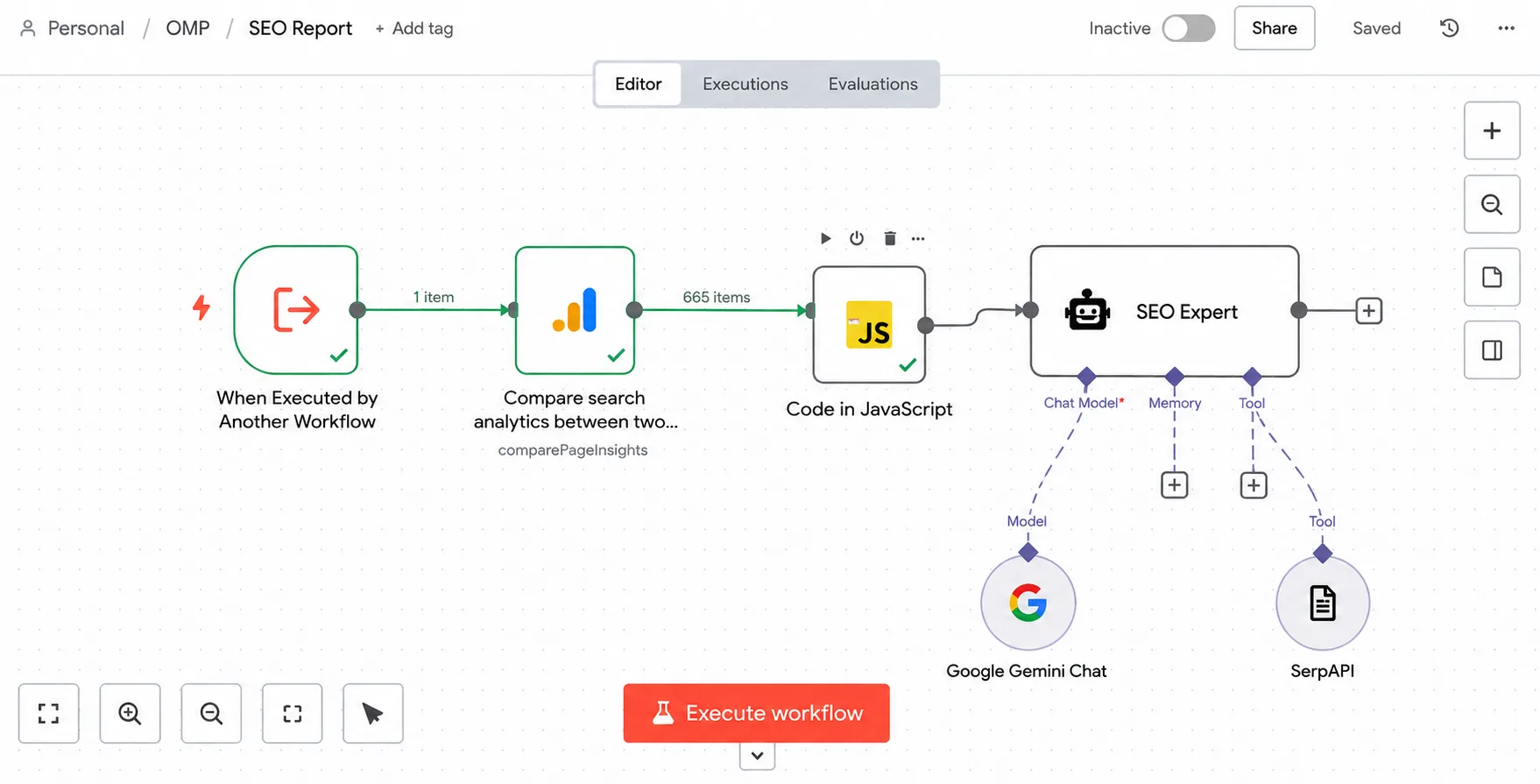
Tool stack: Google Search Console, n8n, Gemini, and SerpAPI
What the workflow does: Automatically pulls your Google Search Console data, organizes it, and turns it into an SEO report that shows what improved, what dropped, and which pages need attention.
Benefits: Removes the manual data pull, spreadsheet work, and SEO report writing completely. Once the workflow is set up, your team or your client can generate the report anytime from ChatGPT.
Hours saved: Roughly 30 minutes per client per week saved. Across a portfolio of 10 clients, that is approximately five hours saved every week.
Replicate this workflow: Automate SEO Reports with n8n + AI Agent
How to build this workflow
In n8n, install the Google Search Console node and connect your account.
Use the compare dates function to pull data for two periods (for example, last seven days vs previous seven days). Set the dimensions to page and query so the data includes both keyword and page-level information.
Add a JavaScript node step to group keywords by page and sum clicks and impressions. Without this, the raw data volume will exceed most LLM token limits.
Connect an LLM via API and write a prompt that generates a weekly SEO analysis covering overall performance overview, biggest keyword changes, traffic fluctuations, keyword opportunities, priority pages for action, and a recommended action plan in table format.
Connect the workflow to ChatGPT using a rank tracker MCP so the report can be triggered directly from a chat interface.
7. Automated email personalization for agency prospecting
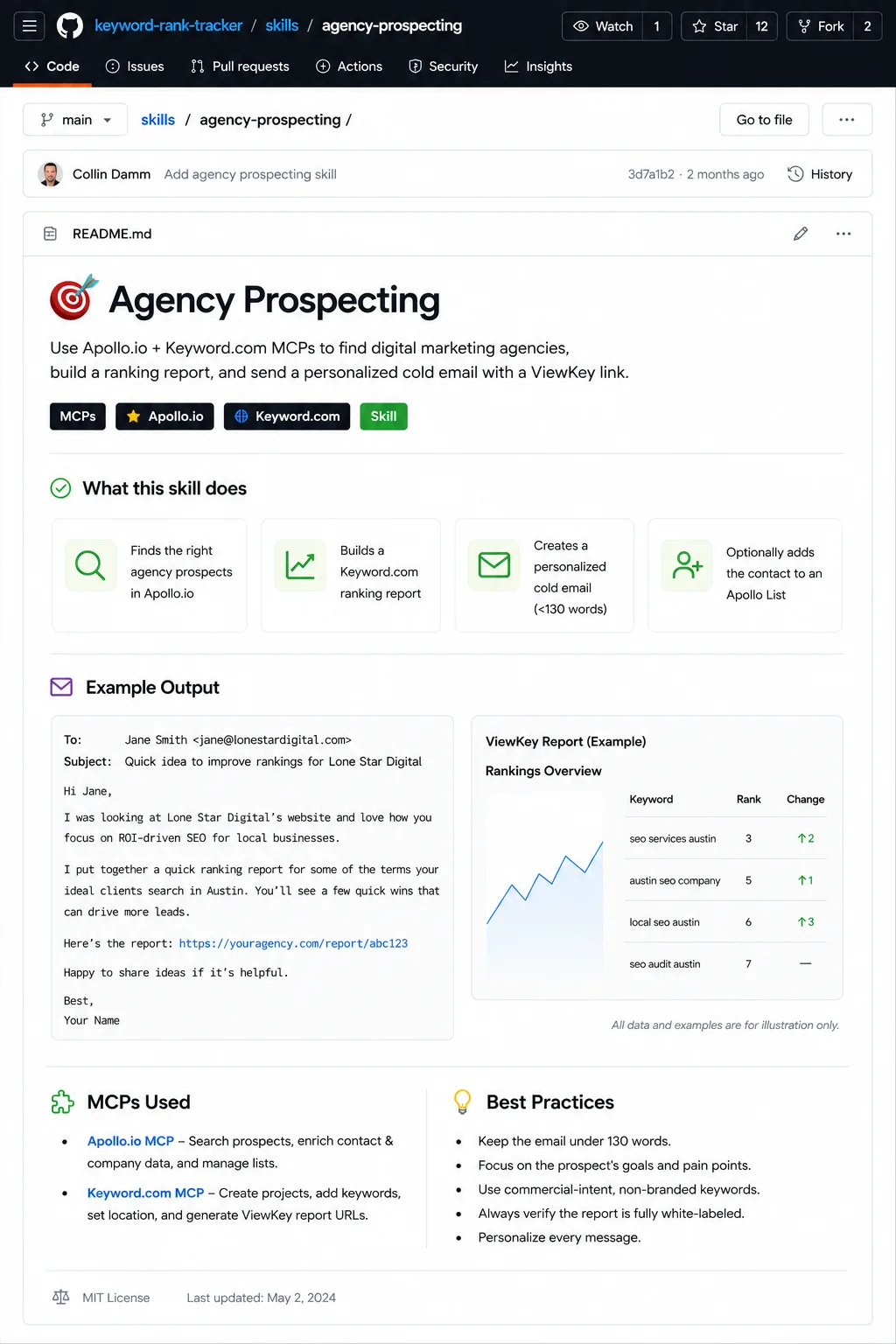
Tool stack: Keyword.com MCP, Apollo, and Claude
What the workflow does: Turns a plain-English prospect description into a personalized cold outreach email with a white-labeled Keyword.com ranking report for the prospect’s own domain. The workflow finds a relevant lead, enriches their contact and company data, scrapes their homepage, suggests SEO keywords, creates a keyword tracking project, checks white-label branding, and drafts a short outreach email with a shared report link.
Benefits: Removes the manual prospect research, SEO keyword selection, rank-tracking setup, and first-draft outreach writing. Instead of jumping between Apollo, the prospect’s website, Keyword.com, and a blank email draft, the workflow guides the user through the full process with approval checkpoints for keyword selection, project creation, and branding.
Hours saved: Roughly 15–25 minutes per prospect saved. Across 20 prospects per week, that is approximately five to eight hours saved every week.
Replicate this workflow: Automate agency prospecting with Apollo + Keyword.com MCP
How to build this workflow
In Claude Code, install the agency prospecting skill from the Keyword Rank Tracker skills repository.
Connect the Apollo.io MCP so the workflow can search for prospects and enrich contacts with verified emails, company details, and role information.
Connect the Keyword.com MCP with write access so the workflow can create keyword projects, add keywords, and generate shareable ranking reports.
Start the workflow by describing your target prospect in plain English, for example: “Head of Marketing at B2B SaaS companies in NYC, 50–200 employees, fintech.” The skill uses Apollo to search for matching prospects and then enriches the selected contact.
Add a website scraping step that pulls useful context from the prospect’s homepage, including the H1, value proposition, services, geography, and credibility signals.
Use an AI step to propose three to five non-branded commercial seed keywords based on the prospect’s business. Then call Keyword.com’s related keyword suggestions, remove branded or competitor terms, and select the strongest keywords for tracking.
Create a Keyword.com tracking project for the prospect’s domain. Choose the tracking geography based on the company type, using local tracking for local-service businesses and national tracking for B2B or SaaS companies.
Check the white-label settings before generating the report. Confirm that the agency name, logo, brand color, and share-link settings are correct so the final shared report is client-ready.
Generate a concise cold email under 130 words. The email should reference one specific observation from the prospect’s website, explain the value of the ranking report, and include the shared link.
Optionally, add the processed contact to an Apollo List such as “agency-prospecting” so your team can track which prospects have already been researched and contacted.
5 mistakes to avoid when replicating AI workflows for SEO
AI workflows can save agencies a lot of time, but only if they are adapted to the way your team actually works. It is easy to see a useful workflow, copy the tools, and assume the same setup will work for every client or campaign. Before you replicate any SEO workflow, make sure you understand the goal, the data inputs, and where human review still needs to happen.
1. Copying the workflow without understanding the goal
Do not replicate an AI workflow just because the tools look impressive. Start by asking what the workflow is actually meant to improve.
Is it supposed to save time on weekly reporting? Find keyword opportunities faster? Monitor ranking drops? Create content briefs? Support agency prospecting?
Once you understand the goal, it becomes easier to decide which parts of the workflow are essential and which parts can be changed for your own process.
Marcell Santilli, CEO of GrowthX AI, puts it plainly in his AI Led Growth workshop:
Don’t try to go to a 0–100 percent automation or streamlining. Instead, figure out where AI can do a hundred times better job than humans, and where human judgment can continue to shape the strategy, alignment, and raise the bar on quality.
2. Assuming your data sources will work the same way
Many AI SEO workflows depend on specific data sources, such as Google Search Console, SerpAPI, Keyword.com, Apollo, Screaming Frog, Ahrefs, or Semrush. If your agency uses different tools, the workflow may need to be adjusted.
Before rebuilding it, check what data the workflow requires. Look at the fields, formats, and access needed. For example, a workflow built around page and query data from Google Search Console will not work the same way with a generic keyword export.
3. Skipping the manual process mapping
If your team cannot clearly explain how the task is done manually, the automated version will probably be messy.
Before building, map the workflow step by step:
- Input: What data does the workflow need?
- Process: What does the SEO or account manager usually do with that data?
- Decision points: Where does human judgment happen?
- Output: What should the workflow produce?
This makes it easier to automate the repetitive parts without losing the strategic thinking that makes the work valuable.
4. Prioritizing complexity over functionality
A workflow is not valuable just because it uses AI, agents, or automation tools. It is valuable if it saves meaningful time, improves consistency, or helps your team act faster.
Before adopting a workflow, ask:
- How often do we repeat this task?
- How many clients would this apply to?
- How much time would it save each week?
- Would the output be better, faster, or more consistent?
- Is this worth maintaining?
The best workflows are usually not the most complex ones. They are the ones that remove repetitive work your team already does across multiple clients.
5. Removing human review too early
AI can summarize, prioritize, and draft recommendations, but SEO decisions still need judgment. That’s how the industry operates in practice — in our State of AI and Automation in SEO survey, only 1% of teams had fully automated their work, and content writing and link building were the tasks they were least willing to hand over. Build in checkpoints where a strategist can approve keywords, review insights, or adjust recommendations before anything goes to a client.
Keyword.com’s Head of Growth, Benjamin Thornton, frames it well in the Rewind newsletter:
The goal of smart automation is to reappear in the workflow at the moments that actually require you. Let AI monitor, flag, and surface issues. Then make sure a human is positioned at every point where judgment, context, and relationship knowledge determine the right next move.
Build your AI SEO workflows with Keyword.com
AI workflows are only as good as the data behind them. Keyword.com gives agencies the accurate ranking data they need to build SEO automations they can actually trust. Use it to power rank tracking reports, keyword movement summaries, client updates, prospecting workflows, and performance alerts.
With Keyword.com’s rank tracker API and SEO MCP, that data is not locked inside one platform. Your team can pull it into ChatGPT, Claude, n8n, Make, Zapier, or your own internal tools to create reports, monitor keyword movement, analyze SEO performance, surface opportunities, and generate client-ready updates.
Ready to get started? See how you can build AI automations that scale reliably for your SEO agency with Keyword.com.