MCP vs API: Which One Do Agencies Need for SEO Automation?
At Keyword.com, we’ve offered a rank tracker API for years, and more recently, we launched an MCP server for SEO too. One question I’m hearing more often is: When it comes to MCP vs API for SEO, which one should an agency use?
The answer is not that one is better than the other. APIs and MCP support different types of automation.
APIs are built for structured, repeatable workflows, such as sending ranking data to dashboards, generating reports on a schedule, or connecting SEO tools to internal systems. MCP makes it easier for AI assistants and agents to access tools, data, and actions through natural-language requests.
In this guide, we’ll break down how MCP and APIs differ, where each one fits in an agency’s automation stack, and which approach works best for different SEO workflows.
What is an API?
An API, or Application Programming Interface, is a way for two software systems to exchange data or trigger actions.
For example, an SEO agency might use an API to pull keyword rankings from a rank tracker, send that data to a reporting dashboard, and automatically generate client reports. Instead of someone manually exporting and uploading the data, the API moves it between tools in the background.
APIs are usually built around predefined requests and responses. One system asks for specific information or requests an action, and the other returns the expected result.
It’s like asking someone to go to a toolbox, grab the blue pen from the second drawer, and write a specific sentence. They follow your instructions exactly, every time, without asking questions.
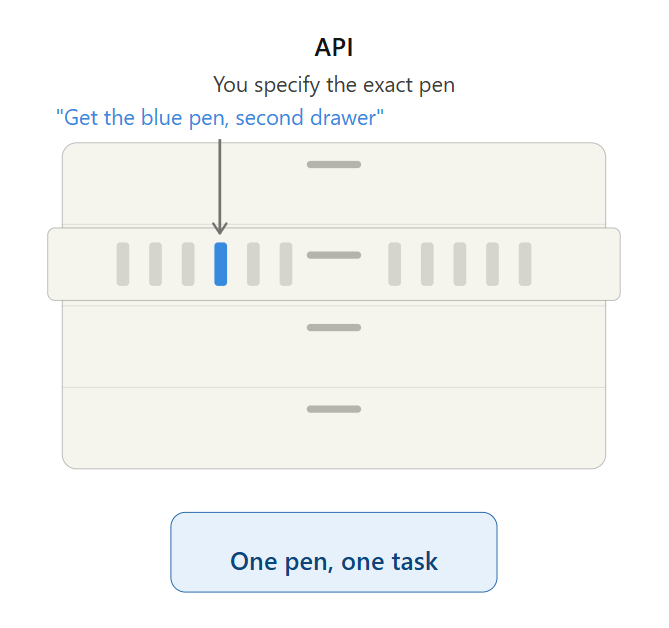
The tradeoff appears when you connect an API to your own workflow. The API provider defines how the API works, but your team may still need to:
- Configure authentication and credentials
- Send requests in the required format
- Work within the provider’s rate limits
- Handle errors, failed requests, and retries
- Maintain the workflow if the API or your internal setup changes
In other words, the API provides the building blocks and instructions, but you are responsible for how they are assembled into your automation. APIs are the backbone of most developer SEO tools — the dashboards, scripts, and internal systems that pull ranking data automatically.
What is MCP?
MCP (Model Context Protocol) is an open standard developed by Anthropic that gives AI assistants a standardized way to connect to external tools and data sources. Instead of being limited to what is in its training data, the AI can access live information from the tools you already use.
Using the toolbox analogy above, if an API is asking someone to grab a specific pen from a specific drawer, MCP is telling them what you need written — they go to the toolbox, find the right pen, and write it for you. You don’t need to know which drawer or which pen. You just describe what you need.
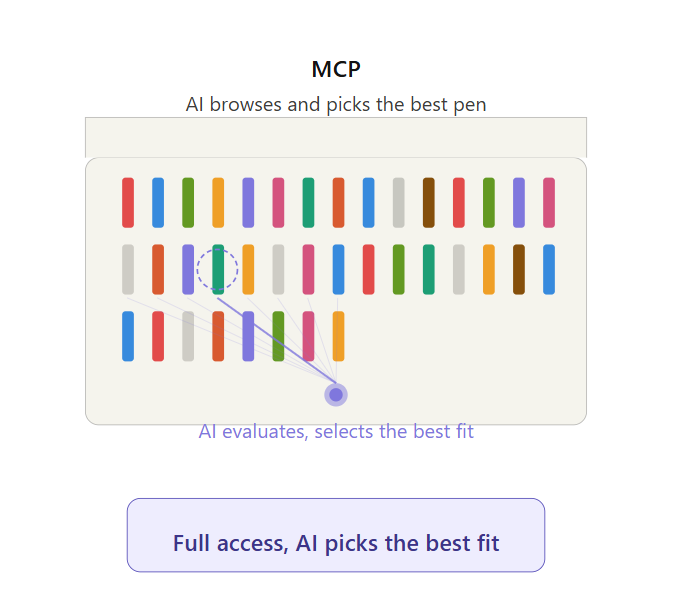
For SEO agencies, this means you can connect a rank tracking MCP like Keyword.com’s and ask “what’s the state of client X’s SEO this week” and get a straightforward answer.
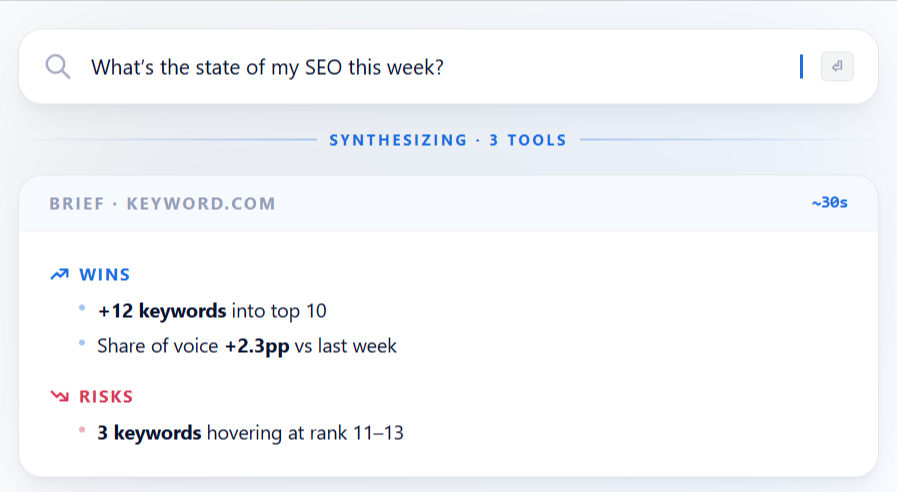
One thing worth clarifying: MCP is built on APIs. When a tool like Keyword.com creates an MCP server, it packages its existing API so AI assistants can use it without you having to deal with the technical setup. It takes care of:
- Securely accessing your SEO tools so you’re not re-entering credentials every session
- Translating plain-language questions into the specific format each tool expects
- Managing request limits, login issues, and errors
- Keeping a record of every action taken, which matters when you’re handling data across multiple client accounts
With an API, you (or your developer) decide ahead of time exactly which endpoints and data your integration will use. With MCP, the AI can discover and use new tools while it’s running — you don’t have to hardcode which capability it needs until you actually ask for it.
That said, an MCP does not replace background automation. In a chat-based setup, it only runs when the AI assistant is actively responding to a request. Once the conversation stops, the workflow stops too.
For anything that needs to run on a schedule, respond to an event, or continue without human input, you still need a separate application or automation platform — usually powered by APIs.
What Is the Difference Between Model Context Protocol and API for SEO Agencies?
APIs connect software to software. It’s structured, automated, and runs without anyone present.
MCP connects AI to tools. It’s conversational, requires an active session, and applies judgment.
Here’s how that plays out as a side-by-side MCP vs API comparison for agency AI workflows:
| API | MCP | |
|---|---|---|
| What is it for | Moving data between systems | Giving AI tools access to external systems |
| Best for | Dashboards, reports, data syncs, internal tools | AI assistants, agents, and contextual analysis |
| Main user | Developer, ops team, technical marketer | AI workflow builder, technical SEO, agency ops |
| Can connections be chained? | Yes, through platforms like Zapier or Make | No. The AI assistant is always the intermediary between tools |
| Technical skill needed | Moderate (Zapier/Make) or developer | Low for usage, varies for setup |
| SEO example | Pull rank tracking data into a reporting dashboard | Ask an AI assistant to summarize ranking changes |
| Does it replace the other? | No | No |
When Should Agencies Use an API for SEO Automation?
Agencies should use an API for SEO automation when the task is structured, repeatable, and requires running without anyone present.
Not everyone thinks MCP is necessary for every use case. As one commenter, campbel noted on Hacker News: “MCP is not something most people need to bother with unless you are building an application that needs extension or you are trying to extend an application.” For agencies, that’s a useful gut check — if you’re not extending or connecting new tools regularly, a direct API integration may still be the simpler path.
Here are situations where APIs fit best for agency SEO workflows:
- The task needs to run on a schedule: SEO reporting automation is the obvious one. Rank data needs to flow into dashboards every week, whether anyone is at their desk or not. Keyword.com’s API, for example, lets agencies pull ranking data, SERP visibility, and share of voice directly into Looker Studio or internal tools on a set schedule.
- Something needs to happen the moment a condition is met: When a keyword drops out of the top 10, a page loses its featured snippet, or a new competitor enters the SERP, your API can detect it and fire an alert via Slack or email.
- The same steps repeat for every client or project: Tasks like onboarding a new client, setting up a report, and distributing a weekly update to the team mostly follow identical steps every time. Tools like Zapier or Make can chain together the right APIs so the entire sequence runs automatically.
- The volume is too high for manual work: A quarterly content audit, for instance, means pulling indexation status, meta tags, and page performance across multiple keywords for every client. An API can handle that in bulk and deliver it wherever you need it — a spreadsheet, a dashboard, an internal tool.
- Multiple tools need to stay in sync without anyone updating them: Instead of reconciling ranking data dashboards, CRMs, and client portals manually, APIs can update them on a schedule.
The common thread is that none of these tasks requires judgment. They need consistency, speed, and reliability.
Related: Rank tracker API use cases for agencies
When Should Agencies Use MCP for SEO Workflows?
Agencies should use MCP for SEO workflows when the task involves interpretation, judgment, or pulling context from multiple places in a single working session.
Here are the situations where MCP fits best for agency SEO workflows.
1. Access Data Without Breaking Your Workflow
Say you’re in the middle of a task like drafting a content refresh brief and need a specific data point to move forward. Instead of opening your rank tracker, clicking through filters, and finding the right view, you ask your AI assistant and get the answer in seconds.
Example prompt: “Pull the current rankings, search volume, position changes, and any other relevant data for these keywords to add as foundational context to a content refresh brief.”
2. Take Action Without Opening the Tool
Need to perform simple tasks like adding a keyword or creating a project in your rank tracker? Instead of logging in to the platform and navigating to the right screen, tell the AI what to do, and it handles it from a single interface.
Example prompt: “Add [competitor URL] to the competitor tracking list for Client X’s project.”
The best part is that some MCP servers also return a direct link to where the action was performed in the tool, so you can verify it without searching.
3. Analyze Patterns Across Your Data
Instead of manually combing through your data to find what matters, MCP lets the AI analyze it and spot patterns you might even miss if you did the task manually.
Example prompt: “What patterns do you see in my top 20 ranking pages? Anything I can replicate across other content?”
4. Get Answers That Span Multiple Tools
Connect your data sources and tools, such as Keyword.com, Google Search Console, Slack, and Salesforce, in one session and ask questions that span all of them, without exporting a CSV, uploading a file, or switching tabs. The AI pulls from each source and can act on what it finds.
Example prompt: “Check which client keywords dropped this month, draft a summary of the biggest changes, and post it to our team’s Slack channel.”
5. Let Your Team Skip the Learning Curve
Not everyone on your team needs to know every tool inside out. With MCPs, a junior team member or a senior SEO can ask a plain-language question and get the answer without learning the interface first.
Example prompt: “Pull Client X’s share of voice data and explain what it means for their visibility this quarter.”
Do SEO Agencies Need MCP, an API, or Both?
Most agencies will eventually use both because they solve different parts of their SEO workflow.
A simple way to think about it:
- API alone works if your automation needs are purely operational (reporting, dashboards, alerts). Many agencies are here today — in our State of AI and Automation in SEO survey, 26% already connect SEO data through APIs — and it works well. The limitation, however, is that nothing in the pipeline interprets the data for you.
- MCP alone works if your needs are ad hoc and analytical (understanding ranking shifts, summarizing performance, investigating problems). However, it leaves you without any background automation.
A rough rule of thumb: if you’re connecting one or two SEO tools to an AI assistant just to ask questions, MCP alone is fine. Once you’re wiring together three or more tools into a recurring, unattended workflow, that’s usually the point where an API (or an automation platform like Zapier or n8n) needs to be doing the heavy lifting.
Ideally, you should use both. APIs for handling the recurring operational work, and MCPs for handling the thinking and on-demand work. Here are some common MCP and API use cases for SEO agencies.
1. Client Reporting
- API: Rank tracking data flows into the client dashboard automatically every week.
- MCP: Before the report goes out, ask the AI to summarize the biggest changes and flag anything worth discussing on the client call.
2. Ranking Drop Investigation
- API: Track ranking changes across keywords and locations and alert the team when there’s a decline.
- MCP: AI pulls the relevant context and helps determine where to investigate first and what might have caused the shift.
3. AI Visibility Tracking
- API: Export AI visibility data, such as citations, mentions, and sentiment score, into internal reports on a schedule.
- MCP: Ask an AI assistant to summarize where the brand is showing up and where it’s missing across AI search platforms.
4. Competitor Monitoring
- API: Track competitor keyword rankings and share of voice changes on a schedule and alert you on your preferred platform.
- MCP: Ask the AI to compare your client’s performance against a specific competitor this quarter and explain where they’re winning and what content or strategy might be driving it.
5. Content Performance Review
- API: Pull ranking data for all published content pieces into a tracker automatically — which pages are climbing, which are stagnant, which are declining.
- MCP: Ask the AI to review the underperforming pages and recommend which ones to refresh, consolidate, or leave alone.
6. Content Planning
- API: Pull current ranking data, search volume trends, and content performance metrics into your planning sheet on a schedule.
- MCP: Ask the AI to review the data and recommend topics to prioritize this quarter based on where you’re losing ground or missing coverage.
Where it Gets Interesting: Combining APIs and MCPs in the Same Workflow
The paired examples above treat API and MCP as separate lanes. But you can also combine them in the same automation pipeline. Here’s how:
Say you want to run automated opportunity discovery every week. The workflow could look like this:
Every Friday, n8n or Zapier triggers the workflow. It calls the Keyword.com API to retrieve the latest ranking data for client projects. That data feeds into Claude via the Claude API.
Claude uses Keyword.com’s MCP to go deeper — detecting which keywords trigger AI Overviews, finding keywords where competitors are cited but your client is not, and identifying the highest-potential opportunities.
Claude writes a summary, and the workflow pushes it into Airtable, Notion, or Slack. Monday morning, the team has a prioritized opportunity list waiting.
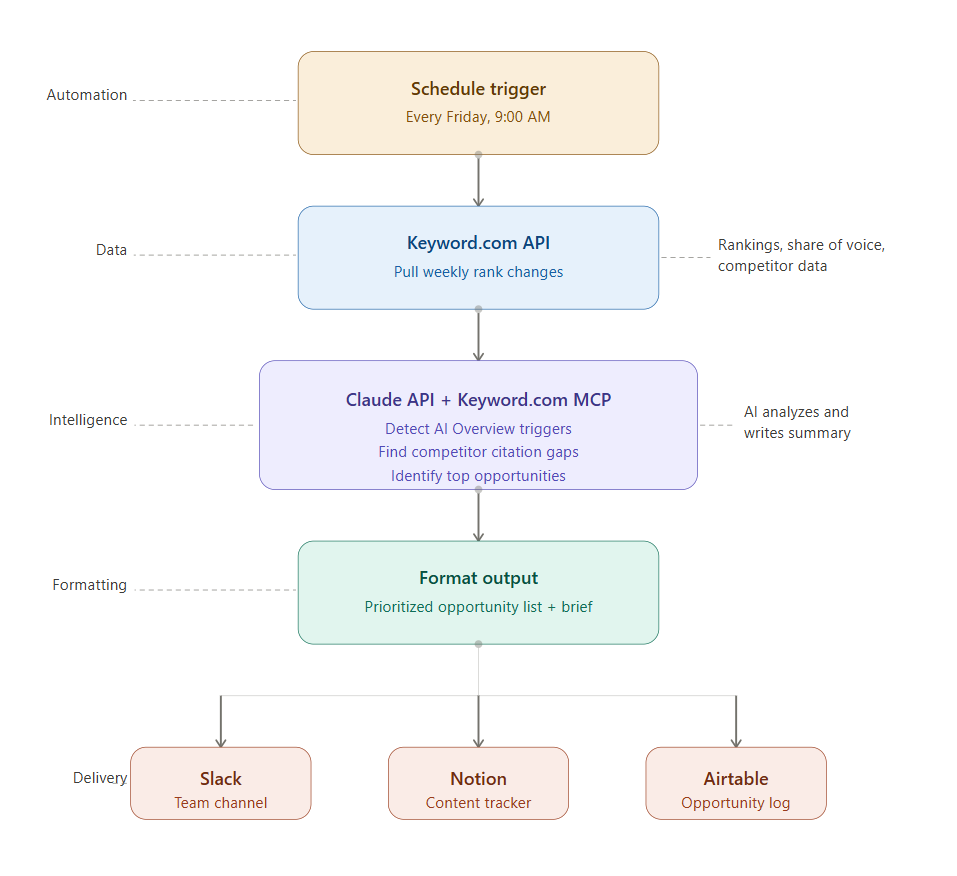
Essentially, API for the data. MCP for thinking. Zapier or n8n for the automation.
How Keyword.com Supports Both API and MCP Workflows for SEO Agencies
SEO agencies do not have to choose between API and MCP workflows. Keyword.com supports both, so you can automate recurring processes while giving your team a faster way to explore the same data with AI.
Use the rank tracker API to pull ranking data, SERP visibility, share of voice, and AI visibility metrics into Looker Studio, DashThis, Oviond, or your own internal tools on a schedule. There are no per-call limits; usage is based on your plan.
Then connect the same data to AI assistants through the Keyword.com MCP server. With more than 50 tools available, your team can summarize performance, investigate ranking changes, compare competitors, and analyze visibility across ChatGPT, Perplexity, and Gemini — all through a conversation. MCP access is included free with every Keyword.com plan.
Ready to automate SEO reporting and build AI-assisted workflows from the same reliable ranking data? Sign up for Keyword.com and start your 14-day free trial.